
Wondershare Filmora
Desktop timeline editor with drag and drop effects plus AI captions, music and cutout.
Best for Beginner to intermediate YouTubers (desktop)
Used Wondershare Filmora and liked it? Upvote it. One upvote per person. Upvotes come from visitors, not from us, and never change "Our ranking".
What it does
Wondershare Filmora is a timeline video editor paired with built in AI tools and creative assets. Users import raw video footage, audio, images, or text prompts to produce finished, styled videos for social channels, marketing, or business projects. It is built for business teams, marketers, influencers, and freelancers.
Read more: 5 features and how people use themShow less
-

AI smart cutout
Isolates and removes unwanted items or replaces the visual background of your media in seconds.
Use caseA video editor removes an unwanted distraction from a clip and swaps out the background before finalizing the visual cut.
From filmora.wondershare.com/filmora-features.html · image from Wondershare Filmora -
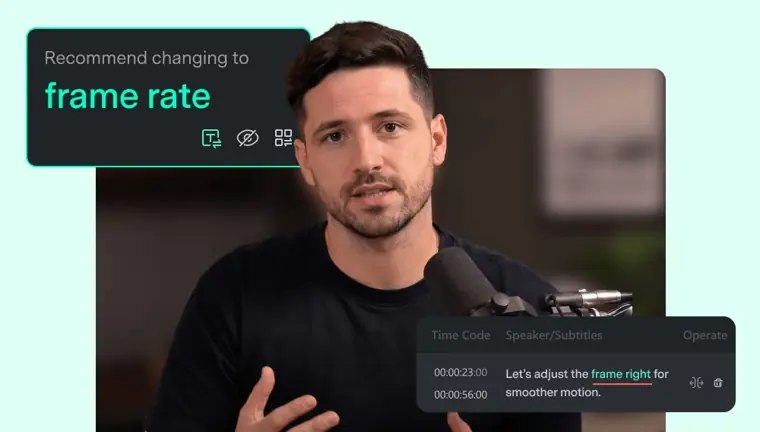
AI speech to text
Converts spoken dialogue directly into synchronized subtitle tracks, complete with tools to proofread errors and fix grammar.
Use caseA creator transcribes dialogue from a spoken clip into subtitles and fixes transcription mistakes in a single click.
From filmora.wondershare.com/filmora-features.html · image from Wondershare Filmora -
AI text to video
Generates visual footage straight from written prompts to supply clips directly onto your project timeline.
Use caseA video creator writes a prompt describing a concept scene to generate footage when missing physical camera clips.
From filmora.wondershare.com/filmora-features.html -
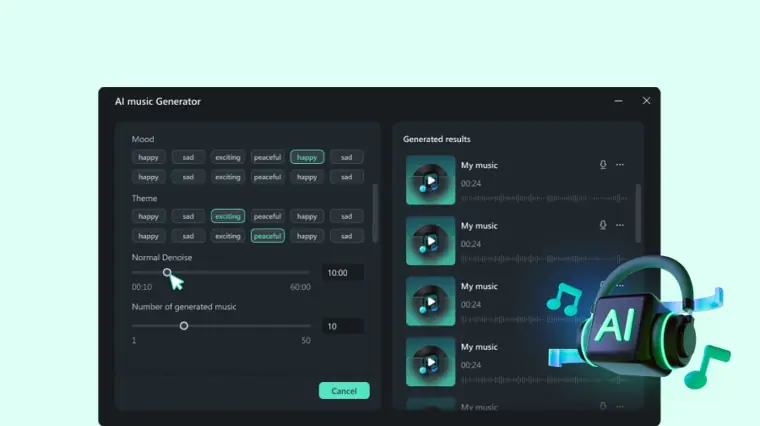
AI music generator
Produces customized soundtrack audio tailored to specific moods, artistic styles, and energy levels.
Use caseA marketer creates background tracks matching the exact mood and energy needed for a promotional campaign.
From filmora.wondershare.com/filmora-features.html · image from Wondershare Filmora -
AI mate editing
Provides an interactive assistant that answers questions and guides you through video editing tasks inside your workspace.
Use caseAn editor asks the assistant for editing help to speed up their workflow during a project.
From filmora.wondershare.com/filmora-features.html
Written from Wondershare Filmora's own website, checked . Each feature links to the page it comes from; images are Wondershare Filmora's own.
Every plan
| Plan | Monthly | Billed yearly | Per | What it includes |
|---|---|---|---|---|
| Free | Free | Not listed | per user | watermark on export; AI features paid by AI credits |
| Monthly Plan | $19.99 | Not listed | per user | billed monthly (third party figure) |
| Basic (Annual) | Not listed | $4.17 | per user | US$49.99/yr (third party); 1GB cloud; 4K export; no watermark |
| Advanced (Annual) | Not listed | $5 | per user | US$59.99/yr (promo, regular US$69.99); 1,000 AI credits/mo; 10GB cloud |
| Premium (Annual) | Not listed | $8.33 | per user | US$99.99/yr (third party) |
| Perpetual | Not listed | Not listed | one time | US$79.99 one time (third party, Windows); 1,000 one time AI credits; updates to Filmora 16 only |
From Wondershare Filmora's own pricing page, checked . Prices are in US dollars per month; "billed yearly" is the monthly price when you pay for a year up front. A few figures (often the yearly price) are derived rather than printed on the page.
Before you pay
- How to cancel
- Subscribers can manage and cancel their subscription anytime online via their Wondershare account subscription page.
What Wondershare Filmora says
renew US$ 19.99/mo (46% off). [Cancel Anytime](https://accounts.wondershare.com/web/subscription). Software Not Included.
Source page - Cancel online yourself
- Yes
What Wondershare Filmora says
renew US$ 19.99/mo (46% off). [Cancel Anytime](https://accounts.wondershare.com/web/subscription). Software Not Included.
Source page - Renews automatically
- Yes
What Wondershare Filmora says
Billed yearly as US$49.99. Automatically renew. Cancel anytime.
Source page - Watermark on the free plan
- Yes
- Commercial use
- Paid plans only
What Wondershare Filmora says
Personal Account | Only for personal non profit use (non commercial), can be used on social networking platforms
Source page - Export your data
- Yes
What Wondershare Filmora says
export your timeline as Final Cut Pro 7 XML when the project needs to continue in another editor.
Source page - Discounts
- Education discounts are offered.
What Wondershare Filmora says
[Education](https://filmora.wondershare.com/store/buy education.html?sysparam=win)
Source page - Support
- Email
What Wondershare Filmora says
Please contact customer_service@wondershare.com if you have any questions or concerns.
Source page
Only what Wondershare Filmora's own pages state, with the quote behind each answer. Anything they don't publish is left out rather than guessed.
Wondershare Filmora video tutorials
Independent creators on YouTube, not Wondershare Filmora or us. The video loads from YouTube only when you press play.
What the free plan includes
Full editor, watermarked exports
Questions people ask about Wondershare Filmora
How much does Wondershare Filmora cost?
Paid plans start at $19.99 a month (Monthly Plan). 6 plans are listed above, from Wondershare Filmora's own pricing page.
Is Wondershare Filmora free?
Yes, there is a free plan: Full editor, watermarked exports.
How do I cancel Wondershare Filmora?
Subscribers can manage and cancel their subscription anytime online via their Wondershare account subscription page. Source
Does the Wondershare Filmora free plan add a watermark?
Yes, free plan output carries a watermark or branding. Source
Can I use Wondershare Filmora output commercially?
Yes, on paid plans only. Source
Does Wondershare Filmora have a student or other discount?
Education discounts are offered. Source
What are the authorization scopes for the audio assets under your individual plan in Filmora?
Audio assets can be used for web videos, audio blogging, and webcasting on personal channels without commercial use on platforms like TikTok, Facebook, and YouTube. Source
Can I share audio assets with other team members?
An Individual License permits 1 person to use the assets, while a Team License grants access to 5 individuals for personal use. Source
I have more questions about licensing that aren't covered here. What should I do?
Contact the Wondershare support team via customer_service@wondershare.com or view the Technology Asset License Agreement. Source
Where this came from
Plans, prices and limits were copied from Wondershare Filmora's own pages, then checked .
- filmora.wondershare.com/
- filmora.wondershare.com/guide/ai-text-based-editing.html
- filmora.wondershare.com/guide/color-hsl.html
- filmora.wondershare.com/guide/export-to-local.html
- filmora.wondershare.com/shop/buy/buy-video-editor-na.html
- filmora.wondershare.com/shop/buy/buy-mac-video-editor-na.html
- filmora.wondershare.com/filmora-commercial-use-license.html
How we collect prices and rank tools · Is something wrong? Correct this listing
Others that do the same job
 Descriptdescript.com
Edit video and podcasts by editing the transcript, with AI audio cleanup.
- Green flag: Free plan
- Green flag: Cancel online
- Green flag: No card for trial
- Red flag: Free plan watermark
 Kapwingkapwing.com
Collaborative browser editor with AI subtitles, smart cut, repurposing and dubbing.
- Green flag: Free plan
- Green flag: Cancel online
- Red flag: Credits reset monthly
- Red flag: Free plan watermark
 VEEDveed.io
Browser editor with AI subtitles, avatars, translation and generation tools.
- Green flag: Free plan
 Adobe Premiere Proadobe.com/products/premiere.html
Industry standard editor with Firefly AI: Generative Extend, text based editing, search.
- Green flag: Refunds within 14 days
 Canva (video editor)canva.com/video-editor
Template driven video editing inside Canva with AI captions, background removal, beat sync.
- Green flag: Free plan
- Green flag: No card for trial
- Red flag: Credits reset monthly
 Riversideriverside.com
Remote studio recording, then transcript editing and auto social clips.
- Green flag: Free plan
- Green flag: No card for trial
- Red flag: Free plan watermark