
Mailchimp
Popular all round email marketing platform with templates, automations and Intuit Assist generative AI on higher plans.
Best for Small businesses wanting a familiar all in one email tool
Used Mailchimp and liked it? Upvote it. One upvote per person. Upvotes come from visitors, not from us, and never change "Our ranking".
What it does
Mailchimp is an email and SMS marketing platform designed to help businesses communicate with their audiences. Users supply their audience data, content, and branding to generate targeted campaigns, marketing automations, and transactional messages. It is built for organizations of all sizes, including ecommerce retailers, small businesses, non profits, and professional services.
Read more: 3 features and how people use themShow less
-
Drag and drop builder
Lets you assemble and customize marketing emails using predesigned layouts, styling adjustments, colors, and buttons.
Use caseA marketer chooses a two column layout and adjusts colors and buttons before sending a promotional email.
From mailchimp.com/solutions/ai-tools -
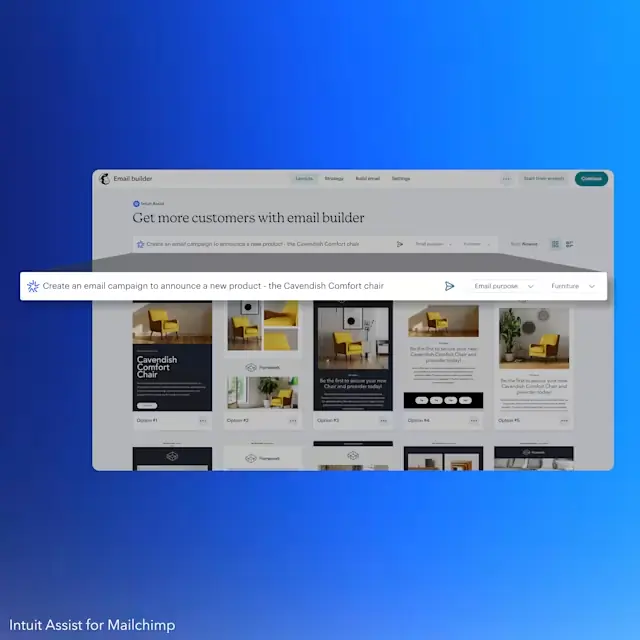
Intuit Assist
Generates draft email copy, rewrites text blocks, and suggests content improvements directly within the campaign editor.
Use caseA business owner drafts email copy quickly when short on time by asking the assistant to shorten or rewrite text.
From mailchimp.com/solutions/ai-tools · image from Mailchimp -
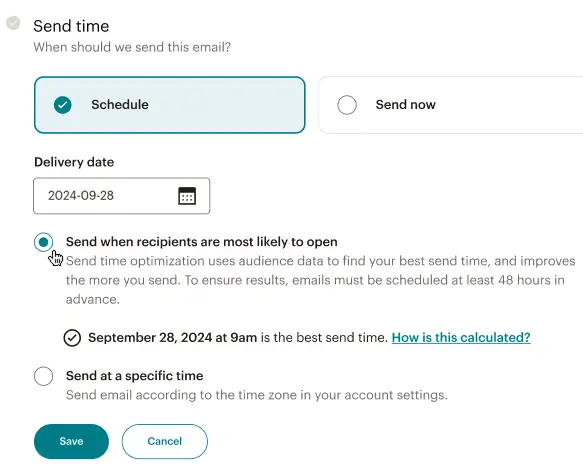
Send time optimization
Evaluates historical engagement patterns to recommend the specific hours and days most likely to produce clicks.
Use caseAn email sender schedules a newsletter based on recommended hours derived from past year click trends.
From mailchimp.com/solutions/ai-tools · image from Mailchimp
Written from Mailchimp's own website, checked . Each feature links to the page it comes from; images are Mailchimp's own.
Every plan
| Plan | Monthly | Billed yearly | Per | What it includes |
|---|---|---|---|---|
| Free | Free | Not listed | per account | Under 250 contacts, 500 sends/mo, 250/day, Mailchimp branding |
| Essentials | $13 | Not listed | per account (priced by contacts) | At 500 contacts; 10x contacts sends (5,000/mo); no generative AI |
| Standard | $20 | Not listed | per account (priced by contacts) | At 500 contacts; 12x sends (6,000/mo); generative AI + Intuit Assist included |
| Premium | $350 | Not listed | per account (priced by contacts) | Starts at 10,000 contacts; 15x sends; generative AI; annual plans via sales for 10k+ contacts |
From Mailchimp's own pricing page, checked . Prices are in US dollars per month; "billed yearly" is the monthly price when you pay for a year up front. A few figures (often the yearly price) are derived rather than printed on the page.
Before you pay
- Unused credits roll over
- No
What Mailchimp says
SMS credits don’t roll over month to month which means that all credits must be used throughout the billing cycle in which you purchase them.
Source page - Support
- Email, live chat, phone
What Mailchimp says
Priority email and chat support 24/7. Phone support available during business hours.
Source page
Only what Mailchimp's own pages state, with the quote behind each answer. Anything they don't publish is left out rather than guessed.
Getting started with Mailchimp
- Set up your account and view or change the primary email address you use for billing, compliance, and important notices.
- Create your Mailchimp audience to import and collect new contacts for your campaigns.
- Use the import tool to add or update contacts in Mailchimp.
- Label and organize your contacts with tags.
- Make a hosted signup form to share across all your online channels.
- Sync Mailchimp with 300+ apps and services using integrations.
- Use Customer Journeys to automatically send targeted emails, tag contacts, and accomplish other important tasks.
Tips
- Schedule a call in your first 90 days to meet 1:1 with an Onboarding Specialist included with Standard or Premium plans.
- Use A/B Testing to test different subject lines, design, content, and send times to learn what works best for your audience.
- Build behavioral segments based on how your audience has engaged with your Mailchimp website, app, campaigns, or prior purchase behavior.
Written from Mailchimp's own help pages: mailchimp.com/services/onboarding/
Mailchimp video tutorials
Independent creators on YouTube, not Mailchimp or us. The video loads from YouTube only when you press play.
What the free plan includes
Under 250 contacts, 500 sends/
Questions people ask about Mailchimp
How much does Mailchimp cost?
Paid plans start at $13 a month (Essentials). 4 plans are listed above, from Mailchimp's own pricing page.
Is Mailchimp free?
Yes, there is a free plan: Under 250 contacts, 500 sends/mo (max 250/day), 1 seat, 1 audience, no automation flows or scheduling.
Do unused Mailchimp credits roll over?
No, unused credits do not carry over to the next month. Source
Does Mailchimp have an API?
Yes.
Do SMS credits roll over from month to month?
No, SMS credits expire at the end of each billing cycle and must be used within the cycle they were purchased. Source
What happens if you purchase an SMS credit subscription in the middle of a billing cycle?
You will be charged a prorated amount for the remaining days of your current billing cycle. Source
Works with
- AI models
- Claude
Where this came from
Plans, prices and limits were copied from Mailchimp's own pages and the other sources listed, then checked .
- mailchimp.com/pricing/marketing/
- mailchimp.com/help/earn-rewards/
- mailchimp.com/
- mailchimp.com/help/earn-commission/
- mailchimp.com/help/mailchimp-enterprise-sso-user-guide/
- mailchimp.com/help/about-sms-marketing-credits/
- mailchimp.com/services/onboarding/
- mailchimp.com/pricing/marketing/compare-plans/
- mailchimp.com/pricing/premium-details/
- mailchimp.com/pricing/pay-as-you-go/
How we collect prices and rank tools · Is something wrong? Correct this listing
Others that do the same job
 MailerLitemailerlite.com
Affordable, simple email marketing tool with automations, landing pages, websites and AI writing assistant.
- Green flag: Free plan
- Green flag: No card for trial
- Red flag: Free plan watermark
 ActiveCampaignactivecampaign.com
Marketing automation platform with advanced email workflows, CRM add ons and Active Intelligence AI builders.
- Green flag: No card for trial
- Green flag: Refunds within 30 days
 Brevobrevo.com
Multichannel email, SMS and WhatsApp marketing platform priced by email volume, with Aura AI tools.
- Green flag: Free plan
- Green flag: Cancel online
- Green flag: No card for trial
- Green flag: Credits don't expire
 GetResponsegetresponse.com
Email marketing suite with AI email/subject generators, landing pages, webinars and course creator.
- Green flag: No card for trial
- Red flag: Free plan watermark
 HubSpot Marketing Hubhubspot.com/products/marketing
CRM native marketing automation suite with email, forms, ads and Breeze AI agents built on HubSpot's CRM.
- Green flag: Free plan
- Green flag: No card for trial
- Red flag: Free plan watermark
 beehiivbeehiiv.com
Newsletter platform with hosted website, ad network, paid subscriptions and growth tools for publishers.
- Green flag: Free plan
- Green flag: No card for trial
- Red flag: Free plan watermark