
Microsoft Clipchamp
Simple Microsoft editor with templates, AI voiceovers, auto subtitles, free with no watermark.
Best for Absolute beginners and Windows users
Used Microsoft Clipchamp and liked it? Upvote it. One upvote per person. Upvotes come from visitors, not from us, and never change "Our ranking".
What it does
Microsoft Clipchamp is an online and desktop video editor that allows users to create and refine content without prior expertise. You can supply your own recordings, text scripts, and media files, or choose from royalty free stock assets to produce finished high definition videos without watermarks. It is designed for everyday creators, vloggers, businesses, and educators who need accessible video editing tools.
Read more: 5 features and how people use themShow less
-
Natural AI voiceover generator
Converts written scripts into spoken narration across global languages. Users can choose specific voices and fine tune settings such as pitch, speed, and emotional tone.
Use caseA business presenter adds step by step narration to corporate video presentations and tutorial videos to keep messaging consistent.
From clipchamp.com -
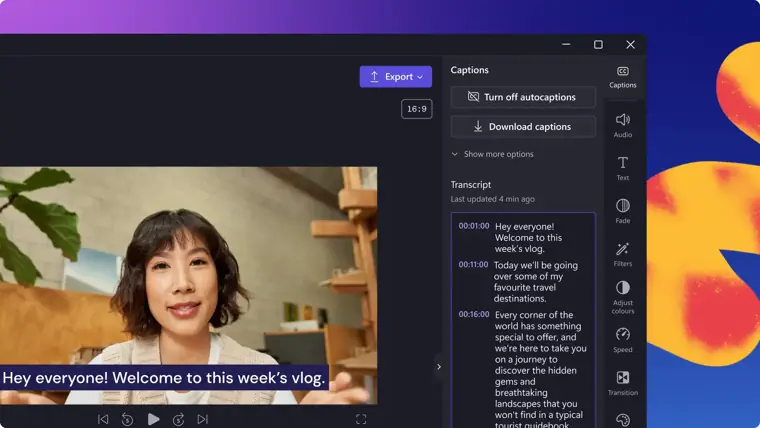
Smart AI subtitle generator
Transcribes speech in videos into captions across more than 80 languages using voice detection. It allows users to customize subtitle styling, fonts, and colors or download the transcript.
Use caseAn educator adds clear subtitles to virtual learning and lecture videos so students can follow along or watch with the sound off.
From clipchamp.com · image from Microsoft Clipchamp -
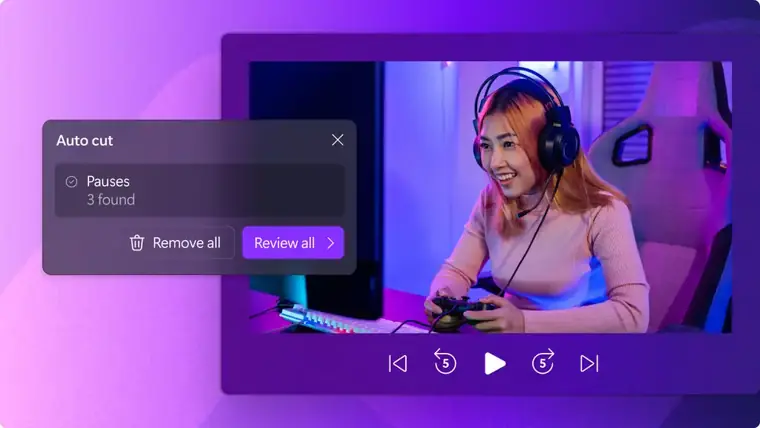
AI silence removal
Scans recorded audio to detect pauses or silent sections longer than three seconds. It lets users preview suggestions and cut out dead air to produce tighter recordings.
Use caseA creator cleans up webcam and voice recordings for demo videos and podcasts by cutting out long pauses.
From clipchamp.com · image from Microsoft Clipchamp -
AI background noise remover
Applies noise suppression technology to eliminate unwanted ambient sounds such as street or wind noise. It cleans up the sound without reducing audio quality to ensure speech remains distinct.
Use caseA vlogger removes street, wind, and ambient sounds from an outdoor voice and video recording to improve sound clarity.
From clipchamp.com -
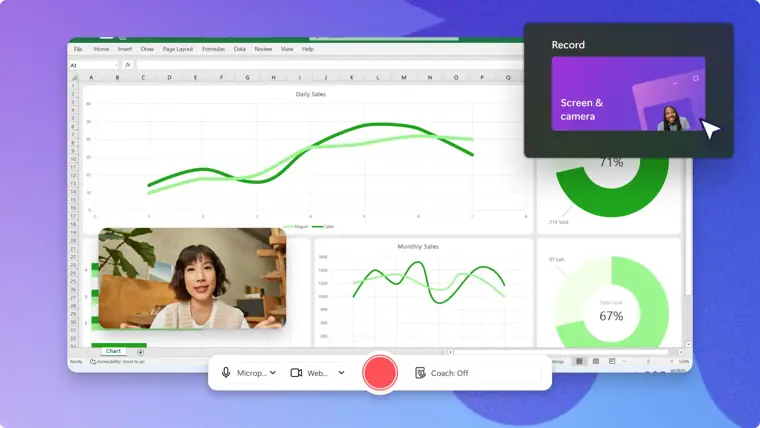
Online screen and camera recorder
Captures webcam video, desktop screen activity, and microphone audio directly from Windows and Mac devices. It supports unlimited retakes and exports content in high definition.
Use caseA professional captures their screen and voice simultaneously to produce an educational training presentation.
From clipchamp.com · image from Microsoft Clipchamp
Written from Microsoft Clipchamp's own website, checked . Each feature links to the page it comes from; images are Microsoft Clipchamp's own.
Every plan
| Plan | Monthly | Billed yearly | Per | What it includes |
|---|---|---|---|---|
| Free | Free | Not listed | per user | 1080p exports; free stock, filters and effects; no brand kit |
| Premium (via Microsoft 365 Personal) | $9.99 | $8.33 | per user | 4K exports; premium stock/filters/effects; 1 brand kit; $99.99/yr |
| Premium (via Microsoft 365 Family) | $12.99 | $10.83 | up to 6 users | same Premium features; $129.99/yr |
From Microsoft Clipchamp's own pricing page, checked . Prices are in US dollars per month; "billed yearly" is the monthly price when you pay for a year up front. A few figures (often the yearly price) are derived rather than printed on the page.
Before you pay
- Watermark on the free plan
- No
What Microsoft Clipchamp says
Export an unlimited number of videos and audio files in HD quality, without any watermarks.
Source page - Export your data
- Yes
What Microsoft Clipchamp says
Export videos in up to 1080p (full HD) video resolution for free, with no watermarks.
Source page
Only what Microsoft Clipchamp's own pages state, with the quote behind each answer. Anything they don't publish is left out rather than guessed.
Microsoft Clipchamp video tutorials
Independent creators on YouTube, not Microsoft Clipchamp or us. The video loads from YouTube only when you press play.
What the free plan includes
Unlimited 1080p exports
Questions people ask about Microsoft Clipchamp
How much does Microsoft Clipchamp cost?
Paid plans start at $9.99 a month (Premium (via Microsoft 365 Personal)). 3 plans are listed above, from Microsoft Clipchamp's own pricing page.
Is Microsoft Clipchamp free?
Yes, there is a free plan: Unlimited 1080p exports.
Does the Microsoft Clipchamp free plan add a watermark?
No, free plan output has no watermark. Source
What do I get with a Clipchamp free account?
The free plan lets you work on and export unlimited videos with personal assets or royalty free content, includes basic and AI editing features, and allows up to 1080p exports with no watermarks. Source
Is Clipchamp available for Microsoft 365 commercial or education customers?
The standard plan is included in some Microsoft 365 business and education licenses, with premium features and AI video creation available with a Copilot license. Source
Works with
- Languages
- over 80 global languages
Where this came from
Plans, prices and limits were copied from Microsoft Clipchamp's own pages, then checked .
How we collect prices and rank tools · Is something wrong? Correct this listing
Others that do the same job
 Descriptdescript.com
Edit video and podcasts by editing the transcript, with AI audio cleanup.
- Green flag: Free plan
- Green flag: Cancel online
- Green flag: No card for trial
- Red flag: Free plan watermark
 Kapwingkapwing.com
Collaborative browser editor with AI subtitles, smart cut, repurposing and dubbing.
- Green flag: Free plan
- Green flag: Cancel online
- Red flag: Credits reset monthly
- Red flag: Free plan watermark
 VEEDveed.io
Browser editor with AI subtitles, avatars, translation and generation tools.
- Green flag: Free plan
 Adobe Premiere Proadobe.com/products/premiere.html
Industry standard editor with Firefly AI: Generative Extend, text based editing, search.
- Green flag: Refunds within 14 days
 Canva (video editor)canva.com/video-editor
Template driven video editing inside Canva with AI captions, background removal, beat sync.
- Green flag: Free plan
- Green flag: No card for trial
- Red flag: Credits reset monthly
 Riversideriverside.com
Remote studio recording, then transcript editing and auto social clips.
- Green flag: Free plan
- Green flag: No card for trial
- Red flag: Free plan watermark