
Ramp
Corporate cards, expense, bill pay and procurement platform with AI that codes transactions and reviews expenses.
Best for US businesses controlling card and vendor spend
What it does
Ramp is a finance and spend management platform that brings together cards, expenses, bill payments, procurement, and accounting workflows. Teams submit receipts, bills, and expense requests, and Ramp automatically codes transactions, enforces spending rules, and reconciles data across business tools. It is built for companies ranging from startups to global enterprises looking to eliminate manual finance tasks.
Read more: 5 features and how people use themShow less
-
Corporate card
Issues unlimited physical and virtual cards with customizable spending limits, vendor controls, and automated compliance rules. Locks cards automatically if employees do not submit required receipts or items on time.
Use caseA finance director sets card limits and merchant rules to block employee purchases in categories like alcohol or weekend spend.
From ramp.com -
AI expense review
Audits transactions against your company expense rules and surfaces warnings for out of policy purchases. Checks receipts and details automatically, approving compliant expenses and escalating non compliant items for review.
Use caseA controller reviews only the flagged transactions that break company travel rules instead of checking thousands of routine receipts.
From ramp.com/enterprise -
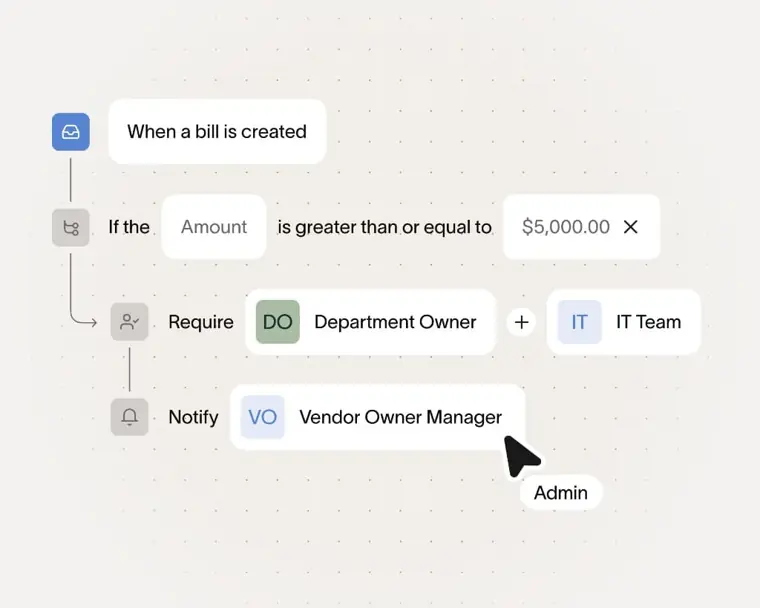
Accounts payable
Extracts line items from invoices using optical character recognition, routes bills through approval workflows, and executes payments. Disburses funds through payment methods including check, ACH, card, and wire transfers.
Use caseAn accounts payable manager uploads vendor invoices to auto populate line items and schedule batched payments across multiple entities.
From ramp.com/pricing · image from Ramp -
Procurement
Manages intake, approval flows, and vendor onboarding forms while creating and tracking purchase orders. Performs three way matching across purchase orders, item receipts, and corporate card transactions.
Use caseA procurement manager routes a software purchase through intake approvals and matches the final invoice against the purchase order.
From ramp.com/pricing -
Accounting automation and auto coding
Categorizes transaction details using AI and maps them directly to your general ledger. Syncs coded entries, accruals, and expense data with connected accounting systems and enterprise resource planning software.
Use caseAn accountant closes the monthly books by automatically syncing coded corporate card expenses into an enterprise accounting system.
From ramp.com/integrations
Written from Ramp's own website, checked . Each feature links to the page it comes from; images are Ramp's own.
Every plan
| Plan | Monthly | Billed yearly | Per | What it includes |
|---|---|---|---|---|
| Free | Free | Not listed | per user | Cards, expenses, bill pay, AR invoicing, basic accounting rules, QBO/Xero |
| Plus | $15 | Not listed | per user + platform fee by team size | AI expense reviews, auto coding, multi entity, NetSuite/Sage Intacct; 20% off annual; 30 day trial |
| Enterprise | Not listed | Not listed | per organization | contact sales; Workday/Oracle, global cards, dedicated CSM |
From Ramp's own pricing page, checked . Prices are in US dollars per month; "billed yearly" is the monthly price when you pay for a year up front. A few figures (often the yearly price) are derived rather than printed on the page.
Before you pay
- How to cancel
- Admins downgrade by opening Statements & payments settings, selecting Cancel subscription, reviewing downgrade details, and selecting Cancel Ramp Plus (or contacting an expert if on custom pricing).
What Ramp says
Open Statements & payments settings↗. 2. Select Cancel subscription. If you have custom pricing, select Connect with an expert instead. 3. Review the downgrade details and select Cancel Ramp Plus.
Source page - Cancel online yourself
- Yes
What Ramp says
1. Open Statements & payments settings↗. 2. Select Cancel subscription. If you have custom pricing, select Connect with an expert instead. 3. Review the downgrade details and select Cancel Ramp Plus.
Source page - Export your data
- Yes
What Ramp says
If your specific tool isn't listed, Ramp also supports custom CSV exports and an open API for flexible connectivity.
Source page - SOC 2
- Yes
What Ramp says
Designed for enterprise scale security and compliance—SOC 2 Type II certified, ISO 27001 accredited, and aligned with FedRAMP Moderate standards.
Source page - Discounts
- Save 20% on the Plus plan with annual billing.
What Ramp says
Plus $15/mo/user + Platform fee based on team size Save 20% with annual billing
Source page - Support
- Chat, email, phone, help center
What Ramp says
Help center Instant, 24/7 AI help for any Ramp question or task Chat, email, and phone support Priority support Custom support
Source page
Only what Ramp's own pages state, with the quote behind each answer. Anything they don't publish is left out rather than guessed.
Ramp video tutorials
Independent creators on YouTube, not Ramp or us. The video loads from YouTube only when you press play.
What the free plan includes
Free tier: unlimited cards, expense mgmt, bill pay, AP OCR, QuickBooks/
Questions people ask about Ramp
How much does Ramp cost?
Paid plans start at $15 a month (Plus). 3 plans are listed above, from Ramp's own pricing page.
Is Ramp free?
Yes, there is a free plan: Free tier: unlimited cards, expense mgmt, bill pay, AP OCR, QuickBooks/Xero sync; US businesses only (approval required).
How do I cancel Ramp?
Admins downgrade by opening Statements & payments settings, selecting Cancel subscription, reviewing downgrade details, and selecting Cancel Ramp Plus (or contacting an expert if on custom pricing). Source
Does Ramp have a student or other discount?
Save 20% on the Plus plan with annual billing. Source
Does Ramp have an API?
Yes.
What integrations does Ramp support?
Ramp provides over 200 integrations spanning accounting, banking, HR and payroll, procurement and productivity, and receipt automation. Source
What accounting software does Ramp integrate with?
Ramp integrates with more than 40 leading accounting systems, including NetSuite, Sage Intacct, Zoho Books, Xero, QuickBooks, Workday Financials, and Oracle Fusion Cloud. Source
Does Ramp integrate with an existing finance stack if a specific tool is not pre built?
Yes, Ramp supports custom CSV exports and provides an open API for flexible connectivity if a tool is not already listed. Source
What happens when an account downgrades from Ramp Plus?
Access to specific Plus features is lost, and the changes take effect when the current billing cycle ends. Source
Where this came from
Plans, prices and limits were copied from Ramp's own pages, then checked .
- ramp.com/pricing
- ramp.com/
- support.ramp.com/managing-ramp-plus
- ramp.com/enterprise
- ramp.com/integrations
How we collect prices and rank tools · Is something wrong? Correct this listing
Others that do the same job
 Julius AIjulius.ai
Chat with spreadsheets and databases to get analysis, charts, reports and presentations from plain English questions.
- Green flag: Free plan
- Red flag: Credits reset monthly
- Red flag: No refunds
 Puzzlepuzzle.io
AI native general ledger for startups with auto categorization, real time metrics and optional bookkeeper reviewed close.
 Rowsrows.com
Online spreadsheet with built in integrations and an AI analyst that cleans, summarizes and charts data.
- Green flag: Free plan
- Green flag: No card for trial
- Green flag: Doesn't train on your data
 Zenizeni.ai
AI powered bookkeeping, CFO, tax and payroll service for startups, run by a dedicated finance team.
- Red flag: No free plan
Clio (Clio Duo / Clio Work)clio.com
Cloud legal practice management with billing, intake and the Clio Work AI workspace for research and drafting.
- Green flag: Doesn't train on your data
 FreshBooksfreshbooks.com
Invoicing first accounting for service businesses and freelancers, with expenses, time tracking, projects and reports.
- Green flag: No card for trial
- Green flag: Refunds within 30 days