
SlidesAI
Turns text into slide presentations, mainly as a Google Slides add on.
Best for Quick text to slides in Google Slides
Used SlidesAI and liked it? Upvote it. One upvote per person. Upvotes come from visitors, not from us, and never change "Our ranking".
What it does
SlidesAI is an AI presentation maker that converts notes, prompts, scripts, or documents into slide presentations. Users provide text or files and receive structured, editable decks in tools like Google Slides and PowerPoint or directly through the web application. It is designed for professionals, educators, and students who need to create presentations rapidly.
Read more: 5 features and how people use themShow less
-
Cross platform workspace support
Builds and edits presentations directly inside environments like Google Slides, PowerPoint, ChatGPT, or an independent web application. It avoids switching software and preserves native files that users can continue refining.
Use caseA professional builds and edits sales presentation slides inside Microsoft PowerPoint without switching to outside tools.
From slidesai.io -
Brand kit import
Imports an existing presentation template to apply specified colors, fonts, layouts, and company logos across all generated slides. It keeps formatting consistent without manual restyling.
Use caseA professional imports a branded PowerPoint deck to generate a board deck using their company logo and predefined layouts.
From slidesai.io -
Document to deck creation
Extracts information from uploaded PDF and Word documents, notes, scripts, or topics to construct complete slide outlines and body content. It structures paragraphs into bullet points and slides without starting from scratch.
Use caseA researcher enters text from a research paper to automatically produce slide content for an upcoming conference.
From slidesai.io -
Multilingual presentation support
Generates presentations across more than one hundred languages and translates input text into a different output presentation language. It enables users to prepare content in one language and deliver slides in another.
Use caseA teacher prepares a digital classroom lesson for a diverse classroom by generating slides in another language.
From slidesai.io/use-cases/educators -
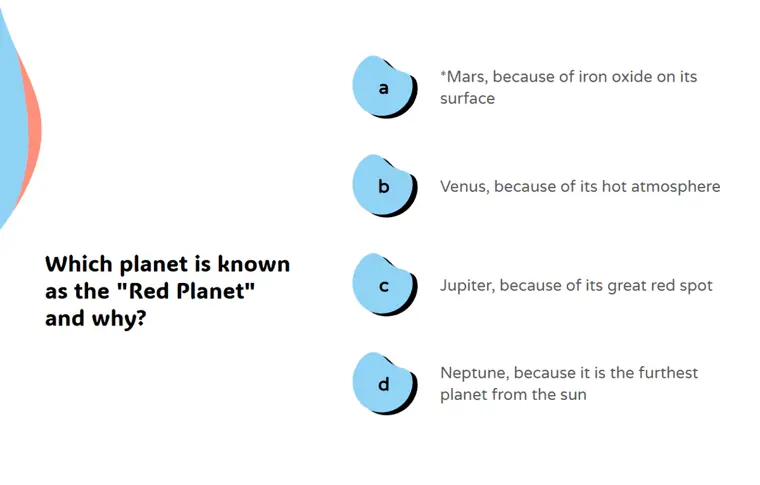
Interactive quiz layouts
Adds prebuilt quiz templates containing multiple choice, true or false, and open ended questions directly into educational decks. It inserts interactive assessment slides without breaking the presentation flow.
Use caseA middle school teacher integrates multiple choice questions into a history lesson plan to check student understanding.
From slidesai.io/use-cases/educators · image from SlidesAI
Written from SlidesAI's own website, checked . Each feature links to the page it comes from; images are SlidesAI's own.
Every plan
| Plan | Monthly | Billed yearly | Per | What it includes |
|---|---|---|---|---|
| Basic | Free | $0 | per user | 12 presentations/yr, 1,000 chars, 120 AI credits/yr |
| Pro | Not listed | $10 | per user | 120 presentations/yr, 6,000 chars, 600 AI credits/yr, document upload |
| Premium | Not listed | $20.83 | per user | unlimited presentations, 12,000 chars, 1,200 AI credits/yr, document upload |
From SlidesAI's own pricing page, checked . Prices are in US dollars per month; "billed yearly" is the monthly price when you pay for a year up front. Some of these figures came from third party reports and could not be confirmed on the official page.
Before you pay
- Refunds
- Subscribers can email support within 48 hours of purchase for a refund if usage is under 5 presentations.
What SlidesAI says
email us at support@slidesai.io within 48hrs of your purchase and we'll refund you. Please note: You're only eligible for a refund if your usage is under 5 presentations.
Source page - Refund window
- 2 days
What SlidesAI says
email us at support@slidesai.io within 48hrs of your purchase and we'll refund you.
Source page - Export your data
- Yes
- Support
Only what SlidesAI's own pages state, with the quote behind each answer. Anything they don't publish is left out rather than guessed.
Getting started with SlidesAI
- Enter the topic or subject you want your presentation to cover.
- Add your instructions by selecting the audience type, presentation type, and tone of voice.
- Review and adjust the AI generated outline.
- Pick a design theme matching your topic, with options for templates, images, and your logo.
Written from SlidesAI's own help pages: slidesai.io/generate/topic-to-ppt
SlidesAI video tutorials
Independent creators on YouTube, not SlidesAI or us. The video loads from YouTube only when you press play.
What the free plan includes
12 presentations/
Questions people ask about SlidesAI
Is SlidesAI free?
Yes, there is a free plan: 12 presentations/year, 1,000 input characters per presentation, 120 AI credits/year.
Can I get a refund from SlidesAI?
Subscribers can email support within 48 hours of purchase for a refund if usage is under 5 presentations. The refund window stated is 2 days. Source
Do I need to have a Google Workspace Account to use SlidesAI?
No, users can access SlidesAI with a regular Gmail account by installing it from the Google Workspace Marketplace. Source
How do I run it from Google Slides?
After installing it from Google Workspace Marketplace, navigate to Extensions > SlidesAI.io > Generate Slides in Google Slides. Source
Can SlidesAI still be used if a team does not use Google Slides?
Yes, it works across Google Slides, Microsoft PowerPoint, and as a web app. Source
How do I use SlidesAI with PowerPoint?
Install the PowerPoint add in to create and edit presentations inside PowerPoint. Source
Works with
- AI models
- Lite, Balanced, Advanced, Ultra
Where this came from
Plans, prices and limits were copied from SlidesAI's own pages and the other sources listed, then checked .
- slidesai.io/pricing
- workspace.google.com/marketplace/app/slidesaiio_create_slides_with_...
- slidesai.io/
- slidesai.io/terms-of-use
- slidesai.io/generate/topic-to-ppt
How we collect prices and rank tools · Is something wrong? Correct this listing
Others that do the same job
 Plus AIplusai.com
AI add in that generates and edits slides directly inside Google Slides and PowerPoint.
- Red flag: Card needed for trial
Gammagamma.app
Generates presentations, docs, websites and social posts from a prompt or file, with editable card based layouts.
- Green flag: Free plan
- Green flag: Cancel online
- Green flag: No card for trial
- Green flag: Some credits roll over
 Beautiful.aibeautiful.ai
Presentation software with smart templates that auto format slides and AI that drafts decks from prompts.
- Green flag: Cancel online
- Red flag: Card needed for trial
- Red flag: No refunds
 Decktopusdecktopus.com
AI presentation generator that builds decks from a topic, with forms, analytics and export.
- Green flag: Cancel online
- Green flag: Some credits roll over
- Green flag: Doesn't train on your data
- Red flag: No free plan
 Napkin AInapkin.ai
Turns text into editable diagrams, infographics and visuals for slides and documents.
- Green flag: Free plan
- Red flag: Free plan watermark
 Prezi (AI)prezi.com
Zooming, non linear presentation tool with Prezi AI that generates and restyles presentations.
- Green flag: Free plan
- Green flag: No card for trial
- Red flag: Trains on your data