Superhuman Docs (formerly Coda)
Doc meets app workspace with tables, automations and Packs, now Superhuman Docs with an in doc AI assistant.
Best for Teams building docs that work like apps
What it does
Superhuman Docs is a collaborative workspace where teams create and organize docs, pages, and trackers. You input text, prompts, tables, and connected data, and you get interactive documents with automated actions and analytical views. It is designed for teams that need to work together and collaborate with AI.
Read more: 4 features and how people use themShow less
-
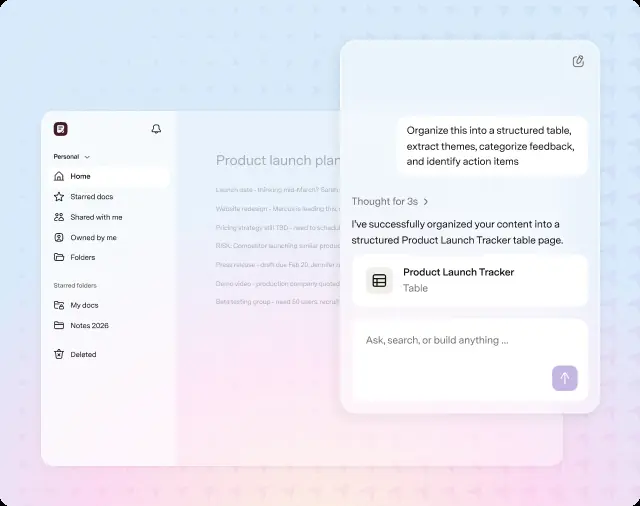
Docs AI assistant
Assists with writing, creates trackers or proposals from prompts, and answers questions across the workspace. It operates directly inside pages to help you refine and format content without using menus.
Use caseA doc maker creates proposals, trackers, and dashboards in minutes by asking the built in assistant.
From superhuman.com/plans/docs · image from Superhuman Docs -
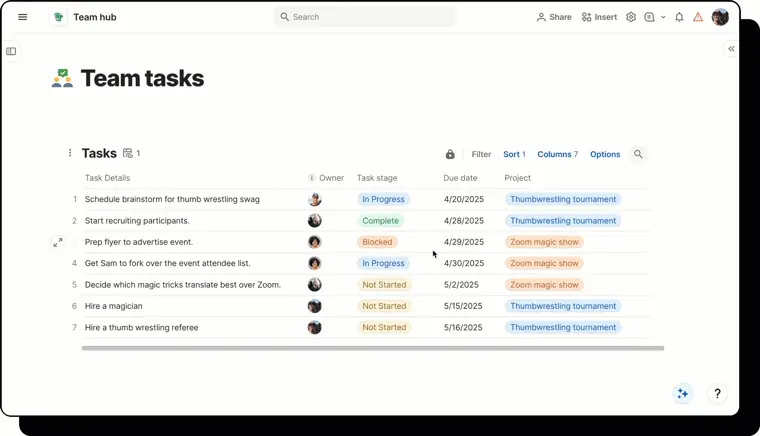
Connected tables and views
Displays and organizes information across linked formats and layouts. It enables users to manipulate doc data through structured databases, custom views, and forms.
Use caseAn editor adds tables and views to an existing doc to organize project data and collect responses.
From superhuman.com/plans/docs · image from Superhuman Docs -
MCP integration
Connects external AI models such as Claude directly to documents using the Model Context Protocol. It allows external agents to create and interact with doc content.
Use caseA doc maker connects Claude via MCP to create and update doc pages automatically.
From superhuman.com/plans/docs -
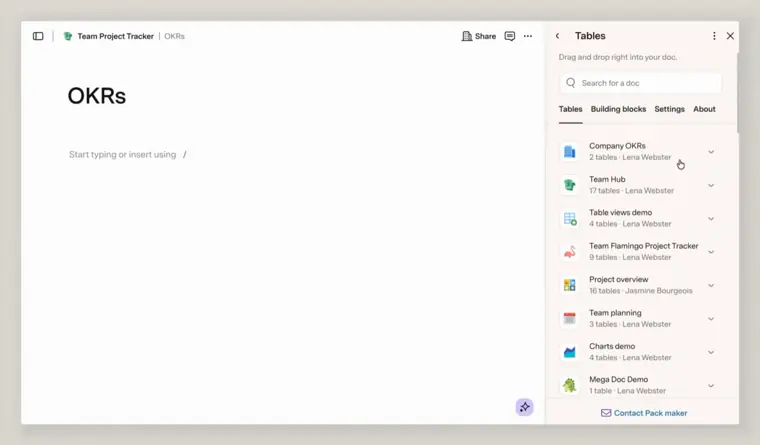
Cross doc syncing
Shares tables and triggers actions across separate documents within a workspace. It keeps distributed information consistent and coordinates workflow steps between distinct projects.
Use caseA team administrator synchronizes data tables and executes tasks across multiple department documents.
From superhuman.com/plans/docs · image from Superhuman Docs
Written from Superhuman Docs's own website, checked . Each feature links to the page it comes from; images are Superhuman Docs's own.
Every plan
| Plan | Monthly | Billed yearly | Per | What it includes |
|---|---|---|---|---|
| Free | Free | $0 | per Doc Maker | unlimited sharing and folders; editors/viewers free |
| Pro | Not listed | Not listed | per Doc Maker | no doc size cap; more automations and Packs |
| Business | Not listed | Not listed | per Doc Maker | more automations and Packs; doc protection (formerly 'Team') |
| Enterprise | Not listed | Not listed | per Doc Maker | contact sales; SSO, admin controls |
From Superhuman Docs (formerly Coda)'s own pricing page, checked . Prices are in US dollars per month; "billed yearly" is the monthly price when you pay for a year up front. A few figures (often the yearly price) are derived rather than printed on the page.
Before you pay
- Renews automatically
- Yes
What Superhuman Docs says
When you sign up for a new plan, as well as when it renews, you will be billed up front for all the users in your workspace.
Source page - HIPAA
- Yes
- SOC 2
- Yes
- Support
- Help Center, live chat
What Superhuman Docs says
Help Center | | | | | | Webinar and trainings | | | | Private | | Resource library | | | | | | Customer success | | | | | | Priority support | | | | | | Live chat
Source page
Only what Superhuman Docs's own pages state, with the quote behind each answer. Anything they don't publish is left out rather than guessed.
Getting started with Superhuman Docs
- Download the Superhuman Docs desktop app for Mac.
- Open the app and sign in using your Superhuman or previous Coda credentials.
- Access and view your docs directly within the application.
Written from Superhuman Docs's own help pages: help.superhuman.com/hc/en-us/articles/4687559...
Superhuman Docs video tutorials
Independent creators on YouTube, not Superhuman Docs or us. The video loads from YouTube only when you press play.
What the free plan includes
Free: 1GB attachments per doc, 7 day version history, low automation quota. Docs AI (beta) and MCP: free users/
Questions people ask about Superhuman Docs
Is Superhuman Docs free?
Yes, there is a free plan: Free: 1GB attachments per doc, 7 day version history, low automation quota. Docs AI (beta) and MCP: free users/editors get a limited free allowance; paid Doc Makers get high limits (fair use)..
Is Superhuman Docs HIPAA compliant?
Yes. Source
Does Superhuman Docs have an API?
Yes.
Is Coda going away?
No, Coda is now Superhuman Docs, retaining all existing docs, workflows, tables, Packs, automations, and formulas under a new name. Source
Does the transition to Superhuman Docs change current plans or pricing?
Existing plans, pricing, and billing remain the same, and the launch of Superhuman Docs does not affect current subscriptions. Source
Who do you pay for on paid workspaces?
You are billed based on the number of Doc Makers in the workspace at the end of each billing cycle, while Editors and Viewers are free. Source
Is Docs AI included in all plans?
During Beta, Docs AI is included with unlimited access on paid plans under a fair use policy, while the Free plan offers limited trials. Source
Works with
- Integrations
- Slack, Google Groups, Chrome, Safari, ChatGPT, Claude, Cursor
- AI models
- Claude
Where this came from
Plans, prices and limits were copied from Superhuman Docs (formerly Coda)'s own pages and the other sources listed, then checked .
- help.superhuman.com/hc/en-us/articles/46962825240077-Coda-is-becomi...
- superhuman.com/plans/docs
- breeze.pm/articles/coda-is-now-superhuman-docs
- usagepricing.com/blueprint/coda
- dub.co/marketplace/superhuman
- help.superhuman.com/hc/en-us/articles/46210093285773-What-s-changin...
- help.superhuman.com/hc/en-us/articles/46210185731341-Overview-Tables
- help.superhuman.com/hc/en-us/articles/46210118248205-Security-recom...
- help.superhuman.com/hc/en-us/articles/46875595711117-Superhuman-Doc...
- help.superhuman.com/hc/en-us/articles/46210186033037-Publish-your-d...
- help.superhuman.com/hc/en-us/articles/46210112117261-Add-the-Superh...
- help.superhuman.com/hc/en-us/articles/46210173797773-Move-docs-betw...
How we collect prices and rank tools · Is something wrong? Correct this listing
Others that do the same job
 Notion (Notion AI)notion.com
All in one docs, wikis, databases and projects workspace with built in AI agent, meeting notes and enterprise search.
- Green flag: Free plan
 Tanatana.inc
Knowledge graph outliner with supertags plus a newer AI meeting platform where agents act on calls.
- Green flag: Free plan
- Green flag: No card for trial
- Green flag: Credits don't expire
- Green flag: Refunds within 60 days
 Akiflowakiflow.com
Consolidates tasks from all your apps into one inbox, then time blocks them on your calendar with an AI assistant.
- Red flag: Card needed for trial
 Asanaasana.com
Work management platform with AI Teammates and AI Studio that triage, route and automate team workflows.
- Green flag: Free plan
- Green flag: No card for trial
 ChatGPTchatgpt.com
OpenAI's general purpose AI assistant for writing, research, coding, images, voice and agentic tasks.
- Green flag: Free plan
 Claudeclaude.com
Anthropic's AI assistant for writing, analysis, coding and agentic work, including Claude Code and Cowork.
- Green flag: Free plan
- Green flag: Cancel online
- Green flag: Credits don't expire
- Green flag: Doesn't train on your data