
Akiflow
Consolidates tasks from all your apps into one inbox, then time blocks them on your calendar with an AI assistant.
Best for Power users drowning in tasks across many apps
Used Akiflow and liked it? Upvote it. One upvote per person. Upvotes come from visitors, not from us, and never change "Our ranking".
What it does
Akiflow brings tasks, calendars, and an AI assistant together into a single application. Users capture tasks from incoming emails or work applications, plan their schedule, and time block events onto their calendar. The software is built for founders, operators, and busy professionals who want structured daily execution.
Read more: 4 features and how people use themShow less
-
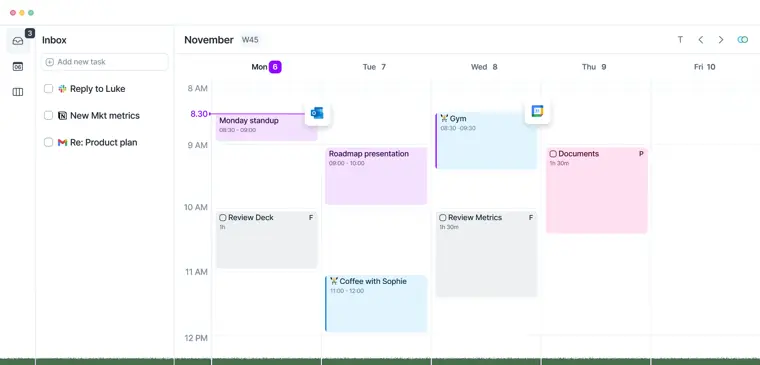
Universal Inbox
Collects items across different work tools and turns emails or Slack messages directly into planned tasks using two way synchronization.
Use caseA team operator saves Slack messages to reply to later and transforms client emails into scheduled to do items.
From akiflow.com · image from Akiflow -
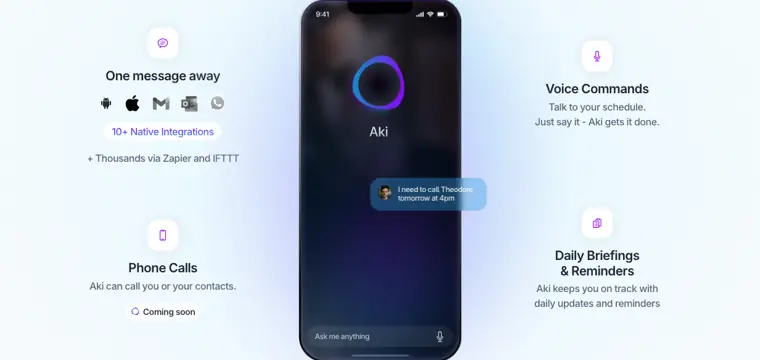
Aki AI Assistant
Accepts voice commands and natural language prompts to create calendar events, assign projects, and provide daily updates.
Use caseAn executive instructs Aki by voice to schedule a phone call with a contact for tomorrow at 4pm.
From akiflow.com · image from Akiflow -
Meeting Link
Shares open calendar slots using a link to schedule one off or recurring meetings without back and forth messages.
Use caseA professional sends an availability link with custom buffer times to book recurring client meetings.
From akiflow.com/features/meeting-link -
Keyboard Shortcuts
Allows navigation across projects, calendars, and tasks while supporting instant task creation through a command bar.
Use caseAn engineer navigates between inbox and calendar views to create and organize tasks without using a mouse.
From akiflow.com/features/shortcuts
Written from Akiflow's own website, checked . Each feature links to the page it comes from; images are Akiflow's own.
Every plan
| Plan | Monthly | Billed yearly | Per | What it includes |
|---|---|---|---|---|
| Pro Monthly | $34 | Not listed | per user | 7 day trial (card required), all features incl. Aki AI and MCP connector |
| Pro Yearly | Not listed | $19 | per user | $228/year |
| Believer (2 years) | Not listed | $14.90 | per user | $357.60 for 2 years |
| Believer (5 years) | Not listed | $11.65 | per user | $699 for 5 years |
| Team | Contact sales | Not listed | custom | contact sales |
From Akiflow's own pricing page, checked . Prices are in US dollars per month; "billed yearly" is the monthly price when you pay for a year up front.
Before you pay
- Card needed for the trial
- Yes
What Akiflow says
New customers receive a 7 day full access trial; a card is required, and the selected subscription begins after the trial unless it is cancelled.
Source page - Discounts
- Eligible university students and researchers receive 40% off Pro Yearly for life, which can also apply to Believer options.
What Akiflow says
Eligible university students and researchers can receive 40% off Pro Yearly for life after academic email verification. The discount can also apply to Believer options; contact support@akiflow.com to verify eligibility.
Source page - Support
- Email, in app live chat, community
What Akiflow says
Email : support@akiflow.com for anything you’d like a hand with. In app chat : tap the chat widget inside Akiflow for a quick reply
Source page
Only what Akiflow's own pages state, with the quote behind each answer. Anything they don't publish is left out rather than guessed.
Akiflow video tutorials
Independent creators on YouTube, not Akiflow or us. The video loads from YouTube only when you press play.
The free trial
Trial only: No free plan. 7 day full access trial, credit card required; subscription starts after trial unless cancelled.
Questions people ask about Akiflow
How much does Akiflow cost?
Paid plans start at $34 a month (Pro Monthly). 5 plans are listed above, from Akiflow's own pricing page.
Is Akiflow free?
There is a free trial but no free plan: No free plan. 7 day full access trial, credit card required; subscription starts after trial unless cancelled..
Do I need a credit card to try Akiflow?
Yes, a card is required to start the trial. Source
Does Akiflow have a student or other discount?
Eligible university students and researchers receive 40% off Pro Yearly for life, which can also apply to Believer options. Source
Are longer term Pro options available?
Yes, Believer options are available at $357.60 for two years or $699 for five years. Source
Where this came from
Plans, prices and limits were copied from Akiflow's own pages and the other sources listed, then checked .
- akiflow.com/pricing
- akiflow.featurebase.app/p/iso-27001
- akiflow.com/
- product.akiflow.com/en/help/articles/2532473-akiflow-webinars
- akiflow.com/privacy-policy
- akiflow.com/integrations/zapier
How we collect prices and rank tools · Is something wrong? Correct this listing
Others that do the same job
 Sunsamasunsama.com
Guided daily planning ritual that pulls tasks from your tools and timeboxes a realistic workday on your calendar.
- Green flag: Cancel online
- Green flag: No card for trial
 Asanaasana.com
Work management platform with AI Teammates and AI Studio that triage, route and automate team workflows.
- Green flag: Free plan
- Green flag: No card for trial
 ChatGPTchatgpt.com
OpenAI's general purpose AI assistant for writing, research, coding, images, voice and agentic tasks.
- Green flag: Free plan
 Claudeclaude.com
Anthropic's AI assistant for writing, analysis, coding and agentic work, including Claude Code and Cowork.
- Green flag: Free plan
- Green flag: Cancel online
- Green flag: Credits don't expire
- Green flag: Doesn't train on your data
 Craftcraft.do
Beautifully designed docs and notes app with built in AI assistant, collaboration, and native apps everywhere.
- Green flag: Free plan
 Reclaim.aireclaim.ai
AI calendar assistant that defends focus time, habits and tasks by auto scheduling them around your meetings.
- Green flag: Free plan
- Green flag: Doesn't train on your data