
Notion (Notion AI)
All in one docs, wikis, databases and projects workspace with built in AI agent, meeting notes and enterprise search.
Best for Teams wanting docs, wikis and AI in one place
What it does
Notion is an AI workspace designed to capture context, find answers, and automate tasks in one system of record. Users bring in notes, project tasks, and data from connected tools to generate docs, build databases, run automated agents, and receive direct answers. It is built for individuals organizing life projects as well as growing businesses and large organizations.
Read more: 4 features and how people use themShow less
-
Notion Agent
Executes complex, multi step tasks using context gathered across your Notion workspace, connected applications, and the web. Chats, generates and edits documents, autofills databases, and provides answers with citations.
Use caseA team member asks the agent to triage product feedback and compile a summary into a project page.
From notion.com/pricing -
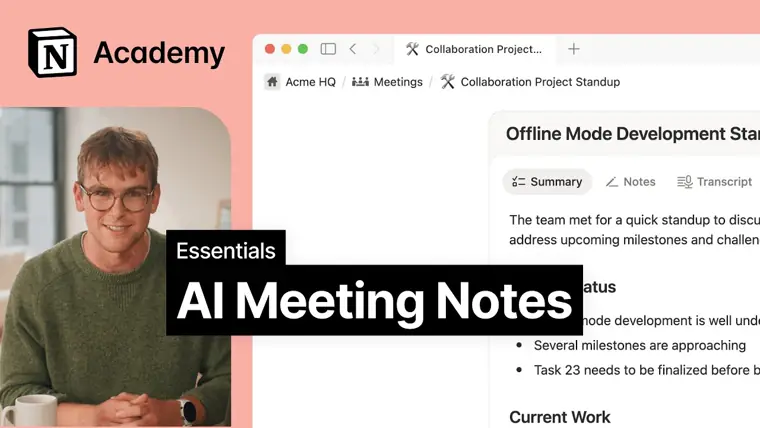
AI Meeting Notes
Transcribes conversations from meetings automatically without requiring a bot to join. Produces summaries and outlines action items for team follow ups.
Use caseA project manager runs a project sync call and automatically generates written meeting notes and action items for attendees.
From notion.com/pricing · image from Notion -
Enterprise Search
Searches for and retrieves quick answers across your Notion workspace and linked external software. Integrates with applications such as Slack, GitHub, and Microsoft Teams to present cited results.
Use caseAn employee searches for project details stored across Slack channels and GitHub repositories directly from their workspace.
From notion.com/pricing -
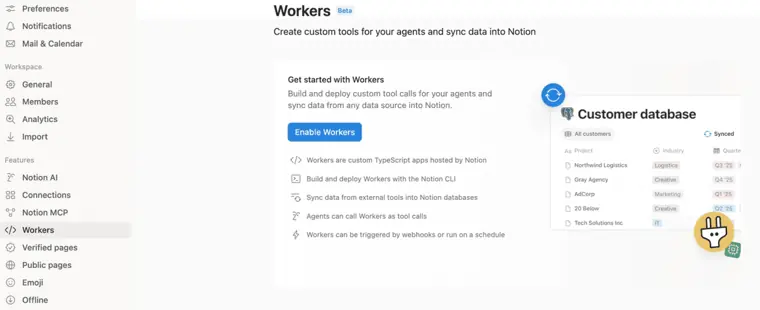
Workers
Executes custom code in the background without needing separate infrastructure to automate tasks, sync external data, and trigger workflows. Powers custom tools invoked by automated agents or scheduled syncs.
Use caseAn engineering lead configures a nightly sync to automatically pull closed Jira tickets into a Notion engineering log for weekly review.
From notion.com · image from Notion
Written from Notion's own website, checked . Each feature links to the page it comes from; images are Notion's own.
Every plan
| Plan | Monthly | Billed yearly | Per | What it includes |
|---|---|---|---|---|
| Free | Free | $0 | per seat | Limited Notion AI trial; 5 MB uploads; 10 guests; 7 day history |
| Plus | $12 | $10 | per seat | Limited AI trial; unlimited uploads; 30 day history |
| Business | $24 | $20 | per seat | Notion AI included (Agent, AI Meeting Notes, Enterprise Search); SAML SSO; 90 day history |
| Enterprise | Not listed | Not listed | per seat | contact sales |
From Notion (Notion AI)'s own pricing page, checked . Prices are in US dollars per month; "billed yearly" is the monthly price when you pay for a year up front. A few figures (often the yearly price) are derived rather than printed on the page.
Before you pay
- Data retention
- When using Notion AI, LLM providers retain data for 30 days on lower plans and utilize zero data retention for Enterprise plan workspaces, or default custom data retention settings revert to 30 days.
What Notion says
When using Notion AI, our LLM providers utilize zero data retention for Enterprise plan workspaces Data retention 30 day retention 30 day retention 30 day retention Zero data retention
Source page - Support
- Customer success manager (Enterprise plan)
What Notion says
Our team of Customer Success Managers are experts to help you get the most out of Notion. Customer success manager
Source page
Only what Notion's own pages state, with the quote behind each answer. Anything they don't publish is left out rather than guessed.
Getting started with Notion
- Open a chat with Agent by clicking the circular face icon at the bottom right corner of your workspace or opening the Notion AI tab in the left sidebar.
- Select an action for the Agent to take based on the current page, or enter your question or multi step query.
- Add additional context by using @-mentions for specific pages or people, or by selecting sources via All sources.
- Upload relevant files to chat by clicking the paperclip icon.
- Optionally switch to another AI model by clicking Auto in the model selector.
Written from Notion's own help pages: notion.com/help/guides/get-started-with-your-... · notion.com/help/guides/power-your-deep-work-u...
Notion video tutorials
Independent creators on YouTube, not Notion or us. The video loads from YouTube only when you press play.
What the free plan includes
Free: unlimited blocks for individuals (limited for 2+ members), 5 MB uploads, 7 day page history, 10 guests. Notion AI on Free and Plus is only a limited trial (a limited number of complimentary AI responses); full Notion AI (Agent, AI Meeting Notes, Enterprise Search) requires Business or Enterprise.
Questions people ask about Notion
How much does Notion cost?
Paid plans start at $12 a month (Plus). 4 plans are listed above, from Notion's own pricing page.
Is Notion free?
Yes, there is a free plan: Free: unlimited blocks for individuals (limited for 2+ members), 5 MB uploads, 7 day page history, 10 guests. Notion AI on Free and Plus is only a limited trial (a limited number of complimentary AI responses); full Notion AI (Agent, AI Meeting Notes, Enterprise Search) requires Business or Enterprise..
Does Notion have an API?
Yes.
Will my workspace start spending Notion credits on its own?
No, because premium models are switched off by default for Notion Agent until an admin turns them on. Source
Does Notion charge more than the model's own price?
No, Notion charges tokens at each provider's published rates with no markup. Source
Why do premium models cost extra?
Models included in your plan do not spend credits, whereas premium models cost much more to run and require Notion credits. Source
Why can't I pick a premium model for Notion Agent?
It typically means an admin hasn't turned the model on, you have reached your individual credit limit, or the workspace is out of credits. Source
Works with
- Integrations
- Slack, Google Drive, GitHub, Asana, Jira, Box, OneDrive, Salesforce, Figma, Google Analytics
- AI models
- Claude Fable 5.1, Claude Sonnet 5, Claude Fable 5, GPT, ChatGPT, Gemini, Grok
Where this came from
Plans, prices and limits were copied from Notion (Notion AI)'s own pages and the other sources listed, then checked .
- notion.com/pricing
- notion.com/help/notion-ai-faqs
- notion.com/help/notion-ai-security-practices
- breeze.pm/articles/notion-ai-pricing
- notion.com
- notion.com/help/manage-ai-models-and-member-credit-spend
- notion.com/help/plan-downgrade
- notion.com/help/guides/get-started-with-your-personal-agent-in-notion
- notion.com/help/guides/find-answers-and-generate-reports-with-enter...
- notion.com/help/guides/power-your-deep-work-using-research-mode-in-notion
- notion.com/help/guides/preserve-perfect-meeting-memory-with-ai-meet...
How we collect prices and rank tools · Is something wrong? Correct this listing
Others that do the same job
Superhuman Docs (formerly Coda)docs.superhuman.com
Doc meets app workspace with tables, automations and Packs, now Superhuman Docs with an in doc AI assistant.
- Green flag: Free plan
 Tanatana.inc
Knowledge graph outliner with supertags plus a newer AI meeting platform where agents act on calls.
- Green flag: Free plan
- Green flag: No card for trial
- Green flag: Credits don't expire
- Green flag: Refunds within 60 days
 Akiflowakiflow.com
Consolidates tasks from all your apps into one inbox, then time blocks them on your calendar with an AI assistant.
- Red flag: Card needed for trial
 Asanaasana.com
Work management platform with AI Teammates and AI Studio that triage, route and automate team workflows.
- Green flag: Free plan
- Green flag: No card for trial
 ChatGPTchatgpt.com
OpenAI's general purpose AI assistant for writing, research, coding, images, voice and agentic tasks.
- Green flag: Free plan
 Claudeclaude.com
Anthropic's AI assistant for writing, analysis, coding and agentic work, including Claude Code and Cowork.
- Green flag: Free plan
- Green flag: Cancel online
- Green flag: Credits don't expire
- Green flag: Doesn't train on your data