
Superhuman Mail
Keyboard first email client with AI drafting, auto labels and scheduling, now part of the Superhuman (ex Grammarly) suite.
Best for Executives and teams living in Gmail or Outlook
Used Superhuman Mail and liked it? Upvote it. One upvote per person. Upvotes come from visitors, not from us, and never change "Our ranking".
What it does
Keyboard first email client with AI drafting, auto labels and scheduling, now part of the Superhuman (ex Grammarly) suite.
Read more: 4 features and how people use themShow less
-
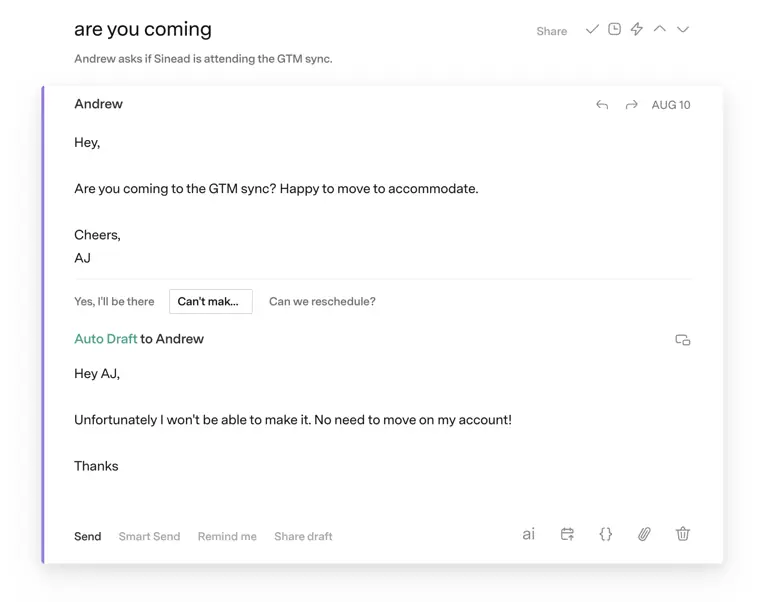
Auto Drafts
Generates draft email responses automatically using AI so you can reply faster.
Use caseA founder reviews prepared draft responses to incoming messages to keep up with constant communication without writing each reply from scratch.
From superhuman.com/plans/mail · image from Superhuman Mail -
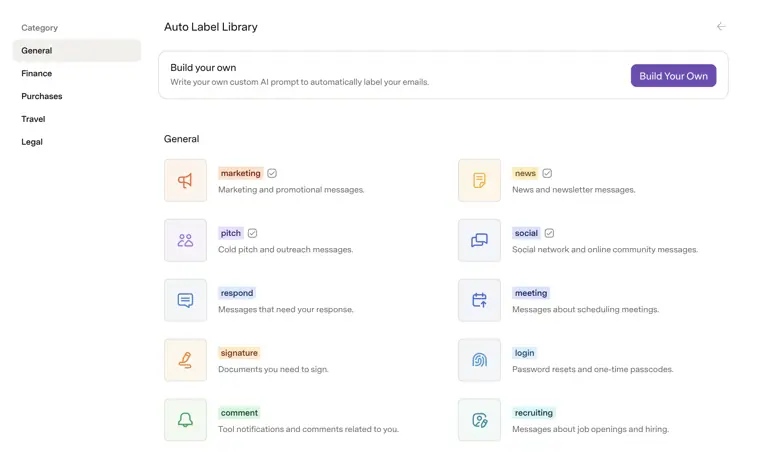
Custom Auto Labels with AI
Applies customized organizational tags to incoming messages automatically based on AI rules.
Use caseA team leader sorts incoming project messages into organized categories so members never miss important updates.
From superhuman.com/plans/mail · image from Superhuman Mail -
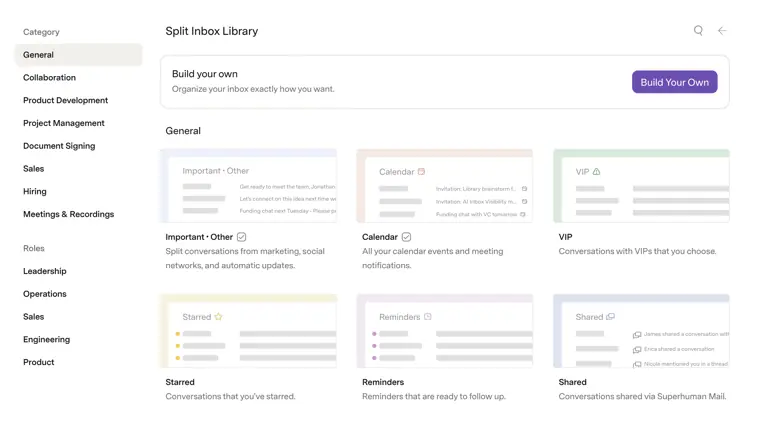
Split Inbox
Divides your primary mail feed into separate dedicated streams to keep different categories of email organized.
Use caseA startup executive separates urgent partner messages from routine notifications to maintain daily focus.
From superhuman.com/plans/mail · image from Superhuman Mail -
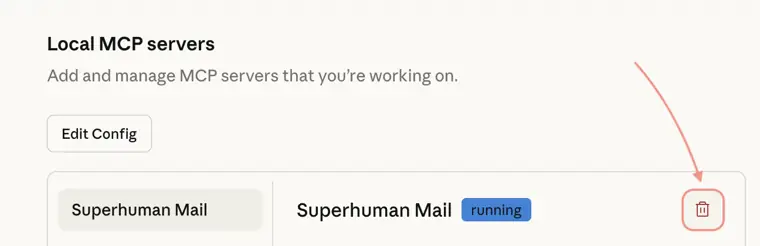
Superhuman Mail MCP
Connects your mailbox to Model Context Protocol integrations to expose mail actions to external AI tools.
Use caseA knowledge worker connects mailbox data and workflows to external assistant agents across the Superhuman suite.
From superhuman.com/plans/mail · image from Superhuman Mail
Written from Superhuman Mail's own website, checked . Each feature links to the page it comes from; images are Superhuman Mail's own.
Every plan
| Plan | Monthly | Billed yearly | Per | What it includes |
|---|---|---|---|---|
| Starter | $30 | $25 | per member | up to 25 seats; includes Mail, Grammarly, Docs, Go |
| Business | $40 | $33 | per member | up to 25 seats; private group coaching |
| Enterprise | Contact sales | Not listed | custom | contact sales |
From Superhuman Mail's own pricing page, checked . Prices are in US dollars per month; "billed yearly" is the monthly price when you pay for a year up front. A few figures (often the yearly price) are derived rather than printed on the page.
Before you pay
- SOC 2
- Yes
- Support
- Email, video call
Only what Superhuman Mail's own pages state, with the quote behind each answer. Anything they don't publish is left out rather than guessed.
Superhuman Mail video tutorials
Independent creators on YouTube, not Superhuman Mail or us. The video loads from YouTube only when you press play.
Questions people ask about Superhuman Mail
How much does Superhuman Mail cost?
Paid plans start at $30 a month (Starter). 3 plans are listed above, from Superhuman Mail's own pricing page.
Is Superhuman Mail free?
No. Superhuman Mail has no free plan.
Works with
- Integrations
- HubSpot, Salesforce, Pipedrive, Zoom, Google Meet, Microsoft Teams
Where this came from
Plans, prices and limits were copied from Superhuman Mail's own pages and the other sources listed, then checked .
- superhuman.com/plans/mail
- getinboxzero.com/superhuman-pricing
- costbench.com/changelog/superhuman-plan-removed-2026-07/
- dub.co/marketplace/superhuman
- help.superhuman.com/hc/en-us/articles/38456908110227-Superhuman-AI-Overview
- superhuman.com/mail/compare/superhuman-mail-vs-shortwave
- trust.superhuman.com
- grammarly.com/blog/company/announcing-company-rebrand-to-superhuman
How we collect prices and rank tools · Is something wrong? Correct this listing
Others that do the same job
 Shortwaveshortwave.com
Gmail based email client with a built in AI executive assistant that searches, summarizes, drafts and organizes your inbox.
- Green flag: Free plan
- Green flag: Refunds within 14 days
 Akiflowakiflow.com
Consolidates tasks from all your apps into one inbox, then time blocks them on your calendar with an AI assistant.
- Red flag: Card needed for trial
 Asanaasana.com
Work management platform with AI Teammates and AI Studio that triage, route and automate team workflows.
- Green flag: Free plan
- Green flag: No card for trial
 ChatGPTchatgpt.com
OpenAI's general purpose AI assistant for writing, research, coding, images, voice and agentic tasks.
- Green flag: Free plan
 Claudeclaude.com
Anthropic's AI assistant for writing, analysis, coding and agentic work, including Claude Code and Cowork.
- Green flag: Free plan
- Green flag: Cancel online
- Green flag: Credits don't expire
- Green flag: Doesn't train on your data
 Craftcraft.do
Beautifully designed docs and notes app with built in AI assistant, collaboration, and native apps everywhere.
- Green flag: Free plan