
Craft
Beautifully designed docs and notes app with built in AI assistant, collaboration, and native apps everywhere.
Best for Apple users wanting polished docs and notes
What it does
Craft is a flexible workspace app for notes, documents, tasks, and planning. You input rough ideas, meeting notes, outlines, and media across your devices, and you get organized collections, shared spaces, and published web documents. It is designed for individual creators, students, writers, and teams who want to keep thinking and tasks in one place.
Read more: 2 features and how people use themShow less
-
Embedded task planning
Integrates tasks, reminders, and daily calendar notes directly inside documents so you can track action items alongside your writing.
Use caseA product manager organizes travel plans, tasks, and blog drafts within the same workspace.
From craft.do -
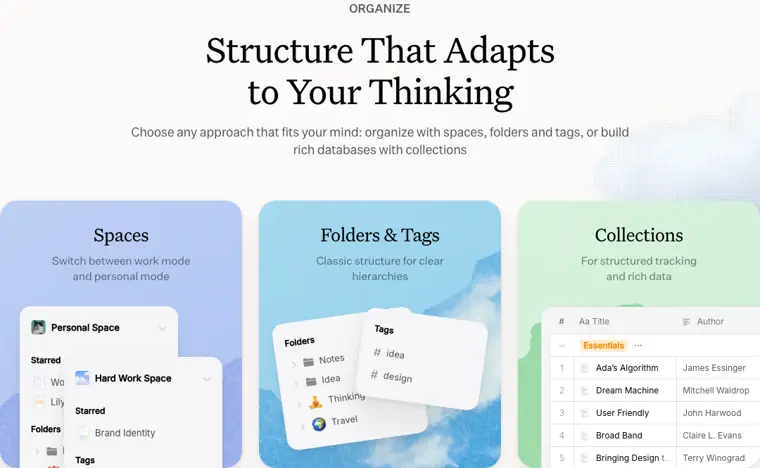
Flexible organization structure
Sorts notes using spaces, folders, tags, and collections to handle both personal and work content.
Use caseA creator separates personal journals from client shoot plans by switching between dedicated spaces.
From craft.do · image from Craft
Written from Craft's own website, checked . Each feature links to the page it comes from; images are Craft's own.
Every plan
| Plan | Monthly | Billed yearly | Per | What it includes |
|---|---|---|---|---|
| Free | Free | $0 | per account | 1,500 blocks; 1 GB; 15 AI credits |
| Plus | $8 | $6.40 | per account | Unlimited content/storage; 50 AI credits/mo |
| Family | $15 | $12 | per group (2 to 6 accounts) | Plus for up to 6 accounts; shared Space |
| Team | $50 | Not listed | per team (up to 10 accounts) | Plus for up to 10 accounts; shared Space |
| Enterprise | Not listed | Not listed | per team | contact sales |
From Craft's own pricing page, checked . Prices are in US dollars per month; "billed yearly" is the monthly price when you pay for a year up front.
Before you pay
- Support
- Help center
What Craft says
feel free to contact support. We’re excited to have you in the Craft community!
Source page
Only what Craft's own pages state, with the quote behind each answer. Anything they don't publish is left out rather than guessed.
Getting started with Craft
- Open Craft and locate the Import icon at the bottom of the left sidebar, or open the three dot menu (⋯) in the top right while in All Documents, Organize, or Unsorted view.
- Pick your source app or file format to follow its dedicated import flow.
- Review and organize your imported content to check that everything imported correctly.
- Verify external references and update internal links.
- Enhance your content by applying Craft styling such as document styling, cards, and page styles.
- Set up folders and spaces to organize your content using Craft’s folder structure.
Tips
- TextBundle import is not available on Web and Windows.
- You can connect your Notion workspace directly without needing a file export.
Written from Craft's own help pages: support.craft.do/en/introduction/move-to-craft
What the free plan includes
Free: 1,500 blocks, 1GB storage, 25MB per upload, 7 day version history, no shared spaces. AI assistant: 15 credits (Core and Fast models only). Plus gets 50 AI credits/
Questions people ask about Craft
How much does Craft cost?
Paid plans start at $8 a month (Plus). 5 plans are listed above, from Craft's own pricing page.
Is Craft free?
Yes, there is a free plan: Free: 1,500 blocks, 1GB storage, 25MB per upload, 7 day version history, no shared spaces. AI assistant: 15 credits (Core and Fast models only). Plus gets 50 AI credits/month incl. Max models..
Does Craft have an API?
Yes.
How does the Free plan work?
You can have up to 1500 blocks across all your documents. You get 1 GB storage and all the essential Craft features, making it perfect for exploring without pressure to upgrade. Source
Works with
- AI models
- Core, Fast, Max
Where this came from
Plans, prices and limits were copied from Craft's own pages and the other sources listed, then checked .
- craft.do/pricing
- support.craft.do/en/introduction/move-to-craft
- craft.do/security
- craft.do/blog/craft-soc-2-announcement
- craft.do/
- docs.craft.do/?tier=plus
- support.craft.do/en/organize-and-find
- craft.do/imagine/guide/api/lovable
- craft.do/imagine/guide/api/replit
- craft.do/imagine/guide/api/shortcuts
- craft.do/imagine/guide/api/bolt
How we collect prices and rank tools · Is something wrong? Correct this listing
Others that do the same job
 Evernoteevernote.com
Veteran note taking app with web clipping, tasks and newly added AI assistant, semantic search and transcription.
- Green flag: Free plan
- Green flag: Cancel online
- Red flag: Card needed for trial
 Memget.mem.ai
AI first note app that auto organizes notes, tracks tasks, and lets you chat with everything you've saved.
- Green flag: Free plan
- Red flag: Credits reset monthly
 Saner.aisaner.ai
ADHD friendly AI assistant that unifies notes, email, calendar and tasks, with an assistant that searches everything.
- Green flag: Free plan
- Green flag: Cancel online
- Green flag: Doesn't train on your data
 Reflectreflect.app
Private, backlinked daily notes app now rebuilt as open source, local Markdown with bring your own key AI.
- Green flag: Free plan
 Akiflowakiflow.com
Consolidates tasks from all your apps into one inbox, then time blocks them on your calendar with an AI assistant.
- Red flag: Card needed for trial
 Asanaasana.com
Work management platform with AI Teammates and AI Studio that triage, route and automate team workflows.
- Green flag: Free plan
- Green flag: No card for trial