
Evernote
Veteran note taking app with web clipping, tasks and newly added AI assistant, semantic search and transcription.
Best for Long time note hoarders and web clippers
What it does
Evernote is a productivity application designed to help individuals and teams capture, organize, and manage information in one central hub. You input items like notes, images, documents, recordings, web clips, and schedules, and you retrieve organized knowledge with context, task tracking, and search results. It is built for anyone managing personal projects or collaborating across an entire organization.
Read more: 4 features and how people use themShow less
-
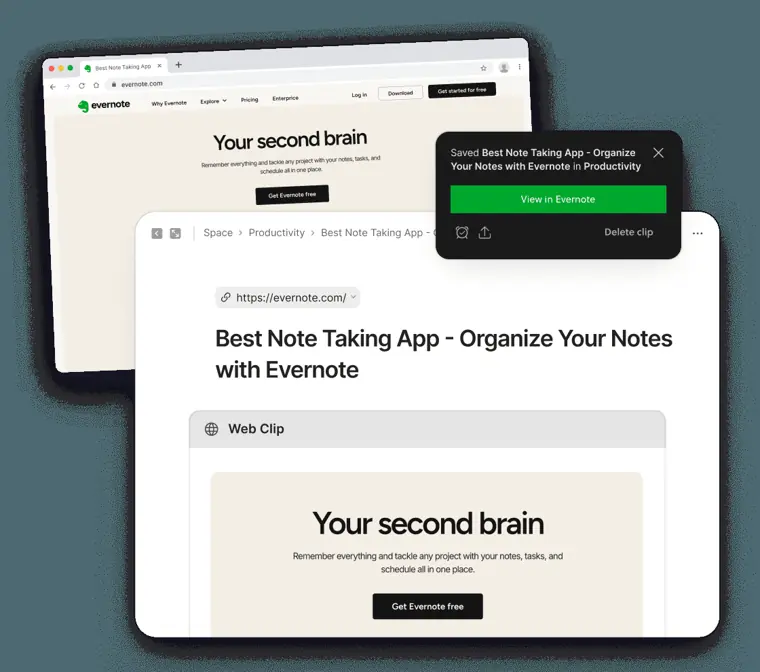
Web Clipper
Saves articles, web pages, images, and online content directly into your notes while stripping away unwanted advertisements.
Use caseA researcher clips recipes, articles, and useful web pages directly from their browser to store them for later reference.
From evernote.com/en-us/features/notes-app · image from Evernote -
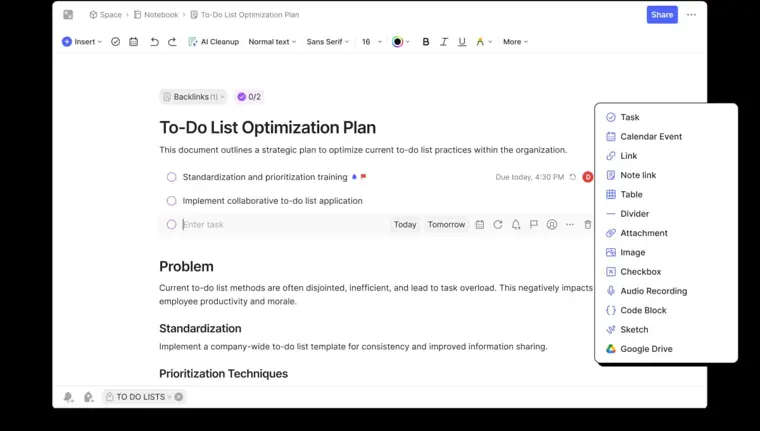
Tasks
Embeds to do lists directly inside notes, allowing you to establish due dates, recurring cadences, reminders, and task assignments.
Use caseA meeting leader walks out of an update session and delegates to dos on the fly to team members.
From evernote.com/en-us/features/notes-app · image from Evernote -
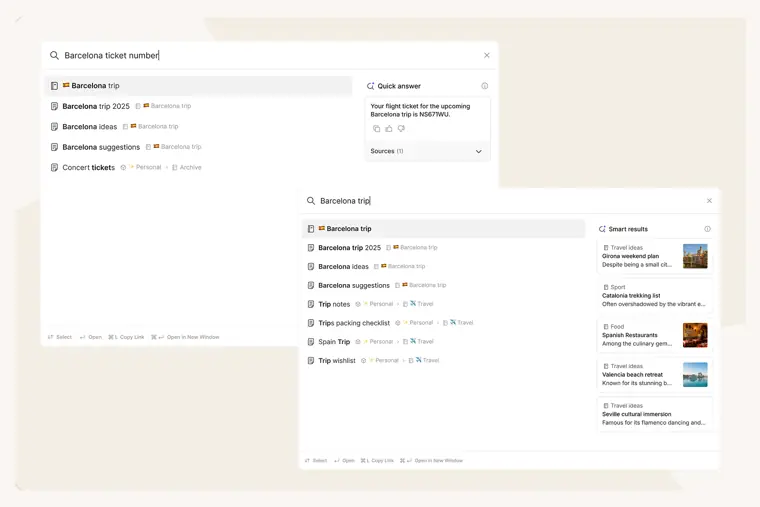
AI powered search
Locates notes and filters content using conversational natural language questions and provides direct answers.
Use caseA team member asks a natural language question to filter account notes and pull up information in seconds without complex operators.
From evernote.com/en-us/features/search · image from Evernote -
Spaces and collaboration
Provides shared team environments for real time editing, commenting, and unified access to projects and updates.
Use caseA team shares and collaborates on blog posts, client information, expenses, and sales data in real time.
From evernote.com
Written from Evernote's own website, checked . Each feature links to the page it comes from; images are Evernote's own.
Every plan
| Plan | Monthly | Billed yearly | Per | What it includes |
|---|---|---|---|---|
| Free | Free | $0 | per user | 50 notes, 1 notebook, 1 device, 1GB |
| Starter | Not listed | $8.25 | per user | 1,000 notes, 20 notebooks, 3 devices, 5GB; $99/yr |
| Advanced | Not listed | $20.83 | per user | Unlimited notes/notebooks/devices/storage (safeguard limits); $249.96/yr |
| Flexible | $10 | Not listed | per seat | From 500 notes / 250MB per seat, scalable; 4+ devices per seat |
| Unlimited | Contact sales | Not listed | custom | contact sales |
From Evernote's own pricing page, checked . Prices are in US dollars per month; "billed yearly" is the monthly price when you pay for a year up front. A few figures (often the yearly price) are derived rather than printed on the page.
Before you pay
- Cancel online yourself
- Yes
What Evernote says
At the bottom of the Billing page, select Cancel subscription. Scroll to the bottom of the page and click Continue to cancel.
Source page - Renews automatically
- Yes
What Evernote says
that indicates that your subscription has been successfully canceled and won't renew.
Source page - Card needed for the trial
- Yes
What Evernote says
If you cancel before the trial ends, your credit card will not be charged
Source page - Data retention
- None of your data will be lost upon downgrading to Free, and you can still view, edit, export, and delete existing notes.
What Evernote says
None of your data will be lost, and you will retain access to all your notes and notebooks, even if you cancel your subscription and your account is downgraded to Free.
Source page - Export your data
- Yes (export notes and notebooks as PDFs)
- Discounts
- Eligible college students can receive 40% off a one year subscription to Evernote Advanced.
What Evernote says
Eligible college students can get 40% off a one year subscription to Evernote Advanced.
Source page - Support
- Help & Learning center, community forum, support ticket, dedicated Customer Success Manager (Enterprise), Priority Queue
What Evernote says
Help & Learning center Community forum File a support ticket Dedicated Customer Success Manager Priority Queue
Source page
Only what Evernote's own pages state, with the quote behind each answer. Anything they don't publish is left out rather than guessed.
Evernote video tutorials
Independent creators on YouTube, not Evernote or us. The video loads from YouTube only when you press play.
What the free plan includes
Free: 50 notes, 1 notebook, 5 spaces, 20 tags, 1 synced device, 1GB storage. Help center says AI Assistant is available to all Evernote v11 users with plan dependent monthly limits (free allowance not quantified); some third party sources say AI Assistant is not on Free.
Questions people ask about Evernote
How much does Evernote cost?
Paid plans start at $10 a month (Flexible). 5 plans are listed above, from Evernote's own pricing page.
Is Evernote free?
Yes, there is a free plan: Free: 50 notes, 1 notebook, 5 spaces, 20 tags, 1 synced device, 1GB storage. Help center says AI Assistant is available to all Evernote v11 users with plan dependent monthly limits (free allowance not quantified); some third party sources say AI Assistant is not on Free..
How do I cancel Evernote?
You can cancel online yourself, without contacting support. Source
Do I need a credit card to try Evernote?
Yes, a card is required to start the trial. Source
Does Evernote have a student or other discount?
Eligible college students can receive 40% off a one year subscription to Evernote Advanced. Source
Does Evernote have an API?
Yes.
How long is the free trial for paid plans?
Unless otherwise specified, free trials last for 7 days, and your credit card will not be charged if cancelled prior to the end. Source
Do you offer a student discount?
Eligible college students can get 40% off a one year subscription to Evernote Advanced. Source
Is there a free trial of Evernote Enterprise?
Enterprise can be tried for free for 14 days. Source
I have an Evernote account. How do I upgrade to the Enterprise plan?
Users must contact sales to upgrade to the Enterprise plan. Source
Works with
- Integrations
- Google (Gmail, Drive, Calendar), Microsoft Outlook (Email, Calendar), Slack, Claude, ChatGPT
Where this came from
Plans, prices and limits were copied from Evernote's own pages and the other sources listed, then checked .
- evernote.com/compare-plans
- evernote.com/pricing
- help.evernote.com/hc/en-us/articles/46317642175763
- help.evernote.com/hc/en-us/articles/46319409880211-AI-Assistant
- help.evernote.com/hc/en-us/articles/45353174499475
- help.evernote.com/hc/en-us/articles/23565231682323-Understanding-Ev...
- pricingsaas.com/companies/evernote/diffs/2026Q1
- evernote.com/
- help.evernote.com/hc/en-us/articles/115005949208-How-to-cancel-your...
How we collect prices and rank tools · Is something wrong? Correct this listing
Others that do the same job
 Craftcraft.do
Beautifully designed docs and notes app with built in AI assistant, collaboration, and native apps everywhere.
- Green flag: Free plan
 Memget.mem.ai
AI first note app that auto organizes notes, tracks tasks, and lets you chat with everything you've saved.
- Green flag: Free plan
- Red flag: Credits reset monthly
 Saner.aisaner.ai
ADHD friendly AI assistant that unifies notes, email, calendar and tasks, with an assistant that searches everything.
- Green flag: Free plan
- Green flag: Cancel online
- Green flag: Doesn't train on your data
 Reflectreflect.app
Private, backlinked daily notes app now rebuilt as open source, local Markdown with bring your own key AI.
- Green flag: Free plan
 Akiflowakiflow.com
Consolidates tasks from all your apps into one inbox, then time blocks them on your calendar with an AI assistant.
- Red flag: Card needed for trial
 Asanaasana.com
Work management platform with AI Teammates and AI Studio that triage, route and automate team workflows.
- Green flag: Free plan
- Green flag: No card for trial