
Saner.ai
ADHD friendly AI assistant that unifies notes, email, calendar and tasks, with an assistant that searches everything.
Best for ADHD and busy professionals juggling notes and tasks
Used Saner.ai and liked it? Upvote it. One upvote per person. Upvotes come from visitors, not from us, and never change "Our ranking".
What it does
Saner.ai is an AI personal assistant designed for people with ADHD and busy professionals. Users input scattered notes, emails, calendar events, tasks, and files, and the software brings them together into one place. In return, users get auto generated daily plans, automatic organization, and conversational search across all their data.
Read more: 3 features and how people use themShow less
-
Automatic daily planning
Scans your connected notes, emails, calendar, and task lists every morning to construct an organized schedule for the day. Marks high priority items and adds blocks for meetings, breaks, and focused work.
Use caseAn entrepreneur begins the morning by reviewing an auto generated daily schedule that incorporates deep work blocks and priorities without organizing them by hand.
From saner.ai -
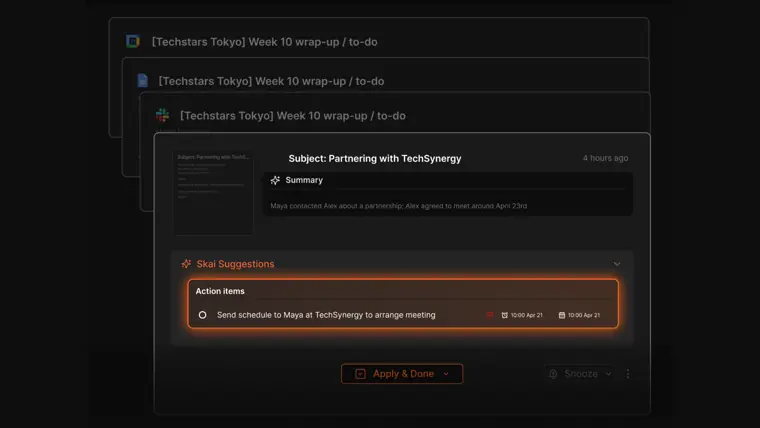
Automatic task capture
Detects actionable requests and to do items hidden inside incoming emails and written notes. Surfaces these actions and issues reminders so follow ups are completed on time.
Use caseAn information security manager relies on the system to flag follow up actions on incoming emails and identify tasks directly from meeting notes.
From saner.ai · image from Saner.ai -
App integrations and sync
Imports data continuously from external platforms such as Gmail, Google Calendar, Google Drive, and Slack into a central workspace. Keeps records aligned across everyday work channels.
Use caseA manager centralizes information by pulling records from Slack, Google Drive, and Gmail into a single timeline view.
From saner.ai
Written from Saner.ai's own website, checked . Each feature links to the page it comes from; images are Saner.ai's own.
Every plan
| Plan | Monthly | Billed yearly | Per | What it includes |
|---|---|---|---|---|
| Free | Free | Not listed | per user | 30 AI messages/mo; 100 notes; 100MB storage |
| Starter | $8 | Not listed | per user | 30 AI messages/day; 1,000 notes; 5GB storage |
| Standard | $16 | Not listed | per user | unlimited* AI messages (fair use); unlimited notes; 100GB storage; 100 AI requests/day |
From Saner.ai's own pricing page, checked . Prices are in US dollars per month; "billed yearly" is the monthly price when you pay for a year up front. A few figures (often the yearly price) are derived rather than printed on the page.
Before you pay
- How to cancel
- Users can cancel by navigating to Settings, selecting Subscription plan, and clicking Manage subscription.
What Saner.ai says
You can cancel your plan by going to Saner.ai app -> Settings -> Subscription plan -> Manage subscription
Source page - Cancel online yourself
- Yes
What Saner.ai says
Just sign in to your account, go to Subscription Plan, select Manage, and cancel it.
Source page - Trains on your data
- No
What Saner.ai says
At Saner.AI, we prioritize the security and privacy of your data. We do not train, sell, or share your data
Source page - Export your data
- Yes
What Saner.ai says
We have daily backup for your data, prioritize data security, and offer export option for all your notes
Source page - GDPR
- Yes
What Saner.ai says
This information is optional and securely stored in compliance with GDPR.
Source page - Discounts
- Student program available via application link, plus early adopter discounts during the beta phase.
What Saner.ai says
Do you have Student Program? Yes, you can read [here](https://tally.so/r/nGzOVj)
Source page
Only what Saner.ai's own pages state, with the quote behind each answer. Anything they don't publish is left out rather than guessed.
Getting started with Saner.ai
- Connect your information sources such as notes, files, Google Drive, Calendar, or Slack.
- Search and synthesize insights across your documents using the Ask AI screen.
- Convert an AI chat message or whole conversation into a note by clicking Create a note.
- Continue refining your notes alongside AI and internet search directly on one screen.
- Click Open similar notes in the side panel to view related notes and connect ideas.
Written from Saner.ai's own help pages: saner.ai/blogs/how-to-use-saner-ai-the-ai-assistant
Saner.ai video tutorials
Independent creators on YouTube, not Saner.ai or us. The video loads from YouTube only when you press play.
What the free plan includes
Free: 30 AI messages and 30 AI requests per month, 100 notes, 1MB file limit, 100MB storage, plus a one time 50 AI request trial bonus. External models (GPT, Claude, Gemini) are pay as you go or bring your own key on all plans.
Questions people ask about Saner.ai
How much does Saner.ai cost?
Paid plans start at $8 a month (Starter). 3 plans are listed above, from Saner.ai's own pricing page.
Is Saner.ai free?
Yes, there is a free plan: Free: 30 AI messages and 30 AI requests per month, 100 notes, 1MB file limit, 100MB storage, plus a one time 50 AI request trial bonus. External models (GPT, Claude, Gemini) are pay as you go or bring your own key on all plans..
How do I cancel Saner.ai?
Users can cancel by navigating to Settings, selecting Subscription plan, and clicking Manage subscription. Source
Does Saner.ai train its AI on my data?
No, the company says your data is not used for training. Source
Does Saner.ai have a student or other discount?
Student program available via application link, plus early adopter discounts during the beta phase. Source
Does my subscription automatically charge each month?
Yes, subscriptions are automatically charged each month. Source
How do I cancel my paid plan?
You can cancel your plan by navigating to Saner.ai app -> Settings -> Subscription plan -> Manage subscription. Source
Is the price of External AI included in the package price?
No, External AI usage is not included; users can pay under a pay as you go model or provide their own API key. Source
What happens when I change plans?
Upgrades charge immediately with a prorated reduction for the remaining billing cycle, while downgrades take effect at the end of the billing cycle. Source
Works with
- Integrations
- Google Drive, Email, Slack, Calendar, Notion, Evernote, Apple Notes, Obsidian
- AI models
- Skai, GPT, Claude, Gemini
Where this came from
Plans, prices and limits were copied from Saner.ai's own pages and the other sources listed, then checked .
- saner.ai/pricing
- saner.ai
- eesel.ai/blog/saner-ai-pricing
- saner.ai/
- saner.ai/blogs/how-to-use-saner-ai-the-ai-assistant
- saner.ai/privacy-policy
How we collect prices and rank tools · Is something wrong? Correct this listing
Others that do the same job
 Craftcraft.do
Beautifully designed docs and notes app with built in AI assistant, collaboration, and native apps everywhere.
- Green flag: Free plan
 Evernoteevernote.com
Veteran note taking app with web clipping, tasks and newly added AI assistant, semantic search and transcription.
- Green flag: Free plan
- Green flag: Cancel online
- Red flag: Card needed for trial
 Memget.mem.ai
AI first note app that auto organizes notes, tracks tasks, and lets you chat with everything you've saved.
- Green flag: Free plan
- Red flag: Credits reset monthly
 Reflectreflect.app
Private, backlinked daily notes app now rebuilt as open source, local Markdown with bring your own key AI.
- Green flag: Free plan
 Akiflowakiflow.com
Consolidates tasks from all your apps into one inbox, then time blocks them on your calendar with an AI assistant.
- Red flag: Card needed for trial
 Asanaasana.com
Work management platform with AI Teammates and AI Studio that triage, route and automate team workflows.
- Green flag: Free plan
- Green flag: No card for trial