
Reflect
Private, backlinked daily notes app now rebuilt as open source, local Markdown with bring your own key AI.
Best for Privacy minded Mac users who want networked notes
Used Reflect and liked it? Upvote it. One upvote per person. Upvotes come from visitors, not from us, and never change "Our ranking".
What it does
Reflect is an open source note taking app centered around daily notes and backlinks. You put in ideas, to do items, voice recordings, and web clips, and you get an interconnected second brain of easily searchable notes stored in plain Markdown files. It is designed for thinkers and knowledge workers wanting to organize their notes locally across their devices.
Read more: 6 features and how people use themShow less
-
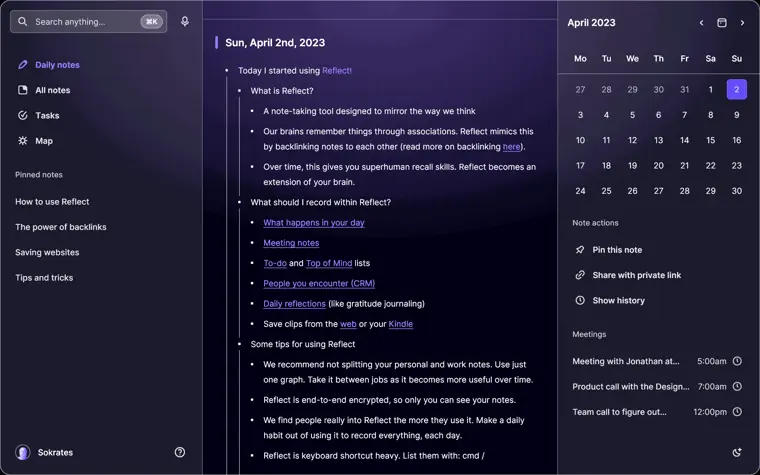
Backlinked notes
Connects related thoughts together by linking notes to one another. Forms a graph of associations that helps you index and search your ideas.
Use caseA thinker connects related concepts across multiple daily entries to reference them later.
From reflect.app · image from Reflect -
Local Markdown files
Stores all your notes locally inside a directory you select. Ensures notes tagged as private stay excluded from AI processing.
Use caseA user selects a folder on their Mac to ensure their notes remain stored locally.
From reflect.app -
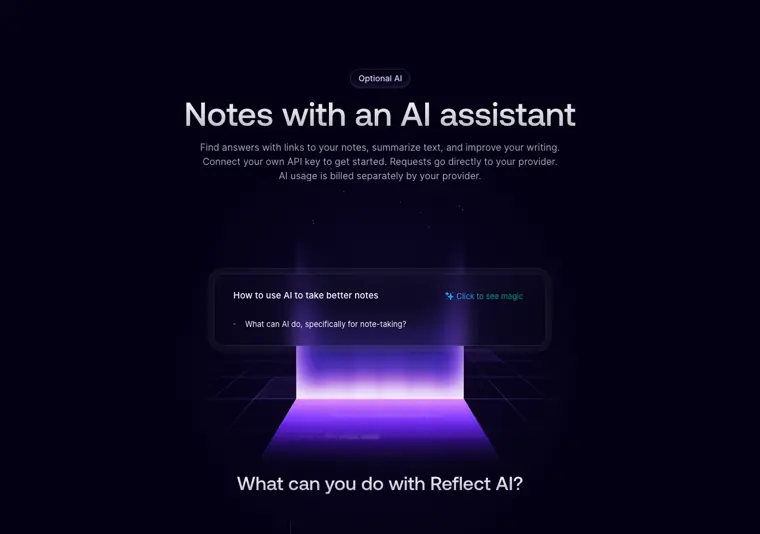
Optional AI assistant
Connects to your own API key to answer questions with citations, summarize entries, extract action items, and refine your writing. Sends requests straight to your provider without separate platform markups.
Use caseA knowledge worker asks their notes for answers with direct links back to the original source notes.
From reflect.app · image from Reflect -
Voice transcription
Transcribes recorded audio memos into text using your chosen transcription service provider.
Use caseA user records an audio memo on the go to capture spoken thoughts directly into their notes.
From reflect.app -
Device sync
Synchronizes notes across Mac, iPhone, and iPad. Lets you pick between iCloud Drive or Git to manage file replication.
Use caseA knowledge worker writes entries on an iPad and reads them updated on a Mac using iCloud Drive or Git.
From reflect.app -
Web and content capture
Saves links, selected text, and screenshots directly using a desktop browser extension. Preserves the original source URL alongside your saved content.
Use caseA researcher clips excerpts and webpage links while reading in a browser on Mac.
From reflect.app
Written from Reflect's own website, checked . Each feature links to the page it comes from; images are Reflect's own.
Every plan
| Plan | Monthly | Billed yearly | Per | What it includes |
|---|---|---|---|---|
| Reflect Open (Mac) | Free | $0 | per user | Free on Mac, open source (MIT), no subscription; AI via your own API key |
| Reflect Pro (iPhone & iPad) | $9.99 | $8.25 | per user | $99/yr on US App Store; local prices vary |
From Reflect's own pricing page, checked . Prices are in US dollars per month; "billed yearly" is the monthly price when you pay for a year up front. Some of these figures came from third party reports and could not be confirmed on the official page.
Before you pay
- Export your data
- Yes (Markdown)
What Reflect says
In the current Reflect app, go to Settings → Graph → Export and choose Reflect Open.
Source page
Only what Reflect's own pages state, with the quote behind each answer. Anything they don't publish is left out rather than guessed.
What the free plan includes
Reflect Open (beta, July 2026) is free and MIT open source on Mac. AI is optional and requires your own OpenAI/
Questions people ask about Reflect
How much does Reflect cost?
Paid plans start at $9.99 a month (Reflect Pro (iPhone & iPad)). 2 plans are listed above, from Reflect's own pricing page.
Is Reflect free?
Yes, there is a free plan: Reflect Open (beta, July 2026) is free and MIT open source on Mac. AI is optional and requires your own OpenAI/Anthropic/Google/OpenRouter API key; the provider bills you directly. No AI is bundled..
What is the pricing model for Reflect Open?
It is free on Mac without a subscription, and requires a paid subscription on iPhone and iPad. Source
How does AI usage billing work?
AI usage requires your own API key and is billed separately directly by your AI provider. Source
What happens to the existing Reflect app?
It will remain available and continue to be maintained with bug fixes. Source
Works with
- Integrations
- iCloud Drive, Git, GitHub, Apple Calendar, Apple Contacts, Chrome
- AI models
- OpenAI, Anthropic, Google, OpenRouter
Where this came from
Plans, prices and limits were copied from Reflect's own pages and the other sources listed, then checked .
How we collect prices and rank tools · Is something wrong? Correct this listing
Others that do the same job
 Craftcraft.do
Beautifully designed docs and notes app with built in AI assistant, collaboration, and native apps everywhere.
- Green flag: Free plan
 Evernoteevernote.com
Veteran note taking app with web clipping, tasks and newly added AI assistant, semantic search and transcription.
- Green flag: Free plan
- Green flag: Cancel online
- Red flag: Card needed for trial
 Memget.mem.ai
AI first note app that auto organizes notes, tracks tasks, and lets you chat with everything you've saved.
- Green flag: Free plan
- Red flag: Credits reset monthly
 Saner.aisaner.ai
ADHD friendly AI assistant that unifies notes, email, calendar and tasks, with an assistant that searches everything.
- Green flag: Free plan
- Green flag: Cancel online
- Green flag: Doesn't train on your data
 Akiflowakiflow.com
Consolidates tasks from all your apps into one inbox, then time blocks them on your calendar with an AI assistant.
- Red flag: Card needed for trial
 Asanaasana.com
Work management platform with AI Teammates and AI Studio that triage, route and automate team workflows.
- Green flag: Free plan
- Green flag: No card for trial