
Krisp (AI Note Taker)
Bot free meeting assistant combining noise cancellation, accent conversion, transcription and AI notes on any call app.
Best for Remote workers on noisy or varied call apps
Used Krisp and liked it? Upvote it. One upvote per person. Upvotes come from visitors, not from us, and never change "Our ranking".
What it does
Krisp is a voice AI app designed for individuals, teams, contact centers, and developers. It processes live spoken audio during calls and in person conversations to deliver cleaned sound alongside automated notes, transcripts, and action items. Users get noise cancellation, accent adjustment, and meeting documentation pushed directly to their business tools.
Read more: 4 features and how people use themShow less
-
AI noise cancellation
Eliminates unwanted background sounds, secondary voices, and room echo during calls in real time. Works directly through your audio setup without requiring specific call app configurations.
Use caseA remote worker eliminates the sound of barking dogs, crying babies, and keyboard clicks during a team conference call.
From krisp.ai -
AI accent conversion
Adjusts a speaker's or listener's accent in real time during live conversations. Helps maintain natural voice tone and emotion while making speech easier to understand.
Use caseA call center agent softens their accent so that customers understand every word clearly during a support call.
From krisp.ai/pricing -
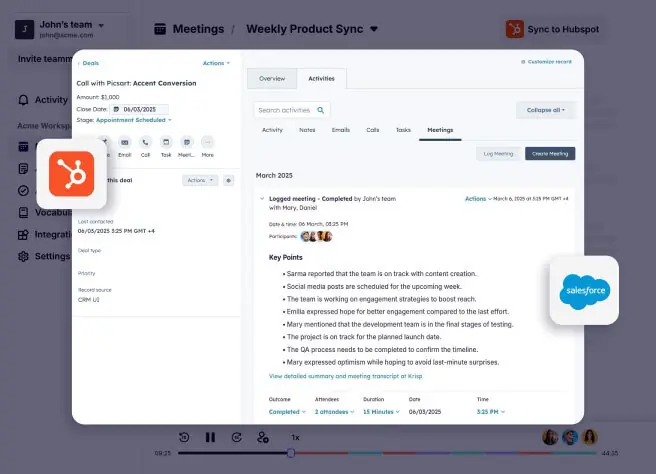
Sync to CRM
Transfers meeting notes, customer insights, and assigned action items automatically into external tools. Connects natively to platforms like Salesforce and HubSpot or through automated workflows.
Use caseA sales representative finishes a customer conversation and automatically sends call notes and follow up tasks into Salesforce.
From krisp.ai · image from Krisp -
In person meeting support
Captures and transcribes spoken conversations that happen away from conferencing software. Uses mobile and desktop apps to record physical sit down discussions and walk and talks.
Use caseA professional attends a face to face sit down discussion and records the meeting on a mobile device for transcription.
From krisp.ai
Written from Krisp's own website, checked . Each feature links to the page it comes from; images are Krisp's own.
Every plan
| Plan | Monthly | Billed yearly | Per | What it includes |
|---|---|---|---|---|
| Free Trial | Free | Not listed | per user | 7 days unlimited transcription and AI notes; no credit card |
| Core | $16 | $8 | per user | Unlimited AI note taker; 10 GB storage |
| Advanced | $30 | $15 | per user | Unlimited transcription and audio recording; 60 GB storage |
| Enterprise | Contact sales | Not listed | custom | contact sales; unlimited storage |
From Krisp (AI Note Taker)'s own pricing page, checked . Prices are in US dollars per month; "billed yearly" is the monthly price when you pay for a year up front. A few figures (often the yearly price) are derived rather than printed on the page.
Before you pay
- Card needed for the trial
- No
- HIPAA
- Yes
- SOC 2
- Yes
Only what Krisp's own pages state, with the quote behind each answer. Anything they don't publish is left out rather than guessed.
Getting started with Krisp
- Download and install Krisp.
- Select Krisp Microphone and Krisp Speaker in your conferencing app like Zoom, Meet, or Teams.
- Review notes, share transcripts, assign action items, and set priorities after the meeting.
Written from Krisp's own help pages: krisp.ai/ai-note-taker/
Krisp video tutorials
Independent creators on YouTube, not Krisp or us. The video loads from YouTube only when you press play.
The free trial
Trial only: 7 day free trial, no card; unlimited transcription, noise cancellation, recording and AI notes during trial
Questions people ask about Krisp
How much does Krisp cost?
Paid plans start at $16 a month (Core). 4 plans are listed above, from Krisp's own pricing page.
Is Krisp free?
There is a free trial but no free plan: 7 day free trial, no card; unlimited transcription, noise cancellation, recording and AI notes during trial.
Is Krisp HIPAA compliant?
Yes. Source
Do I need a credit card to try Krisp?
No, you can start without a credit card. Source
Does Krisp have an API?
Yes.
Works with
- Integrations
- Salesforce, HubSpot, Slack, ConnectWise, Claude, ChatGPT, Cursor, Zoom, Google Meet, Microsoft Teams
- AI models
- Claude, ChatGPT, Cursor
- Languages
- 17+ languages (transcription), 16 languages (summaries), 60+ languages (voice translation)
Where this came from
Plans, prices and limits were copied from Krisp (AI Note Taker)'s own pages and the other sources listed, then checked .
- krisp.ai/pricing/
- krisp.ai/ai-note-taker/
- krisp.ai/
- krisp.ai/noise-cancellation/
- krisp.ai/contact-center/noise-cancellation/
- help.krisp.ai/hc/en-us
- krisp.ai/developers/voice-translation-api/
- krisp.ai/vt-comparison/
- krisp.ai/integrations/
How we collect prices and rank tools · Is something wrong? Correct this listing
Others that do the same job
 tl;dvtldv.io
Meeting recorder and AI notetaker for Zoom, Meet and Teams with multi meeting insights and CRM automation.
- Green flag: Free plan
- Green flag: Doesn't train on your data
 Bluedotbluedothq.com
Bot free AI notetaker recording via Chrome extension or desktop app, with summaries in 100+ languages.
- Green flag: Free plan
- Green flag: Cancel online
- Green flag: Doesn't train on your data
- Red flag: No refunds
 Fathomfathom.ai
Free forever AI notetaker that records Zoom, Meet and Teams calls and auto generates summaries and CRM notes.
- Green flag: Free plan
 Fireflies.aifireflies.ai
AI notetaker that records, transcribes and summarizes meetings across platforms, with search, analytics and integrations.
- Green flag: Free plan
- Green flag: Doesn't train on your data
- Red flag: Credits reset monthly
 MeetGeekmeetgeek.ai
AI meeting assistant that records, transcribes and summarizes calls, with team analytics and CRM automations.
- Green flag: Free plan
 Otter.aiotter.ai
Real time meeting transcription and AI summaries, with an auto joining notetaker and a bot free desktop app.
- Green flag: Free plan
- Red flag: Credits reset monthly
- Red flag: No refunds