
Morgen
Unified calendar and task hub with an AI Planner that time blocks your day across every calendar provider.
Best for People juggling multiple calendars including iCloud
Used Morgen and liked it? Upvote it. One upvote per person. Upvotes come from visitors, not from us, and never change "Our ranking".
What it does
Morgen is a daily planner that consolidates your to dos, events, and projects into a single app. Users connect their task managers and calendars to receive automated planning recommendations and schedule dedicated focus blocks. It is designed for individual professionals and teams wanting to manage their schedule across multiple tools.
Read more: 5 features and how people use themShow less
-
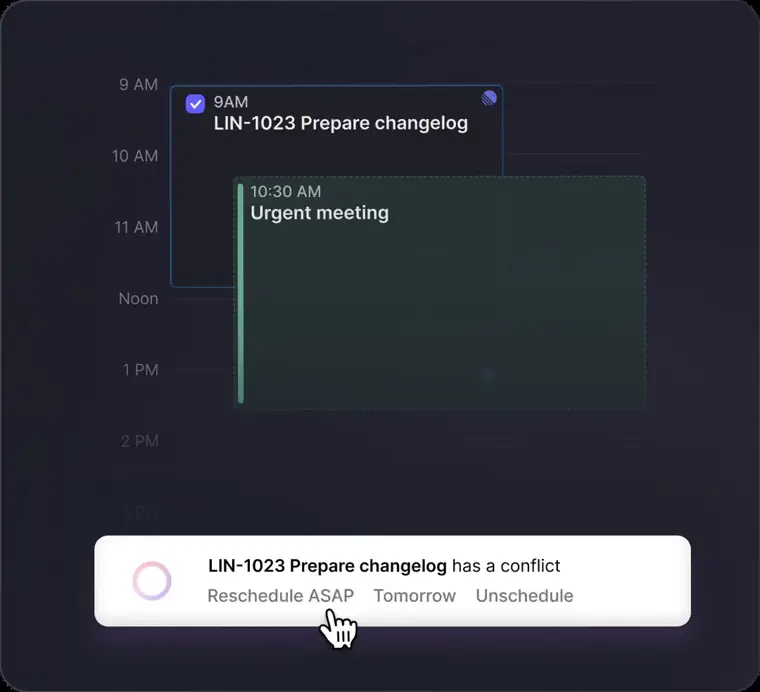
AI Planner time blocking
Generates live schedule recommendations on your calendar guided by ideal week templates and adapts automatically when conflicts occur. It evaluates your capacity and reprioritizes your tasks to prevent missed deadlines.
Use caseA team member reprioritizes their planned work sessions after a surprise meeting conflicts with their schedule.
From morgen.so · image from Morgen -
Multi calendar unification
Brings together accounts from Google, Outlook, Apple, Fastmail, and CalDAV into a unified desktop and mobile interface. It lets users view schedules together, manage subsets with custom shortcuts, and prevent double bookings across accounts.
Use caseA business owner connects three business calendars and a personal family schedule into one view to keep track of all commitments.
From morgen.so -
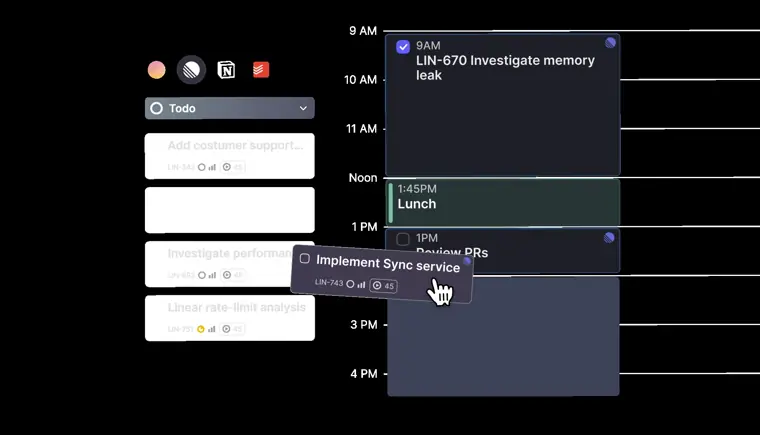
Task integrations
Imports to dos directly from third party tools like Notion, Linear, ClickUp, and Todoist to be scheduled directly into your calendar. It synchronizes task completion states and due dates back to the original platforms.
Use caseA project manager drags assigned tasks out of Notion and drops them directly into calendar focus blocks to set their daily agenda.
From morgen.so · image from Morgen -
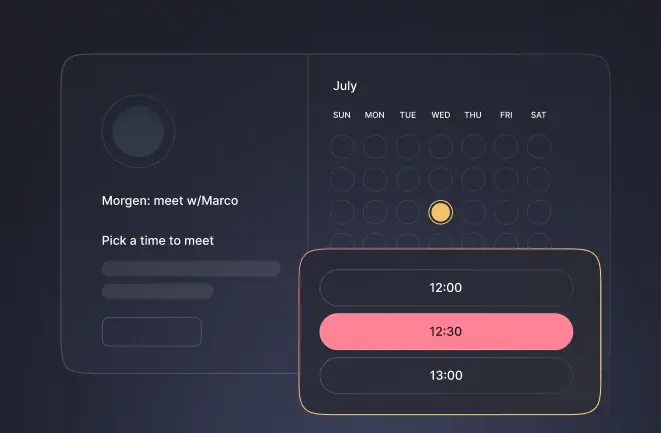
Built in scheduling links
Creates personalized booking pages and open invites that verify availability in real time across multiple calendars. It supports team scheduling by checking availability across multiple cohosts before offering times.
Use caseA consultant sends a personalized booking link to a client so they can book an open slot verified against both work and personal calendars.
From morgen.so · image from Morgen -
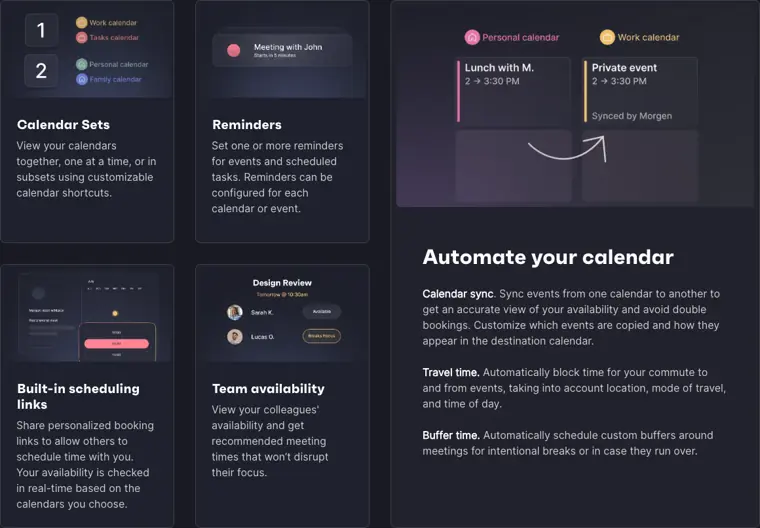
Calendar automations
Automates routine scheduling needs by duplicating events between calendars and blocking intentional padding. It automatically adds buffer times around meetings and reserves transit time based on location and time of day.
Use caseAn employee adds custom buffer periods around customer calls to ensure meetings do not run into each other.
From morgen.so · image from Morgen
Written from Morgen's own website, checked . Each feature links to the page it comes from; images are Morgen's own.
Every plan
| Plan | Monthly | Billed yearly | Per | What it includes |
|---|---|---|---|---|
| Pro | $30 | $15 | per user | AI Planner, unlimited calendar/task integrations, booking links; 14 day trial, no card |
| Team | $25 | $10 | per seat, 2 seat min | Same core features as Pro |
From Morgen's own pricing page, checked . Prices are in US dollars per month; "billed yearly" is the monthly price when you pay for a year up front. A few figures (often the yearly price) are derived rather than printed on the page.
Before you pay
- Refunds
- A full refund is provided within the first 30 days of signing up upon email request.
What Morgen says
We'll be happy to refund the full amount (not pro rated) within your first 30 days of signing up to Morgen.
Source page - Refund window
- 30 days
- How to cancel
- Subscribers can cancel or downgrade using in service functionalities or by contacting the company.
What Morgen says
You can cancel your account or downgrade to a free plan (if available) at any time by either contacting us or using the corresponding functionalities within the Services.
Source page - Card needed for the trial
- No
- Trains on your data
- No
What Morgen says
We do not permit these AI service providers to use AI Chat Data to train or improve their general purpose models
Source page - Data retention
- Content may be deleted permanently from systems 60 days after cancellation.
What Morgen says
We reserve the right to delete permanently all content from our systems after 60 days from the cancellation.
Source page - Export your data
- Yes
What Morgen says
If you want to export any data before your account is cancelled, please contact us.
Source page - GDPR
- Yes
- Discounts
- 25% discount for students, academics, and nonprofits, plus 15% discount for 1 year when switching from competitors.
What Morgen says
Morgen offers 25% discounts to non profits, students, and those working in education. We also offer 15% discounts to those switching to Morgen from one of our competitors.
Source page - Support
- Email, in app chat, community (Discord)
What Morgen says
1. In app: Click on the ? icon in the lower left of your Morgen desktop app > select Contact Morgen Support. 2. By email: Send us an email to connect@morgen.so. 3. Join Discord
Source page
Only what Morgen's own pages state, with the quote behind each answer. Anything they don't publish is left out rather than guessed.
Getting started with Morgen
- Download Morgen for Windows, Linux, or macOS as a desktop app, or access it in your browser at web.morgen.so.
- Launch Morgen on your PC to open the Setup Assistant.
- Connect your calendar accounts and any optional integrations like video conferencing and task management apps through the assistant.
- Click on the profile avatar icon in the bottom left corner and select Explore Morgen to learn more about the app's capabilities.
Tips
- Download Morgen on your desktop or laptop first if you signed up from mobile, as the mobile app is available only after desktop setup.
- Connecting an iCloud calendar may require setting up an App Specific Password.
- Use the Morgen desktop app rather than the web app to access all features, including system wide shortcuts, quick launch, and local task integrations.
Written from Morgen's own help pages: morgen.so/guides/getting-started-with-morgen · morgen.so/guides/get-started-with-morgen-v4
Morgen video tutorials
Independent creators on YouTube, not Morgen or us. The video loads from YouTube only when you press play.
The free trial
Trial only: No free plan listed. 14 day full access trial, no credit card; 30 day money back guarantee.
Questions people ask about Morgen
How much does Morgen cost?
Paid plans start at $25 a month (Team). 2 plans are listed above, from Morgen's own pricing page.
Is Morgen free?
There is a free trial but no free plan: No free plan listed. 14 day full access trial, no credit card; 30 day money back guarantee..
Can I get a refund from Morgen?
A full refund is provided within the first 30 days of signing up upon email request. The refund window stated is 30 days. Source
How do I cancel Morgen?
Subscribers can cancel or downgrade using in service functionalities or by contacting the company. Source
Does Morgen train its AI on my data?
No, the company says your data is not used for training. Source
Do I need a credit card to try Morgen?
No, you can start without a credit card. Source
Does Morgen have a student or other discount?
25% discount for students, academics, and nonprofits, plus 15% discount for 1 year when switching from competitors. Source
Does Morgen have an API?
Yes.
How do I change my subscription from a monthly to an annual plan?
You can visit your billing page to change plans, and if switched mid cycle, the annual subscription is discounted pro rated. Source
What is your refund policy?
You can email connect@morgen.so for a full, non prorated refund within the first 30 days of signing up. Source
What are your accepted payment methods?
Morgen accepts cards, Apple Pay, and PayPal, with processing handled via Paddle. Source
Works with
- AI models
- OpenAI, Anthropic, Google
Where this came from
Plans, prices and limits were copied from Morgen's own pages and the other sources listed, then checked .
- morgen.so/pricing
- platform.morgen.so/developers-api
- security-profiles.nudgesecurity.com/app/morgen-so
- morgen.so/
- web.morgen.so/
- morgen.so/guides
- morgen.so/refund
- morgen.so/privacy
- morgen.so/faq
- morgen.so/terms-conditions
- morgen.so/integrations
How we collect prices and rank tools · Is something wrong? Correct this listing
Others that do the same job
 Reclaim.aireclaim.ai
AI calendar assistant that defends focus time, habits and tasks by auto scheduling them around your meetings.
- Green flag: Free plan
- Green flag: Doesn't train on your data
 Motionusemotion.com
All in one AI work platform that auto plans tasks and projects into your calendar and reshuffles as priorities change.
- Green flag: Cancel online
- Green flag: Doesn't train on your data
 SkedPalskedpal.com
Turns a nested to do list into an auto generated, time blocked schedule using time maps and priorities.
- Green flag: No card for trial
 Akiflowakiflow.com
Consolidates tasks from all your apps into one inbox, then time blocks them on your calendar with an AI assistant.
- Red flag: Card needed for trial
 Asanaasana.com
Work management platform with AI Teammates and AI Studio that triage, route and automate team workflows.
- Green flag: Free plan
- Green flag: No card for trial
 ChatGPTchatgpt.com
OpenAI's general purpose AI assistant for writing, research, coding, images, voice and agentic tasks.
- Green flag: Free plan