
Reclaim.ai
AI calendar assistant that defends focus time, habits and tasks by auto scheduling them around your meetings.
Best for Busy professionals protecting focus time in Google/Outlook
Used Reclaim.ai and liked it? Upvote it. One upvote per person. Upvotes come from visitors, not from us, and never change "Our ranking".
What it does
Reclaim.ai is an AI calendar application designed for individuals and teams looking to optimize their schedules. Users connect their existing calendars and input their work goals, tasks, and scheduling preferences. The software automatically defends deep work, reschedules priorities around conflicts, and manages meeting availability.
Read more: 3 features and how people use themShow less
-
Focus Time defense
Protects uninterrupted blocks on your schedule for deep work and adjusts sessions automatically as meetings or priorities shift.
Use caseA product team member protects extended blocks of calendar time for writing and research synthesis without getting interrupted by meetings.
From reclaim.ai/features/focus-time -
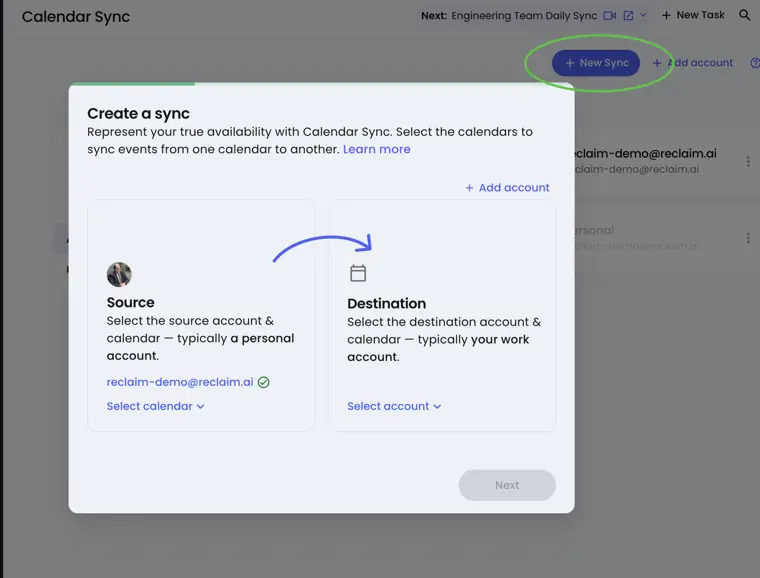
Calendar Sync
Mirrors availability and events across multiple personal and professional schedules to stop double booking.
Use caseA cofounder syncs multiple calendars to ensure external bookings do not conflict with private schedules or other commitments.
From reclaim.ai/pricing · image from Reclaim.ai -
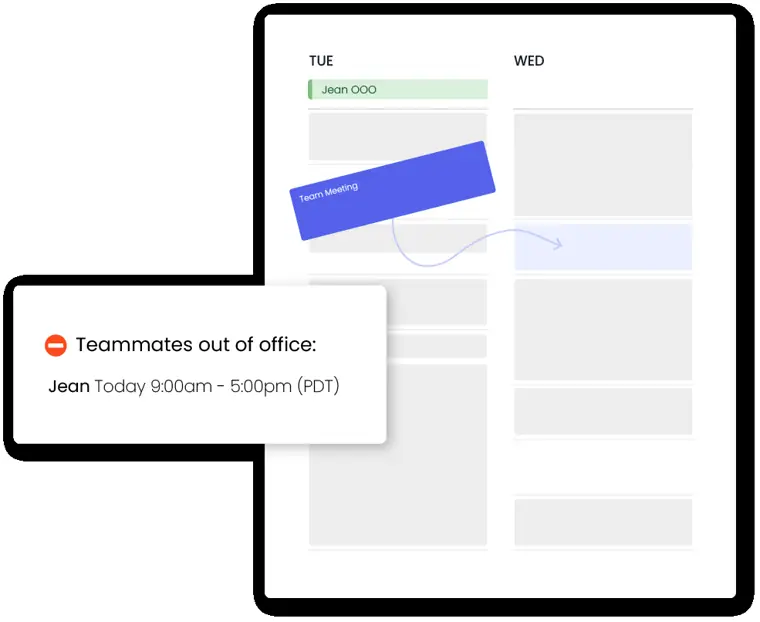
Team out of office calendar
Aggregates employee paid time off onto a shared view and moves conflicting tasks and meetings automatically.
Use caseA team coordinator tracks member absences to reorganize workload capacity and avoid meeting handoff errors during team vacations.
From reclaim.ai · image from Reclaim.ai
Written from Reclaim.ai's own website, checked . Each feature links to the page it comes from; images are Reclaim.ai's own.
Every plan
| Plan | Monthly | Billed yearly | Per | What it includes |
|---|---|---|---|---|
| Lite | Free | $0 | per user | 1 user, 5 AI agents, 1 week range, 1 calendar sync, 1 scheduling link |
| Starter | $12 | $10 | per seat | up to 10 seats, 10 agents/seat, 8 week range, 3 syncs, 3 links |
| Business | $18 | $15 | per seat | up to 100 seats, 100 agents/seat, 12 week range, unlimited syncs/links |
| Enterprise | Not listed | $22 | per seat | 100+ seats, SSO/SCIM; annual only |
From Reclaim.ai's own pricing page, checked . Prices are in US dollars per month; "billed yearly" is the monthly price when you pay for a year up front.
Before you pay
- Trains on your data
- No
- SOC 2
- Yes
What Reclaim.ai says
We're proud to share our SOC 2 Type II certification – with zero exceptions.
Source page - GDPR
- Yes
- Discounts
- Education: 50% discount off any plan for up to 12 months for students, educators, and school administrators (excluding Enterprise). Nonprofit: 20% discount off any plan for 3 years for qualified 501(c)3 nonprofits (excluding Enterprise). Also offers an annual billing discount (save 20%).
What Reclaim.ai says
Reclaim offers a 50% discount off of any Reclaim plan for up to 12 months to educators, students, and school administrators.
Source page - Support
- Email, live chat, help center
What Reclaim.ai says
Send us a message via live chat in the app, help docs, or on our website. This is the best way to reach us during support hours. Reach out to us anytime at support@reclaim.ai
Source page
Only what Reclaim.ai's own pages state, with the quote behind each answer. Anything they don't publish is left out rather than guessed.
Getting started with Reclaim.ai
- Connect your primary Google Calendar or Outlook Calendar and adjust your Settings → Hours to define working, meeting, and personal hours.
- Open Reclaim Chat to the right side of your calendar in the Planner to ask questions or request scheduling changes using natural language.
- Open Agents in the far right menu and click 'Add' to browse and set up options like Focus Time, Habits, Buffers, Smart Meetings, and Meeting Quality.
- Create and customize AI powered Scheduling Links from the Scheduling tab in Reclaim to share availability and book meetings.
- Visit Settings → Integrations to connect your external tools and AI applications.
- Bring your task list into Reclaim by connecting supported task management tools or creating tasks directly through Reclaim Chat.
- Review your Insights tab to understand workload patterns and see how your time is being spent across meetings and Focus Time.
Tips
- Sign up with your primary work calendar, or whichever calendar you use for the majority of your weekly scheduling.
- Review staged calendar updates in Preview Mode before applying them so you can verify changes before anything goes live.
- Ask Reclaim Chat product and help questions to get explanations of features, workflows, and settings directly inside the Planner.
Written from Reclaim.ai's own help pages: help.reclaim.ai/en/articles/14846468-how-to-g...
Reclaim.ai video tutorials
Independent creators on YouTube, not Reclaim.ai or us. The video loads from YouTube only when you press play.
What the free plan includes
Lite: 1 user, 1 week scheduling range, 1 calendar sync, 1 scheduling link, 5 AI agents, 2 connected calendars, limited integrations (Google Tasks, Slack, Zoom, Google Meet)
Questions people ask about Reclaim.ai
How much does Reclaim.ai cost?
Paid plans start at $12 a month (Starter). 4 plans are listed above, from Reclaim.ai's own pricing page.
Is Reclaim.ai free?
Yes, there is a free plan: Lite: 1 user, 1 week scheduling range, 1 calendar sync, 1 scheduling link, 5 AI agents, 2 connected calendars, limited integrations (Google Tasks, Slack, Zoom, Google Meet).
Does Reclaim.ai train its AI on my data?
No, the company says your data is not used for training. Source
Does Reclaim.ai have a student or other discount?
Education: 50% discount off any plan for up to 12 months for students, educators, and school administrators (excluding Enterprise). Nonprofit: 20% discount off any plan for 3 years for qualified 501(c)3 nonprofits (excluding Enterprise). Also offers an annual billing discount (save 20%). Source
What is the education discount offered by Reclaim?
Reclaim offers a 50% discount off of any Reclaim plan for up to 12 months to educators, students, and school administrators, applicable to monthly or annual plans (excluding Enterprise). Source
What discount is available for nonprofits?
Qualified 501(c)3 nonprofits can receive a 20% discount for 3 years on month to month or annual plans (excluding Enterprise). Source
What are Reclaim's support hours?
Support is available Monday through Friday from 7am to 5pm Pacific Time. Source
Works with
- Integrations
- Slack, Zoom, ClickUp, Jira, Google Calendar, Todoist, Asana, Linear, Outlook Calendar, Google Tasks
Where this came from
Plans, prices and limits were copied from Reclaim.ai's own pages and the other sources listed, then checked .
- reclaim.ai/pricing
- updates.reclaim.ai/announcements/reclaim-is-soc-2-type-ii-approved
- reclaim.ai/
- help.reclaim.ai/en/collections/7804405-security-and-compliance
- help.reclaim.ai/en/articles/5341864-how-do-i-contact-support
- help.reclaim.ai/en/
- help.reclaim.ai/en/articles/6060348-time-blocking-customization-on-...
- help.reclaim.ai/en/articles/6211178-education-discount-at-reclaim-ai
- help.reclaim.ai/en/articles/6211177-nonprofit-discount-at-reclaim-ai
How we collect prices and rank tools · Is something wrong? Correct this listing
Others that do the same job
 Motionusemotion.com
All in one AI work platform that auto plans tasks and projects into your calendar and reshuffles as priorities change.
- Green flag: Cancel online
- Green flag: Doesn't train on your data
 Morgenmorgen.so
Unified calendar and task hub with an AI Planner that time blocks your day across every calendar provider.
- Green flag: No card for trial
- Green flag: Refunds within 30 days
- Green flag: Doesn't train on your data
 SkedPalskedpal.com
Turns a nested to do list into an auto generated, time blocked schedule using time maps and priorities.
- Green flag: No card for trial
 Akiflowakiflow.com
Consolidates tasks from all your apps into one inbox, then time blocks them on your calendar with an AI assistant.
- Red flag: Card needed for trial
 Asanaasana.com
Work management platform with AI Teammates and AI Studio that triage, route and automate team workflows.
- Green flag: Free plan
- Green flag: No card for trial
 ChatGPTchatgpt.com
OpenAI's general purpose AI assistant for writing, research, coding, images, voice and agentic tasks.
- Green flag: Free plan