
Taskade
AI workspace where custom agents generate projects, run automations and build mini apps from prompts.
Best for Small teams wanting AI agents and automations cheaply
What it does
Taskade is a workspace platform designed for individuals and teams to build custom tools and run automated operations. You provide text prompts, files, and integrated web data, and Taskade creates applications, automations, and collaborating software agents. It is built for creators, consultants, developers, and organizations looking to coordinate workflows and manage projects without traditional coding.
Read more: 5 features and how people use themShow less
-
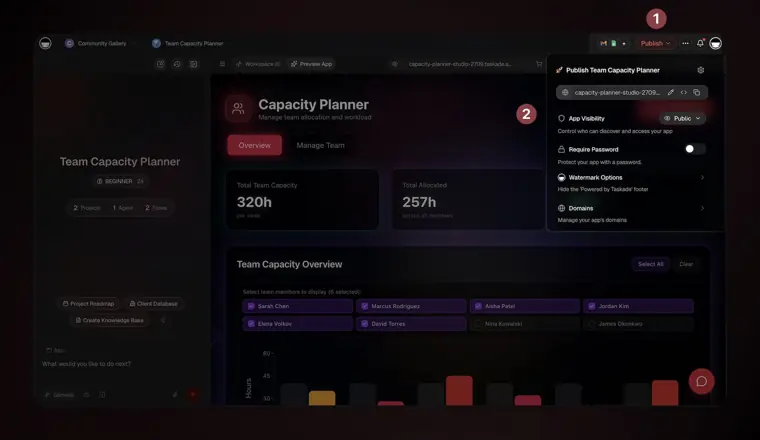
Taskade Genesis app builder
Generates complete web applications, portals, forms, and tracking dashboards directly from text prompts. Provides built in hosting and privacy options so you can run tools internally or publish them.
Use caseA business owner creates a custom inventory management system that tracks stock and updates workflows.
From taskade.com/pricing · image from Taskade -
Custom AI agents
Executes background tasks, answers questions, and coordinates actions by following assigned skills and tools. Runs continuously to monitor inboxes, handle leads, and update project dashboards.
Use caseA nonprofit director uses agents to manage volunteer lists, monitor incoming donations, and coordinate upcoming events.
From taskade.com/pricing -
Agent knowledge training
Builds persistent memory for your workspace by indexing uploaded documents, spreadsheets, and web links. Allows autonomous agents to search, consult, and edit the exact materials you provide.
Use caseA consultant trains agents on internal client documents and spreadsheets to generate tailored advice.
From taskade.com/pricing -
Scheduled AI automations
Orchestrates multi step processes using branching, looping, filters, and scheduled recurring timers. Connects internal workspace agents to external platforms through webhooks and third party tools.
Use caseAn operations manager schedules recurring workflows that extract data, update team databases, and notify members.
From taskade.com/pricing -
Collaborative AI teams
Groups multiple specialized software agents together so they can share tasks and coordinate responses. Automatically selects the most qualified agent in the team to answer inquiries or execute complex jobs.
Use caseA marketing team queries an agent group where individual agents divide research, drafting, and proofreading tasks.
From taskade.com/pricing
Written from Taskade's own website, checked . Each feature links to the page it comes from; images are Taskade's own.
Every plan
| Plan | Monthly | Billed yearly | Per | What it includes |
|---|---|---|---|---|
| Free | Free | $0 | workspace, 2 users | 3 apps, 1 agent, 3 automations, 250MB, 0 monthly credits |
| Pro | $10 | Not listed | workspace, 10 users | Unlimited apps/agents; 1,000 automation runs/mo; 50K credits/mo; 100GB |
| Business | $25 | Not listed | workspace, unlimited users | 150K credits/mo; 1TB; custom domains; SSO; API |
| Max | $100 | Not listed | workspace, unlimited users | 400K credits/mo; autonomous agents |
| Enterprise | $250 | Not listed | workspace, unlimited users | 1.1M credits/mo; SCIM; BYOK; custom SLA |
From Taskade's own pricing page, checked . Prices are in US dollars per month; "billed yearly" is the monthly price when you pay for a year up front. A few figures (often the yearly price) are derived rather than printed on the page.
Before you pay
- How to cancel
- Subscribers can cancel their subscription in Settings under Plans.
What Taskade says
Cancel your subscription from the same page. Your plan stays active until the end of the billing period.
Source page - Cancel online yourself
- Yes
What Taskade says
Cancel your subscription from the same page. Your plan stays active until the end of the billing period.
Source page - Renews automatically
- Yes
What Taskade says
Your allowance renews automatically. Need more? Extra credit packs stack on top and never expire.
Source page - Unused credits roll over
- Partial
What Taskade says
Monthly Credits Included with an eligible plan and reset each billing cycle Extra Credits Purchased or earned credits that do not expire
Source page - Watermark on the free plan
- Yes
What Taskade says
Remove the "Powered by Taskade" watermark from your published apps for a clean, professional client facing finish.
Source page - Trains on your data
- No
What Taskade says
Zero Training Policy : We contractually prohibit AI providers from using your data to train general AI models.
Source page - Export your data
- Yes
What Taskade says
we log account and workspace activity, monitor security events, and can export workspace activity for you.
Source page - SOC 2
- No
What Taskade says
An independent SOC 2 audit is part of the program and is not complete. We have no SOC 2 report to hand you yet
Source page - Support
- Email
What Taskade says
Vulnerability reports support@taskade.com; we fix what we confirm, and credit you by name on request.
Source page
Only what Taskade's own pages state, with the quote behind each answer. Anything they don't publish is left out rather than guessed.
Getting started with Taskade
- Sign up at taskade.com and create a workspace.
- Invite your team to collaborate in real time.
- Click "New Project" in your workspace and choose a template or start blank.
- Open any project and type "/" to access AI commands.
- Go to the Agents section to create a new agent and train it on your data.
- Go to the Automations section, pick a trigger, add actions, and enable the flow.
- Navigate to taskade.com/create, describe your app in plain English, and publish it.
Tips
- Attach reference material such as brand guides, CSVs, or requirement PDFs by clicking the paperclip icon before generating an app.
- Refine your app interface by describing one change at a time to Taskade EVE or by pointing directly at components using the Element Selector.
- Repair a broken preview during app creation with a single click using Fix with AI on the error card.
Written from Taskade's own help pages: taskade.com/learn/genesis/quickstart · taskade.com/learn/genesis/first-app · taskade.com/learn/genesis/overview
Taskade video tutorials
Independent creators on YouTube, not Taskade or us. The video loads from YouTube only when you press play.
What the free plan includes
2 users, 1 workspace, up to 3 apps, 1 AI agent, 250 MB knowledge base; AI credits start at 0 (earn or buy).
Questions people ask about Taskade
How much does Taskade cost?
Paid plans start at $10 a month (Pro). 5 plans are listed above, from Taskade's own pricing page.
Is Taskade free?
Yes, there is a free plan: 2 users, 1 workspace, up to 3 apps, 1 AI agent, 250 MB knowledge base; AI credits start at 0 (earn or buy)..
How do I cancel Taskade?
Subscribers can cancel their subscription in Settings under Plans. Source
Do unused Taskade credits roll over?
Partly: some unused credits carry over, with limits. Source
Does the Taskade free plan add a watermark?
Yes, free plan output carries a watermark or branding. Source
Does Taskade train its AI on my data?
No, the company says your data is not used for training. Source
Does Taskade have an API?
Yes.
What do I unlock when I upgrade to a paid plan?
Paid plans add more AI credits, higher storage, and advanced features like AI agents with a large built in toolkit, 100+ bidirectional automations, custom agent tools, and priority support. Source
Can I switch plans or billing cycles anytime?
Yes. You can upgrade, downgrade, or switch between monthly and annual billing at any time from Settings, then Plans. Source
How many seats does each plan include?
Free is built for individuals getting started, Pro includes up to 10 users for small teams, and Business adds unlimited seats for growing organizations. Source
Which credits does Taskade use first?
Taskade uses Monthly Credits first. When they run out, it uses Extra Credits, which do not expire. Source
Works with
- Integrations
- Slack, Gmail, Google Workspace, Microsoft 365, HubSpot, Salesforce, Stripe, GitHub, Google Drive, Dropbox
- AI models
- OpenAI GPT, DeepSeek, Qwen, Claude
Where this came from
Plans, prices and limits were copied from Taskade's own pages and the other sources listed, then checked .
- taskade.com/pricing
- taskade.com/learn/account/premium-plans
- aiproductivity.ai/pricing/taskade/
- taskade.com/learn/genesis/first-prompt
- taskade.com/upgrade/options?source=pricing_addons
- taskade.com/learn/genesis/model-credits
- taskade.com/security
- taskade.com/upgrade/options
How we collect prices and rank tools · Is something wrong? Correct this listing
Others that do the same job
 Todoisttodoist.com
Personal and team to do app where Ramble turns voice into tasks and Task Assist breaks goals into steps.
- Green flag: Free plan
- Green flag: Cancel online
- Green flag: Refunds within 30 days
 Trellotrello.com
Kanban boards where AI builds boards from goals, generates checklists, sets due dates and summarizes cards.
- Green flag: Free plan
 Akiflowakiflow.com
Consolidates tasks from all your apps into one inbox, then time blocks them on your calendar with an AI assistant.
- Red flag: Card needed for trial
 Asanaasana.com
Work management platform with AI Teammates and AI Studio that triage, route and automate team workflows.
- Green flag: Free plan
- Green flag: No card for trial
 ChatGPTchatgpt.com
OpenAI's general purpose AI assistant for writing, research, coding, images, voice and agentic tasks.
- Green flag: Free plan
 Claudeclaude.com
Anthropic's AI assistant for writing, analysis, coding and agentic work, including Claude Code and Cowork.
- Green flag: Free plan
- Green flag: Cancel online
- Green flag: Credits don't expire
- Green flag: Doesn't train on your data