
Trello
Kanban boards where AI builds boards from goals, generates checklists, sets due dates and summarizes cards.
Best for Simple visual task tracking for small teams
Used Trello and liked it? Upvote it. One upvote per person. Upvotes come from visitors, not from us, and never change "Our ranking".
What it does
Trello is a visual work management tool that organizes tasks and projects into boards, lists, and cards. You enter tasks, forward emails, or route chat messages into the platform to get organized workflows, tracked project roadmaps, and scheduled calendars. It is built for individuals and teams across disciplines such as product management, marketing, and engineering.
Read more: 5 features and how people use themShow less
-
Trello Inbox
Collects incoming tasks, ideas, and messages from places like email, Slack, and Microsoft Teams. It uses AI to convert forwarded messages into organized to dos with necessary links and summaries.
Use caseA team member forwards an email to their Trello Inbox to automatically transform it into a structured to do item.
From trello.com -
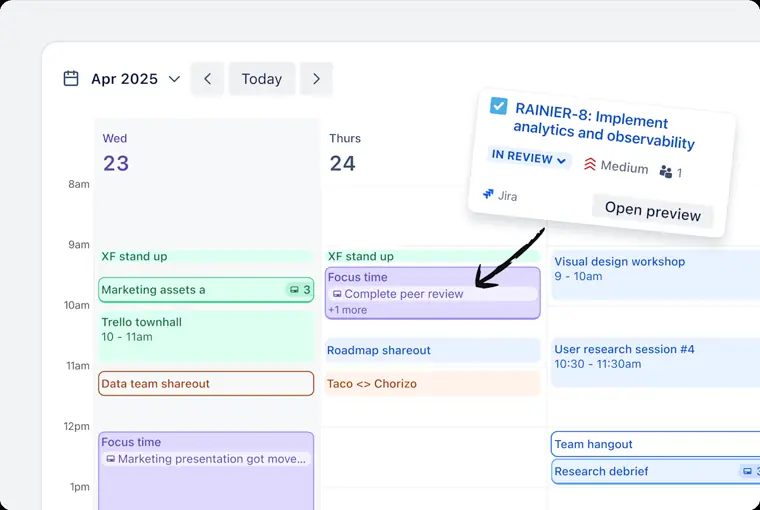
Trello Planner
Synchronizes with calendars like Google Calendar and Outlook to place tasks directly into focused calendar time slots. It allows you to drag and drop items into boards and mark quick tasks done directly from the planning view.
Use caseA busy professional schedules tasks and events directly from Google Calendar or Outlook to dedicate focused time slots to their work.
From trello.com/planner · image from Trello -
Butler automation
Automates routine tasks and actions directly within boards using built in rule sets. It handles repetitive actions automatically so users do not need to do manual administrative work.
Use caseA product management team automates repetitive, everyday steps across their sprint boards to avoid manual updates.
From trello.com/teams/product -
Card mirroring
Displays synchronized copies of cards across multiple boards at the same time. Any mirrored card provides visibility and access to a task wherever it is placed.
Use caseA manager mirrors a card from a project board onto their central personal board to track task progress across multiple locations.
From trello.com -
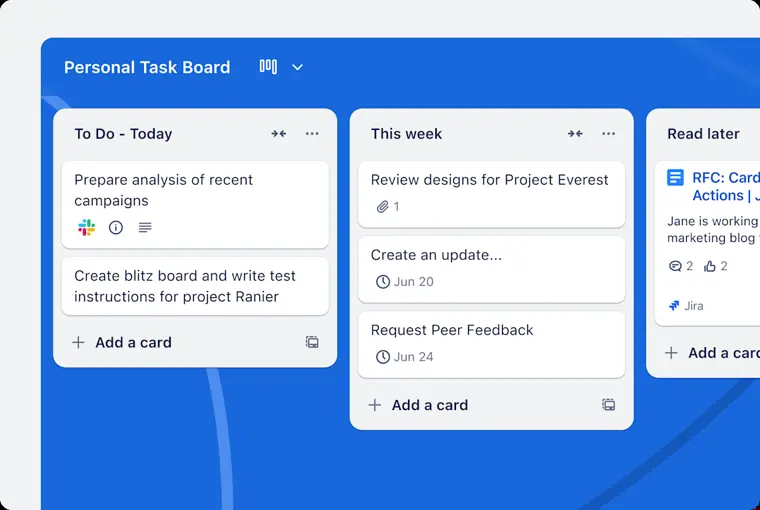
Power Ups and integrations
Links external tools such as Google Drive, Jira Cloud, Miro, and Slack directly into boards. It enables teams to attach documents, sync issues, and share activity without switching between apps.
Use caseAn engineering lead connects Jira Cloud to Trello cards to track real time progress on software issues without leaving the board.
From trello.com · image from Trello
Written from Trello's own website, checked . Each feature links to the page it comes from; images are Trello's own.
Every plan
| Plan | Monthly | Billed yearly | Per | What it includes |
|---|---|---|---|---|
| Free | Free | $0 | per user | up to 10 collaborators and 10 boards per Workspace, 10MB files, 250 command runs/mo |
| Standard | $6 | $5 | per user | unlimited boards, 250MB files, 1,000 command runs/mo |
| Premium | $12.50 | $10 | per user | unlimited command runs, views, admin features; free trial |
| Enterprise | Not listed | $17.50 | per user | $210/user/yr, unlimited Workspaces; volume pricing via sales |
From Trello's own pricing page, checked . Prices are in US dollars per month; "billed yearly" is the monthly price when you pay for a year up front. A few figures (often the yearly price) are derived rather than printed on the page.
Trello video tutorials
Independent creators on YouTube, not Trello or us. The video loads from YouTube only when you press play.
What the free plan includes
Up to 10 collaborators and 10 boards per Workspace; no AI on free (AI on Standard and above).
Questions people ask about Trello
How much does Trello cost?
Paid plans start at $6 a month (Standard). 4 plans are listed above, from Trello's own pricing page.
Is Trello free?
Yes, there is a free plan: Up to 10 collaborators and 10 boards per Workspace; no AI on free (AI on Standard and above)..
Does Trello have an API?
Yes.
Works with
- Integrations
- Slack, Microsoft Teams
Where this came from
Plans, prices and limits were copied from Trello's own pages and the other sources listed, then checked .
- trello.com/pricing
- reworked.co/collaboration-productivity/trello-rolls-out-7-ai-featur...
- pricingsaas.com/companies/trello/diffs/2026W32
- trello.com/trust
- trello.com/
How we collect prices and rank tools · Is something wrong? Correct this listing
Others that do the same job
 Todoisttodoist.com
Personal and team to do app where Ramble turns voice into tasks and Task Assist breaks goals into steps.
- Green flag: Free plan
- Green flag: Cancel online
- Green flag: Refunds within 30 days
 Taskadetaskade.com
AI workspace where custom agents generate projects, run automations and build mini apps from prompts.
- Green flag: Free plan
- Green flag: Cancel online
- Green flag: Some credits roll over
- Green flag: Doesn't train on your data
 Akiflowakiflow.com
Consolidates tasks from all your apps into one inbox, then time blocks them on your calendar with an AI assistant.
- Red flag: Card needed for trial
 Asanaasana.com
Work management platform with AI Teammates and AI Studio that triage, route and automate team workflows.
- Green flag: Free plan
- Green flag: No card for trial
 ChatGPTchatgpt.com
OpenAI's general purpose AI assistant for writing, research, coding, images, voice and agentic tasks.
- Green flag: Free plan
 Claudeclaude.com
Anthropic's AI assistant for writing, analysis, coding and agentic work, including Claude Code and Cowork.
- Green flag: Free plan
- Green flag: Cancel online
- Green flag: Credits don't expire
- Green flag: Doesn't train on your data