
Sunsama
Guided daily planning ritual that pulls tasks from your tools and timeboxes a realistic workday on your calendar.
Best for Individuals wanting calm, intentional daily planning
Used Sunsama and liked it? Upvote it. One upvote per person. Upvotes come from visitors, not from us, and never change "Our ranking".
What it does
Sunsama is a digital daily planner, task manager, and calendar designed for modern professionals. Users bring in tasks, emails, and backlogs from external work tools to organize their workload and schedule dedicated focus blocks. In return, it provides a realistic daily plan and unified schedule that prevents burnout and ends workdays on time.
Read more: 5 features and how people use themShow less
-
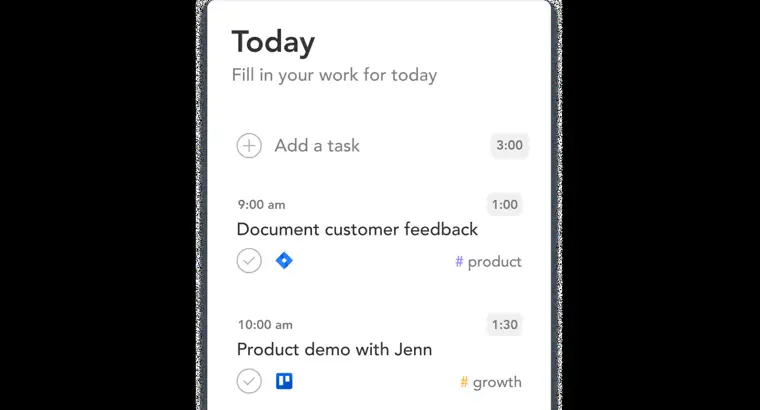
Daily planning
Guides you to set an intentional schedule each morning by prioritizing key work and setting realistic workloads. Helps you visualize commitments alongside meetings so you know what can fit today.
Use caseA busy professional plans the day ahead to balance important goals without taking on an excessive workload.
From sunsama.com · image from Sunsama -
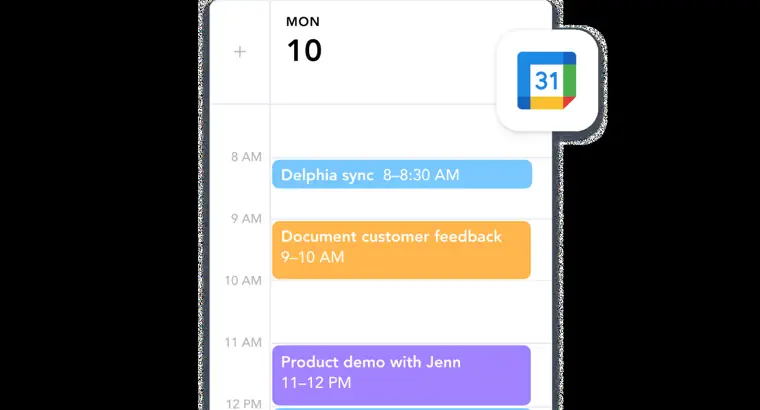
Calendar timeboxing
Consolidates multiple calendars into one place and lets you place tasks right onto your schedule. Ensures you visualize and reserve time blocks directly on your calendar for critical work.
Use caseA product leader blocks off specific hours on the calendar to go deep on critical work without interruptions.
From sunsama.com · image from Sunsama -
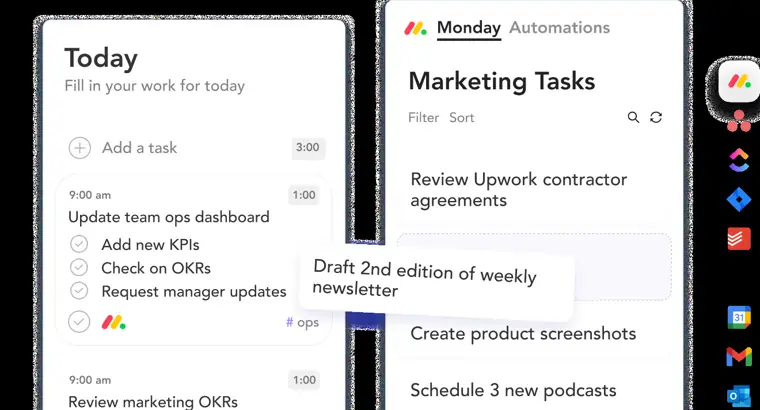
Project management integrations
Pulls tickets and backlog items out of external project trackers and converts them into a daily task list. Keeps tasks unified without requiring manual updates across platforms.
Use caseAn engineer brings Jira tickets and pull requests into a centralized daily plan without feeling overwhelmed by backlogs.
From sunsama.com · image from Sunsama -
Communication to task conversion
Transforms messages and communications into actionable tasks. Allows you to drag emails into your schedule or use message actions on incoming chat messages to ensure follow ups are planned.
Use caseA team member uses message actions in Microsoft Teams to turn chat requests into follow up tasks.
From sunsama.com -
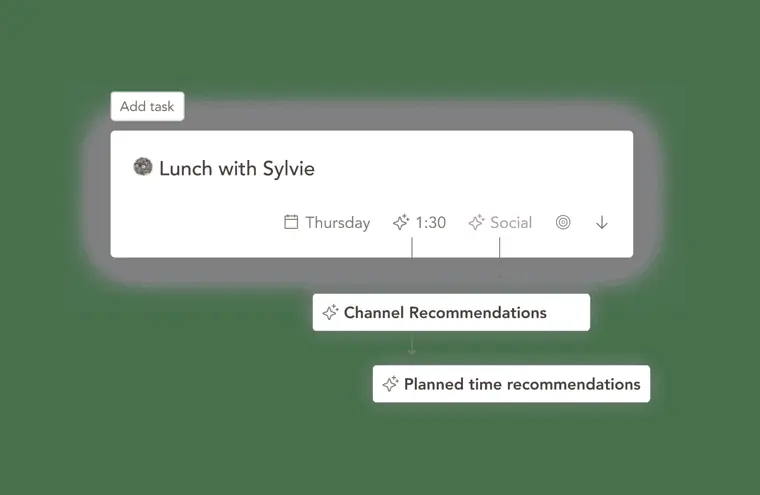
Automated time estimates
Recommends time estimates and channels for tasks using AI. Reduces the overhead of manually estimating tasks so you can focus on building and shipping.
Use caseA software engineer relies on automated recommendations for time estimates instead of estimating tickets manually.
From sunsama.com/team/engineering · image from Sunsama
Written from Sunsama's own website, checked . Each feature links to the page it comes from; images are Sunsama's own.
Every plan
| Plan | Monthly | Billed yearly | Per | What it includes |
|---|---|---|---|---|
| Pro | $22 | $17 | per user | 14 day free trial; unlimited usage and integrations; AI + MCP + Zapier |
| Enterprise | Contact sales | Not listed | custom | contact sales |
From Sunsama's own pricing page, checked . Prices are in US dollars per month; "billed yearly" is the monthly price when you pay for a year up front.
Before you pay
- Cancel online yourself
- Yes
What Sunsama says
Sunsama lets you cancel without going through support or dozens of screens. When you cancel we’ll only ask you why and then immediately provide a button to cancel your subscription.
Source page - Renews automatically
- Yes
What Sunsama says
When you cancel your subscription, you can continue to use Sunsama until the end of the billing cycle. Then it will not be automatically renewed.
Source page - Card needed for the trial
- No
- Data retention
- Workspace data is permanently deleted 30 days after a subscription ends due to cancellation, and user access logs are kept for 90 days.
What Sunsama says
30 days after your subscription ends due to cancellation, the data in your workspace will be permanently deleted.
Source page - Export your data
- Yes
What Sunsama says
users can export all their data in JSON format through the application dashboard for self service data extraction.
Source page - SOC 2
- Yes
- Discounts
- Offers generous nonprofit plans upon contacting support with proof, a student discount for actively enrolled college students until graduation or 4 years, and a 20% discount on annual subscriptions.
What Sunsama says
Sunsama does offer generous non profit plans. Contact support@sunsama.com with proof of non profit status to apply special pricing.
Source page - Support
- Email, in app support chat bubble, Slack community
What Sunsama says
reach out via the support chat bubble in the bottom right corner of the app — we respond within one business day.
Source page
Only what Sunsama's own pages state, with the quote behind each answer. Anything they don't publish is left out rather than guessed.
Getting started with Sunsama
- Choose whether to build your task list for today or tomorrow.
- Click 'Add task' and type in the tasks you intend to work on.
- Add planned time estimates to each task.
- Connect your calendar and drag to dos from your connected external tools into your day.
- Bump non essential tasks to tomorrow or next week.
- Reorder tasks, timebox them onto your calendar or auto schedule, and set your shutdown time.
- Review your daily task list, note potential obstacles, optionally share to Slack or Teams, and click Get Started.
Written from Sunsama's own help pages: help.sunsama.com/docs/getting-started/setting...
Sunsama video tutorials
Independent creators on YouTube, not Sunsama or us. The video loads from YouTube only when you press play.
The free trial
Trial only: No free plan. 14 day free trial, no credit card required, full access.
Questions people ask about Sunsama
How much does Sunsama cost?
Paid plans start at $22 a month (Pro). 2 plans are listed above, from Sunsama's own pricing page.
Is Sunsama free?
There is a free trial but no free plan: No free plan. 14 day free trial, no credit card required, full access..
How do I cancel Sunsama?
You can cancel online yourself, without contacting support. Source
Do I need a credit card to try Sunsama?
No, you can start without a credit card. Source
Does Sunsama have a student or other discount?
Offers generous nonprofit plans upon contacting support with proof, a student discount for actively enrolled college students until graduation or 4 years, and a 20% discount on annual subscriptions. Source
How do I cancel my free trial?
It is not possible to cancel your free trial, and you will not be charged when it ends unless you decide to upgrade. Source
What happens when I cancel my subscription?
You can continue using Sunsama until the end of the billing cycle, after which it will not auto renew, and workspace data is permanently deleted 30 days later. Source
Where this came from
Plans, prices and limits were copied from Sunsama's own pages and the other sources listed, then checked .
- sunsama.com/pricing
- help.sunsama.com/docs/billing/overview
- help.sunsama.com/docs/security/overview
- help.sunsama.com/docs/timeboxing-auto-scheduling
- sunsama.com/
- help.sunsama.com/docs/billing/overview/
- help.sunsama.com/docs/getting-started/setting-up-your-account/
- help.sunsama.com/
- help.sunsama.com/docs/security/it-approval/
- help.sunsama.com/docs/security/vulnerability-disclosure-program/
- help.sunsama.com/docs/billing/pricing-manifesto/
- help.sunsama.com/docs/billing/overview/referral-program/
How we collect prices and rank tools · Is something wrong? Correct this listing
Others that do the same job
 Akiflowakiflow.com
Consolidates tasks from all your apps into one inbox, then time blocks them on your calendar with an AI assistant.
- Red flag: Card needed for trial
 Asanaasana.com
Work management platform with AI Teammates and AI Studio that triage, route and automate team workflows.
- Green flag: Free plan
- Green flag: No card for trial
 ChatGPTchatgpt.com
OpenAI's general purpose AI assistant for writing, research, coding, images, voice and agentic tasks.
- Green flag: Free plan
 Claudeclaude.com
Anthropic's AI assistant for writing, analysis, coding and agentic work, including Claude Code and Cowork.
- Green flag: Free plan
- Green flag: Cancel online
- Green flag: Credits don't expire
- Green flag: Doesn't train on your data
 Craftcraft.do
Beautifully designed docs and notes app with built in AI assistant, collaboration, and native apps everywhere.
- Green flag: Free plan
 Reclaim.aireclaim.ai
AI calendar assistant that defends focus time, habits and tasks by auto scheduling them around your meetings.
- Green flag: Free plan
- Green flag: Doesn't train on your data