
Cal.com
Open source scheduling infrastructure and Calendly alternative with a generous free plan, routing forms and APIs.
Best for Teams and developers wanting flexible, open source booking
Used Cal.com and liked it? Upvote it. One upvote per person. Upvotes come from visitors, not from us, and never change "Our ranking".
What it does
Cal.com is customizable scheduling software that lets you connect your calendar, define your availability, and share booking links. You share a link and Cal.com manages timezone detection, calendar syncing, automated reminders, and video meetings. It is built for individuals, businesses taking calls, and developers building scheduling platforms.
Read more: 5 features and how people use themShow less
-
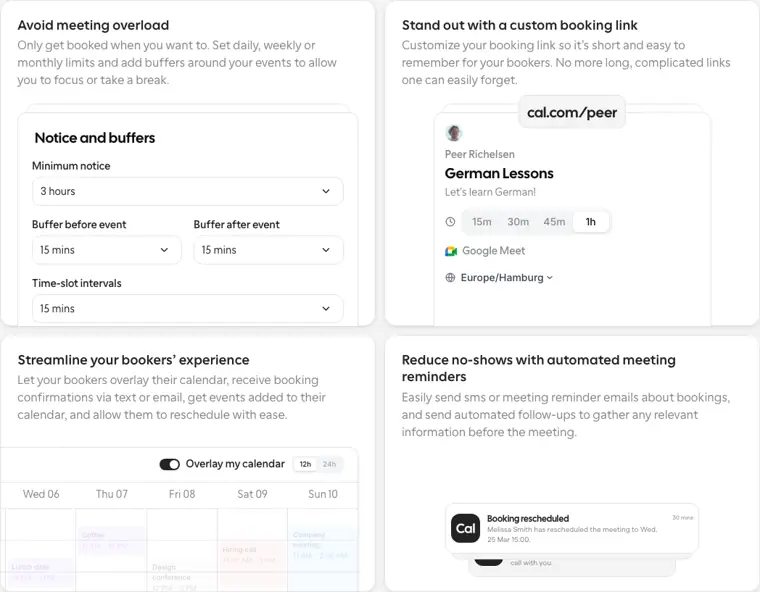
Custom booking links
Generates a personalized, short scheduling link that bookers can open to choose meeting times and view availability.
Use caseA partner manager shares a short cal.com link with an influencer to book an introductory collaboration call.
From cal.com · image from Cal.com -
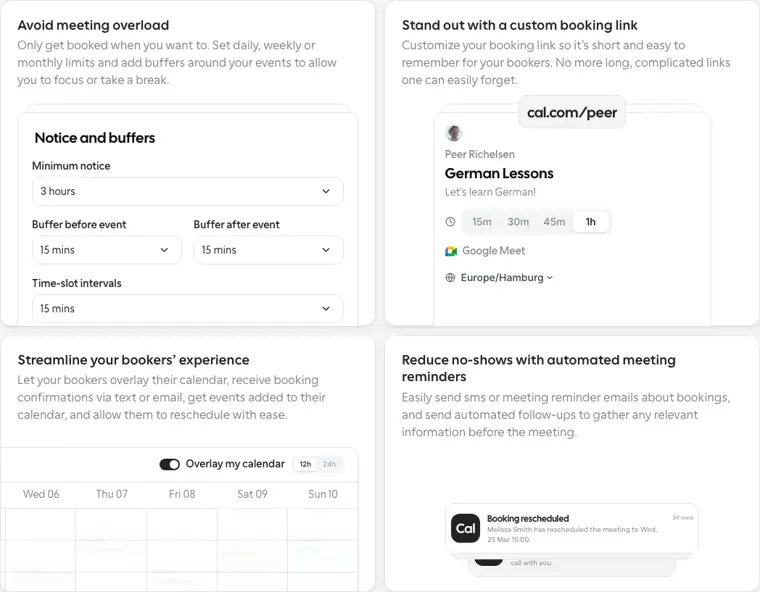
Notice and buffers
Restricts when bookers can schedule meetings by establishing minimum notice periods, daily or monthly limits, and buffer times before and after events.
Use caseA professional adds thirty minute buffers around meetings to take breaks and avoid meeting overload.
From cal.com · image from Cal.com -
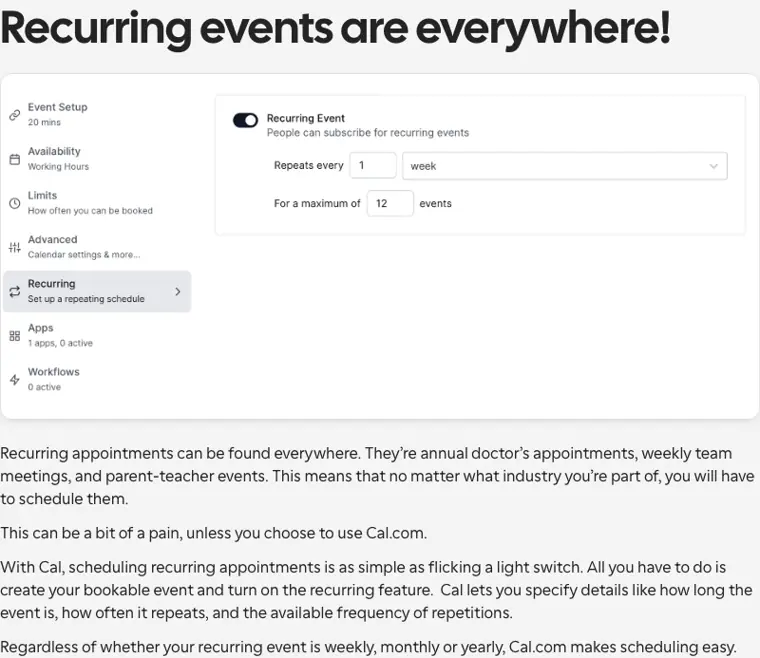
Recurring events
Enables repeating bookings by letting you configure meeting lengths, repetition frequencies, and intervals.
Use caseA team lead schedules a recurring weekly check in with co workers without having to rebook each week.
From cal.com/features/recurring-events · image from Cal.com -
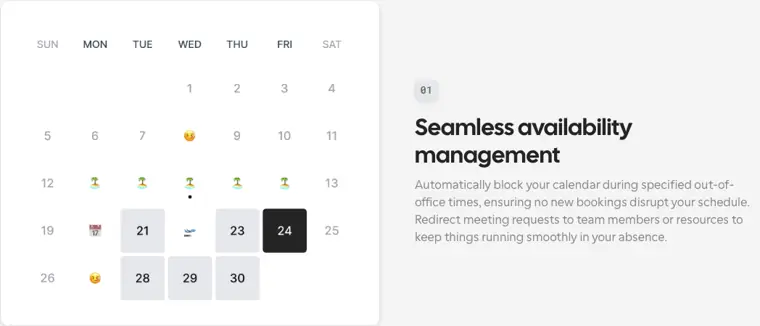
Out of office management
Blocks calendar availability during specified away periods and can reroute incoming appointment requests to alternate colleagues.
Use caseA team member going on leave blocks their calendar and automatically delegates incoming client booking requests to a colleague.
From cal.com/features/ooo · image from Cal.com -
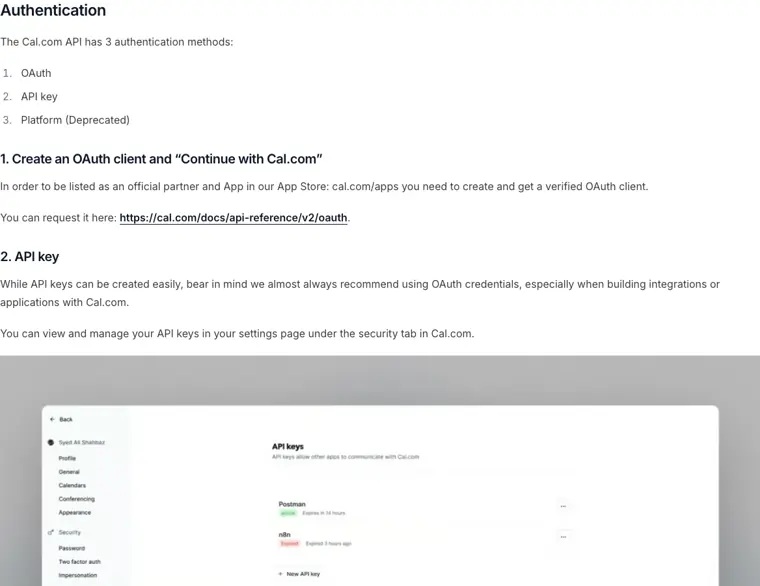
Developer API v2
Provides secure HTTPS endpoints authenticated via API keys or OAuth to programmatically manage bookings, schedules, event types, and teams.
Use caseA software engineer connects their platform to manage user schedules, event types, and bookings using an API key over HTTPS.
From cal.com · image from Cal.com
Written from Cal.com's own website, checked . Each feature links to the page it comes from; images are Cal.com's own.
Every plan
| Plan | Monthly | Billed yearly | Per | What it includes |
|---|---|---|---|---|
| Free | Free | $0 | per user | 1 user, unlimited event types and calendars |
| Teams | Not listed | $12 | per user | 1 team, shared availability; 14 day trial |
| Organizations | Not listed | $28 | per user | unlimited sub teams; 14 day trial |
| Enterprise | Not listed | Not listed | per org | contact sales |
From Cal.com's own pricing page, checked . Prices are in US dollars per month; "billed yearly" is the monthly price when you pay for a year up front.
Before you pay
- Card needed for the trial
- No
- Watermark on the free plan
- Yes
- Trains on your data
- No
- Data retention
- Users can delete their data at any time via self serve options or email, resulting in complete deletion including at subprocessors.
What Cal.com says
You can get your data out, or delete it. Any time, self serve or by email. Deleting means deleted, including at our subprocessors.
Source page - HIPAA
- Yes
What Cal.com says
ask us for a Business Associate Agreement (available on Teams plans and up; email privacy@cal.com or ask support or sales)
Source page - SOC 2
- Yes
What Cal.com says
Cal.com is SOC 2 Type II compliant, independently audited to meet the highest standards for data security and privacy so you can schedule with confidence.
Source page - GDPR
- Yes
What Cal.com says
Compliant with the European Union’s GDPR, safeguarding personal data and user privacy rights.
Source page - Support
- Email, live chat, help center
Only what Cal.com's own pages state, with the quote behind each answer. Anything they don't publish is left out rather than guessed.
Getting started with Cal.com
- Clone the Cal.diy repository.
- Change into the cloned cal.diy directory.
- Prepare your configuration by copying .env.example to .env and updating it.
- Start Cal.diy via docker compose up -d.
- Open your browser to http://localhost:3000 to initialize the setup wizard and define your first user.
Written from Cal.com's own help pages: cal.diy/docker
Cal.com video tutorials
Independent creators on YouTube, not Cal.com or us. The video loads from YouTube only when you press play.
What the free plan includes
Individuals: free forever for 1 user, unlimited event types and calendars, 100+ integrations, Stripe/
Questions people ask about Cal.com
Is Cal.com free?
Yes, there is a free plan: Individuals: free forever for 1 user, unlimited event types and calendars, 100+ integrations, Stripe/PayPal payments, Salesforce/HubSpot sync..
Does the Cal.com free plan add a watermark?
Yes, free plan output carries a watermark or branding. Source
Does Cal.com train its AI on my data?
No, the company says your data is not used for training. Source
Is Cal.com HIPAA compliant?
Yes. Source
Do I need a credit card to try Cal.com?
No, you can start without a credit card. Source
Does Cal.com have an API?
Yes.
What is Cal.com and how does it work as a scheduling app?
Cal.com is a scheduling app used to eliminate booking back and forth by syncing calendars, detecting timezones, sending reminders, and enabling video calls. Source
How much does Cal.com cost and what's included in each plan?
Cal.com has a robust free plan for individuals, Teams at $16/user/month (or $12 billed yearly), Organizations at $37/user/month (or $28 billed yearly), and custom priced Enterprise tiers. Source
Is Cal.com SOC 2 certified?
Yes, Cal.com maintains SOC 2 Type II certification verified through annual independent audits. Source
Works with
- Languages
- 65+ languages
Where this came from
Plans, prices and limits were copied from Cal.com's own pages and the other sources listed, then checked .
- cal.com/pricing
- cal.com/compliance/soc-2
- cal.com/
- cal.diy/docker
- cal.com/docs/api-reference/v2/introduction
- cal.com/security
- cal.com/privacy
- cal.com/compliance
- cal.com/help/welcome
How we collect prices and rank tools · Is something wrong? Correct this listing
Others that do the same job
 Calendlycalendly.com
Market leading booking link tool that lets invitees pick open slots, with routing, round robin and CRM sync.
- Green flag: Free plan
 Akiflowakiflow.com
Consolidates tasks from all your apps into one inbox, then time blocks them on your calendar with an AI assistant.
- Red flag: Card needed for trial
 Asanaasana.com
Work management platform with AI Teammates and AI Studio that triage, route and automate team workflows.
- Green flag: Free plan
- Green flag: No card for trial
 ChatGPTchatgpt.com
OpenAI's general purpose AI assistant for writing, research, coding, images, voice and agentic tasks.
- Green flag: Free plan
 Claudeclaude.com
Anthropic's AI assistant for writing, analysis, coding and agentic work, including Claude Code and Cowork.
- Green flag: Free plan
- Green flag: Cancel online
- Green flag: Credits don't expire
- Green flag: Doesn't train on your data
 Craftcraft.do
Beautifully designed docs and notes app with built in AI assistant, collaboration, and native apps everywhere.
- Green flag: Free plan