
Read AI
Meeting copilot producing summaries, engagement analytics and searchable reports across meetings, email and messages.
Best for Professionals wanting meeting analytics plus cross app search
What it does
Read AI is an AI assistant that joins and measures meetings while connecting to your calendar, email, and messaging tools. You provide meeting audio or video alongside communications, and it produces automated summaries, full transcripts, actionable follow up items, and searchable insights. It is built for individual professionals, teams, and academic users looking to eliminate busywork and track outcomes.
Read more: 5 features and how people use themShow less
-
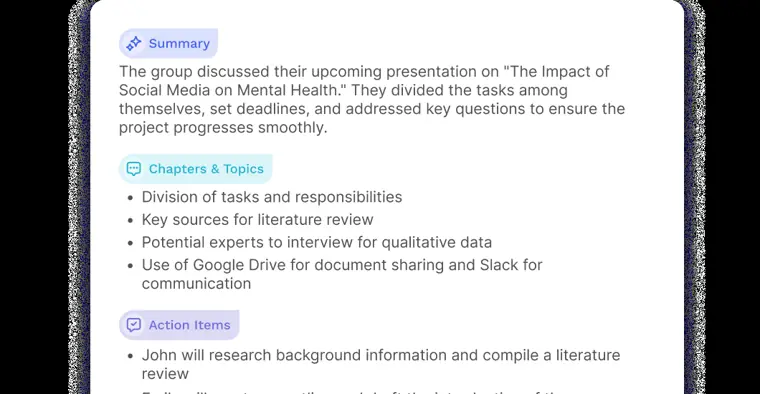
Meeting reports
Generates meeting summaries, transcripts organized by speaker, extracted action items, and key questions across video conferencing platforms.
Use caseA professor reviews key points, action items, and student questions after finishing a virtual class session.
From read.ai/plans-pricing · image from Read AI -
Ask Read
Searches across your past meetings, emails, and messages to retrieve answers, citations, and relevant context.
Use caseA team member asks what was decided and who owns an open task from previous discussions.
From read.ai/plans-pricing -
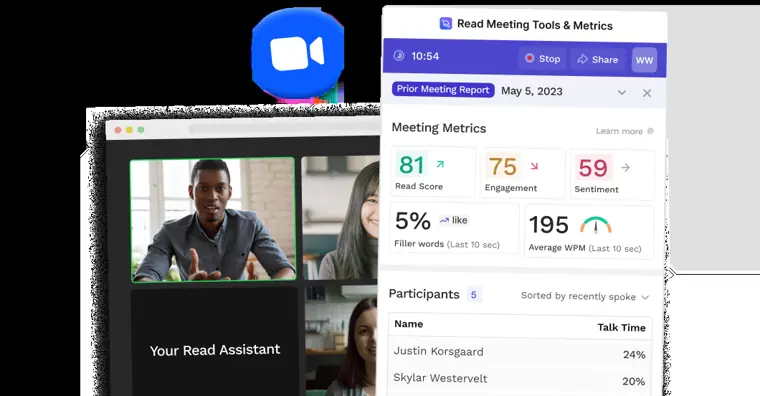
Meeting coach
Evaluates spoken delivery by analyzing metrics such as talking speed, filler words, charisma, and bias during calls.
Use caseA presenter reviews their talking speed and filler words after a call to improve clarity and impact.
From read.ai/plans-pricing · image from Read AI -
Audio and video playback
Records full sessions and highlights pivotal moments with annotations showing participant sentiment and reactions.
Use caseA student plays back video highlight reels from a lecture to review critical discussions before an exam.
From read.ai/plans-pricing -
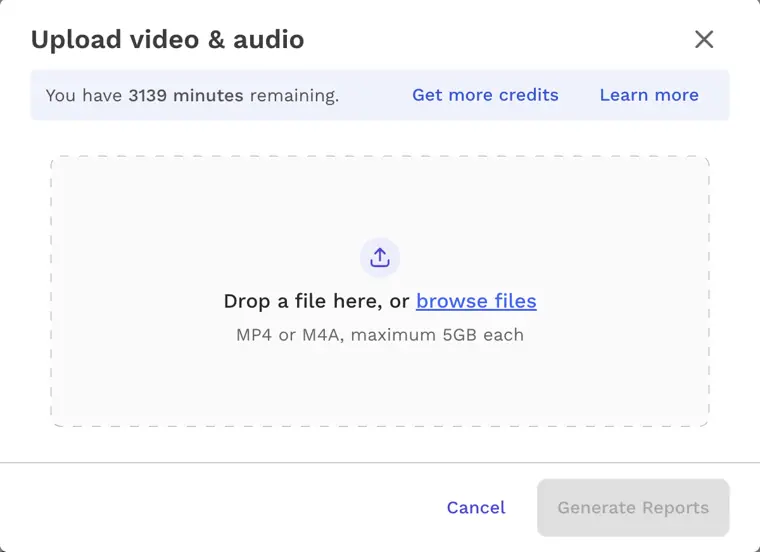
Meeting audio video uploads
Processes pre recorded audio and video files to produce transcripts, summaries, topics, and action items.
Use caseA student uploads recordings of in person classes to generate summaries and notes.
From read.ai/plans-pricing · image from Read AI
Written from Read AI's own website, checked . Each feature links to the page it comes from; images are Read AI's own.
Every plan
| Plan | Monthly | Billed yearly | Per | What it includes |
|---|---|---|---|---|
| Free | Free | $0 | per user | 5 meeting transcripts/mo; 1 hr meeting max |
| Pro | $19.75 | $15 | per user | Unlimited transcripts; 4 hr max; 100 upload min/mo |
| Enterprise | $29.75 | $22.50 | per user | Adds playback & highlights; 200 upload min/mo |
| Enterprise+ | $39.75 | $29.75 | per user | HIPAA, SAML/SCIM; 8 hr max; 300 upload min/mo; 5+ licenses; contact sales |
From Read AI's own pricing page, checked . Prices are in US dollars per month; "billed yearly" is the monthly price when you pay for a year up front. A few figures (often the yearly price) are derived rather than printed on the page.
Before you pay
- Card needed for the trial
- No
- Trains on your data
- Opt out
What Read AI says
Contributing to model improvement is off by default. You decide - and can change your mind any time.
Source page - Data retention
- Enterprise+ users can set custom retention policies to automatically delete meeting reports after a specified number of days, or delete data via account deletion controls.
What Read AI says
Set data retention policy to automatically delete meeting reports after a specified number of days.
Source page - Export your data
- Yes
- HIPAA
- Yes
What Read AI says
Read AI meets HIPAA's technical safeguard requirements for protected health information. Healthcare and human services teams can request a Business Associates Agreement (BAA)
Source page - SOC 2
- Yes
What Read AI says
Read AI is independently audited against SOC 2 Type II standards every year.
Source page - GDPR
- Yes
What Read AI says
For eligible Workspace customers in the EU and EEA, Read AI acts as a data processor under GDPR Article 28 and offers a Data Processing Agreement.
Source page - Support
- Help center, email
Only what Read AI's own pages state, with the quote behind each answer. Anything they don't publish is left out rather than guessed.
Getting started with Read AI
- Create an account on Read by signing up at read.ai with SSO or a username and password, or by installing the Read app, add on, or extension.
- Provide permission during onboarding for Read to connect to your calendar.
- Configure your settings for Read to join meetings or manually add Read to a meeting.
- Grant permission for Read to join and record when prompted in the meeting.
Tips
- If you belong to a workspace, ensure the Downloads option is enabled in Workspace Settings > Reports & Sharing to access the API and MCP server.
- Meeting participants can remove Read and delete recorded data during a call by typing 'opt out' in the chat or clicking the provided opt out link.
- If you are not properly redirected after signing in with your organization's SAML SSO during OAuth authentication, restart the OAuth process.
Written from Read AI's own help pages: support.read.ai/hc/en-us/articles/25702259763... · support.read.ai/hc/en-us/articles/49379985941...
Read AI video tutorials
Independent creators on YouTube, not Read AI or us. The video loads from YouTube only when you press play.
What the free plan includes
5 meeting transcripts and 5 meeting reports/
Questions people ask about Read AI
How much does Read AI cost?
Paid plans start at $19.75 a month (Pro). 4 plans are listed above, from Read AI's own pricing page.
Is Read AI free?
Yes, there is a free plan: 5 meeting transcripts and 5 meeting reports/month, 1 hour meeting cap, no playback or uploads, basic integrations.
Does Read AI train its AI on my data?
It can, but you can opt out. Source
Is Read AI HIPAA compliant?
Yes. Source
Do I need a credit card to try Read AI?
No, you can start without a credit card. Source
Does Read AI have an API?
Yes.
What is included in Read AI's Free plan?
The Free plan includes 5 meeting transcripts per month, unlimited enterprise search, summaries for meetings, email, and messaging, a personalized meeting coach, basic integrations, Topic Readouts, support for 20+ languages, and access to desktop/mobile apps. Source
Does Read AI train AI models on user data by default?
No, AI model training is opt in and turned off by default. Source
Works with
- Integrations
- Google Meet, Zoom, Microsoft Teams, Slack, Salesforce, HubSpot, Notion, Jira, Confluence, Zapier
- AI models
- Anthropic Claude, OpenAI GPT
- Languages
- Supports 20+ languages (and up to 36 languages for meeting reports including Afrikaans, Arabic, Catalan, Chinese, Czech, Danish, Dutch, English, Finnish, French, German, Greek, Hebrew, Hindi, Hungarian, Indonesian, Italian, Japanese, Korean, Malay, Norwegian, Persian/Farsi, Polish, Portuguese, Romanian, Russian, Slovak, Spanish, Swedish, Tagalog, Thai, Turkish, Ukrainian, Urdu, Vietnamese)
Where this came from
Plans, prices and limits were copied from Read AI's own pages and the other sources listed, then checked .
- read.ai/plans-pricing
- support.read.ai/api/v2/help_center/en-us/articles/22189506678803.json
- read.ai/articles/granola-ai-pricing-alternatives
- read.ai/
- support.read.ai/hc/en-us/articles/49381161088659-API-Reference
- support.read.ai/hc/en-us/articles/49381158409491-MCP-Server
- support.read.ai/hc/en-us
- read.ai/privacy
- read.ai/privacy-policy
- read.ai/edu-pricing
How we collect prices and rank tools · Is something wrong? Correct this listing
Others that do the same job
 Avomaavoma.com
AI meeting assistant combining notes, scheduling, conversation intelligence and revenue intelligence for go to market teams.
- Green flag: No card for trial
- Green flag: Doesn't train on your data
 Akiflowakiflow.com
Consolidates tasks from all your apps into one inbox, then time blocks them on your calendar with an AI assistant.
- Red flag: Card needed for trial
 Asanaasana.com
Work management platform with AI Teammates and AI Studio that triage, route and automate team workflows.
- Green flag: Free plan
- Green flag: No card for trial
 ChatGPTchatgpt.com
OpenAI's general purpose AI assistant for writing, research, coding, images, voice and agentic tasks.
- Green flag: Free plan
 Claudeclaude.com
Anthropic's AI assistant for writing, analysis, coding and agentic work, including Claude Code and Cowork.
- Green flag: Free plan
- Green flag: Cancel online
- Green flag: Credits don't expire
- Green flag: Doesn't train on your data
 Craftcraft.do
Beautifully designed docs and notes app with built in AI assistant, collaboration, and native apps everywhere.
- Green flag: Free plan