
Wrike
Enterprise work management with Wrike AI and Copilot generating content, summarizing comments and building automation rules from text.
Best for Mid size and enterprise teams managing complex projects
Used Wrike and liked it? Upvote it. One upvote per person. Upvotes come from visitors, not from us, and never change "Our ranking".
What it does
Wrike is an enterprise work delivery platform designed for people and AI agents to collaborate on projects. Teams enter plans, requests, and project updates, and they receive real time reports, automated workflows, organized tasks, and intelligent summaries. It is built for cross functional enterprise teams including product managers, marketing, professional services, operations, and IT.
Read more: 4 features and how people use themShow less
-
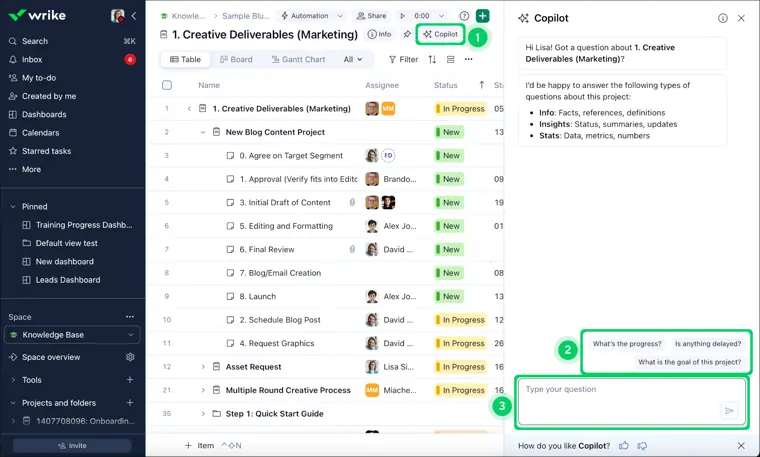
Wrike Copilot
Answers questions, produces summaries of work, and facilitates collaboration to minimize ongoing back and forth discussions.
Use caseA project lead reviews project discussions to summarize ongoing progress without running extra status meetings.
From wrike.com · image from Wrike -
AI in work items
Drafts project documents instantly, condenses long discussion threads with one click, and translates or adjusts communication tone.
Use caseA team member condenses a 50 comment discussion thread to review essential decisions quickly.
From wrike.com/ai/features-vbx -
AI widget creation
Builds charts and tracking metrics in real time based on natural language text prompts rather than manual report configuration.
Use caseA manager types a request to display billable hours broken down by consultant to check team output.
From wrike.com/ai/features-vbx -
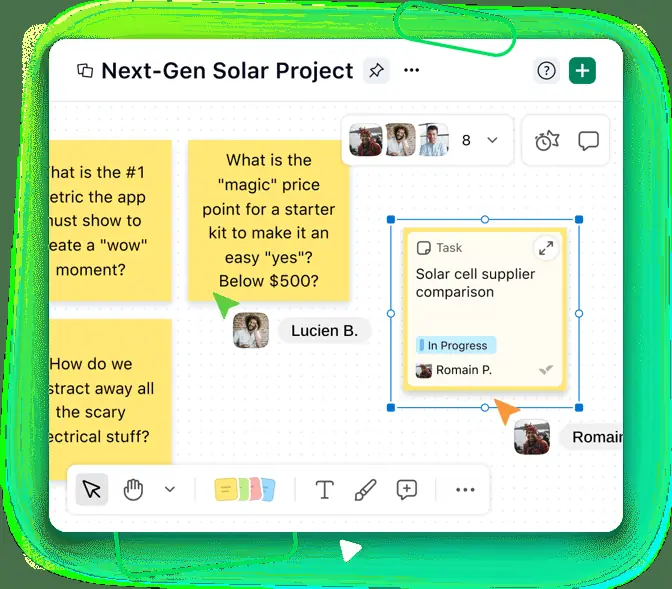
AI whiteboard
Organizes visual notes on a canvas, groups related ideas together, and converts brainstormed concepts into structured project tasks.
Use caseA marketing manager runs a campaign launch retrospective and converts the brainstormed sticky notes into scheduled project deliverables.
From wrike.com/features/whiteboard · image from Wrike
Written from Wrike's own website, checked . Each feature links to the page it comes from; images are Wrike's own.
Every plan
| Plan | Monthly | Billed yearly | Per | What it includes |
|---|---|---|---|---|
| Free | Free | $0 | per user | basic task management |
| Team | Not listed | $10 | per user | 2 to 15 users |
| Business | Not listed | $25 | per user | 5 to 200 users; annual billing only |
| Pinnacle | Not listed | Not listed | per user | contact sales |
| Apex | Not listed | Not listed | per user | contact sales |
From Wrike's own pricing page, checked . Prices are in US dollars per month; "billed yearly" is the monthly price when you pay for a year up front. A few figures (often the yearly price) are derived rather than printed on the page.
Before you pay
- Card needed for the trial
- No
What Wrike says
Sign up for a free two week trial of Wrike today — no credit card required.
Source page - Trains on your data
- No
What Wrike says
Neither Wrike nor Google uses your search inputs to train its machine learning models or for advertising purposes
Source page - Export your data
- Yes (Excel spreadsheets, QuickBooks time entries)
What Wrike says
Import and export your Excel spreadsheets to and from Wrike with one click.
Source page - SOC 2
- Yes
What Wrike says
SOC2 Type II, which shows our commitment to taking a robust and secure approach to products, processes, and security surrounding our customer data
Source page - GDPR
- Yes
What Wrike says
What does Wrike do to ensure GDPR compliance? Wrike takes data privacy/security very seriously. We have the following independent third party certifications
Source page
Only what Wrike's own pages state, with the quote behind each answer. Anything they don't publish is left out rather than guessed.
Getting started with Wrike
- Settle in and get oriented with the platform.
- Learn the fundamentals of Wrike.
- Prep the workspace if you are an account manager.
- Onboard your team if you are an account administrator.
- Start working and collaborate with colleagues.
- Monitor work and build up success.
- Work from home productively.
Written from Wrike's own help pages: help.wrike.com/hc/en-us/articles/209603989-Ty...
Wrike video tutorials
Independent creators on YouTube, not Wrike or us. The video loads from YouTube only when you press play.
What the free plan includes
Free plan: task/
Questions people ask about Wrike
Is Wrike free?
Yes, there is a free plan: Free plan: task/project management, board and table views; no AI listed on free. User limit not stated on official page..
Does Wrike train its AI on my data?
No, the company says your data is not used for training. Source
Do I need a credit card to try Wrike?
No, you can start without a credit card. Source
Does Wrike have an API?
Yes.
What are the different types of licenses?
Wrike provides two main user license types: full users (regular and external users) who require a paid seat, and limited users who either require a paid seat at a reduced rate (contributors) or can be added for free (viewers). Source
What happens when my trial has expired?
The account is blocked until you choose to downgrade to the free version or speak with a representative, while your data remains intact. Source
How do I purchase a subscription?
First time users can sign up for a 14 day free trial. After a trial, the Team and Business plans up to 15 users without add ons can be bought in the Account section; larger seat counts or plans require contacting a sales representative. Source
Can I pay in my local currency and what kind of taxes apply?
Prices and invoices are in US dollars, which your bank converts to local currency, and clients are responsible for applicable state and local taxes. Source
Where this came from
Plans, prices and limits were copied from Wrike's own pages and the other sources listed, then checked .
- wrike.com/price/
- costbench.com/software/project-management/wrike/free-plan
- wrike.com/
- wrike.com/price-vag/
- help.wrike.com/hc/en-us/articles/209603989-Types-of-Licenses-in-Wrike
- wrike.com/templates/
- wrike.com/security/
- wrike.com/professional-services/
- wrike.com/apps/
- wrike.com/apps/email-integration/wrike-for-gmail/
- wrike.com/apps/email-integration/wrike-for-outlook/
How we collect prices and rank tools · Is something wrong? Correct this listing
Others that do the same job
 ClickUpclickup.com
All in one work hub where ClickUp Brain answers questions, writes docs, summarizes tasks and runs Super Agents across your workspace.
- Green flag: Free plan
- Green flag: No card for trial
 Akiflowakiflow.com
Consolidates tasks from all your apps into one inbox, then time blocks them on your calendar with an AI assistant.
- Red flag: Card needed for trial
 Asanaasana.com
Work management platform with AI Teammates and AI Studio that triage, route and automate team workflows.
- Green flag: Free plan
- Green flag: No card for trial
 ChatGPTchatgpt.com
OpenAI's general purpose AI assistant for writing, research, coding, images, voice and agentic tasks.
- Green flag: Free plan
 Claudeclaude.com
Anthropic's AI assistant for writing, analysis, coding and agentic work, including Claude Code and Cowork.
- Green flag: Free plan
- Green flag: Cancel online
- Green flag: Credits don't expire
- Green flag: Doesn't train on your data
 Craftcraft.do
Beautifully designed docs and notes app with built in AI assistant, collaboration, and native apps everywhere.
- Green flag: Free plan