
ClickUp
All in one work hub where ClickUp Brain answers questions, writes docs, summarizes tasks and runs Super Agents across your workspace.
Best for Teams wanting tasks, docs and AI agents together
Used ClickUp and liked it? Upvote it. One upvote per person. Upvotes come from visitors, not from us, and never change "Our ranking".
What it does
All in one work hub where ClickUp Brain answers questions, writes docs, summarizes tasks and runs Super Agents across your workspace.
Read more: 5 features and how people use themShow less
-
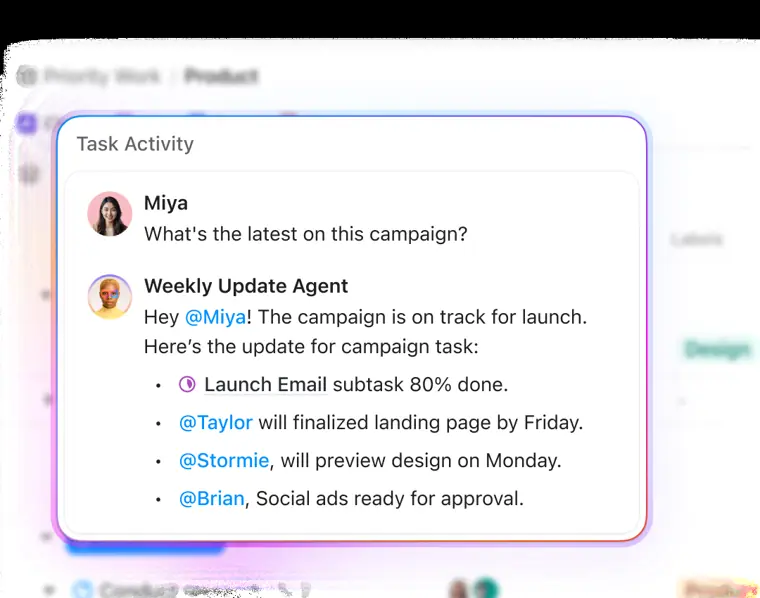
Super Agents
Automate complex workflows and handle tasks autonomously by capturing action items directly from team conversations.
Use caseA project coordinator uses an Assign Agent to automatically determine task owners for incoming project items.
From clickup.com/features/tasks · image from ClickUp -
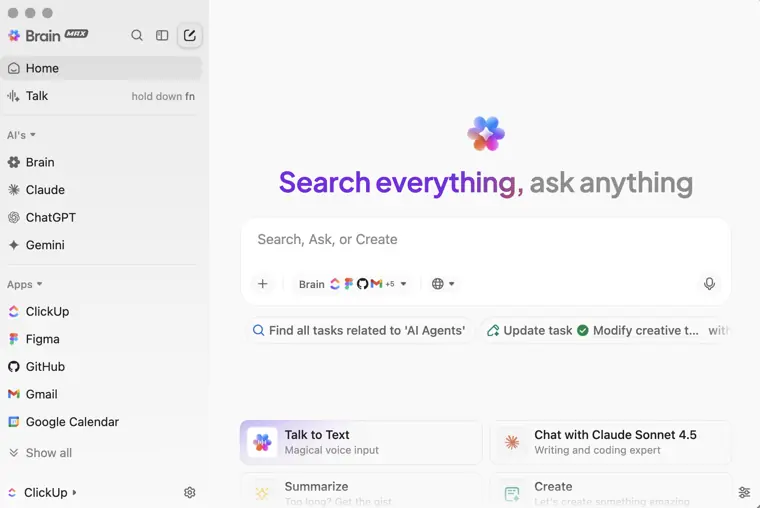
ClickUp Brain
Connects your workspace tasks, documents, and discussions using built in AI to answer questions and generate updates.
Use caseA team member asks complex questions across company apps and workspace records without leaving their active task.
From clickup.com/features/tasks · image from ClickUp -
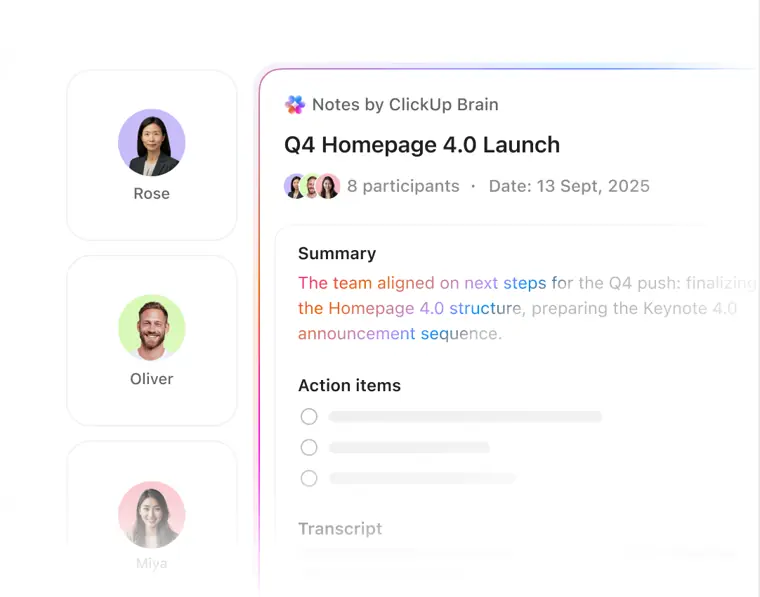
AI Notetaker
Transcribes spoken audio from virtual meetings and produces structured summaries alongside clear action items.
Use caseA team lead runs a weekly meeting and relies on automatic transcriptions to capture assigned follow ups.
From clickup.com/features · image from ClickUp -
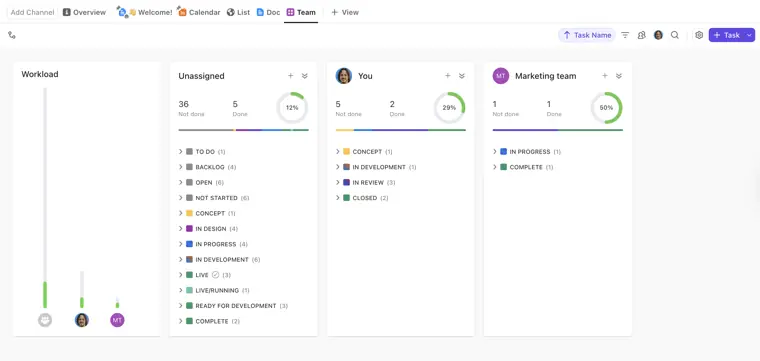
Team View
Displays what each member is currently handling and allows managers to rebalance assignments by dragging and dropping items.
Use caseA resource manager reviews member capacity and shifts tasks across assignees to balance sprint points.
From help.clickup.com · image from ClickUp -
Automations
Triggers updates, assignments, and alerts automatically whenever preset workspace conditions occur.
Use caseA workflow admin creates rules that update task states and reassign work whenever a status changes.
From clickup.com/features/tasks
Written from ClickUp's own website, checked . Each feature links to the page it comes from; images are ClickUp's own.
Every plan
| Plan | Monthly | Billed yearly | Per | What it includes |
|---|---|---|---|---|
| Free | Free | $0 | per workspace | 500 AI credits/workspace, 5 Spaces, 60MB storage, 100 MCP calls/day |
| Core | Not listed | $9 | per user | 1,000 pooled AI credits/user/mo, 1K automations/mo, 300 MCP calls/day; regular $12 annual |
| Business | Not listed | $17 | per user | 1,500 pooled AI credits/user/mo, 10K automations/mo, 1,000 MCP calls/day; regular $25 annual |
| Max | Not listed | $100 | per user | 10,000 pooled AI credits/user/mo, 1M automations/mo, no MCP cap; regular $120 |
| Enterprise | Contact sales | Not listed | custom | contact sales; 3,000 AI credits/user/mo, 1M automations/mo |
From ClickUp's own pricing page, checked . Prices are in US dollars per month; "billed yearly" is the monthly price when you pay for a year up front. A few figures (often the yearly price) are derived rather than printed on the page.
Before you pay
- Card needed for the trial
- No
- HIPAA
- Yes
- Support
- 24/7 Support
Only what ClickUp's own pages state, with the quote behind each answer. Anything they don't publish is left out rather than guessed.
Getting started with ClickUp
- Hover over the Space, Folder, or Subfolder in your Home Sidebar or Spaces Sidebar and click the plus icon.
- Select Overview in the Views Bar at the top to open the location's Overview.
- Click the + Card button in the upper right corner.
- Search or browse the available cards and click a card to add it to your Overview.
Tips
- To make Overview the default view, right click Overview in the Views Bar and toggle Set as default view on.
- When you hit a feature usage limit, data created using that feature is not impacted, but you must upgrade your Workspace to add or edit information with that feature.
- Activity ranking serves as a general viewing or presence signal rather than a direct count of completed work or output.
Written from ClickUp's own help pages: help.clickup.com/hc/en-us/articles/1511582105... · help.clickup.com/hc/en-us/articles/1012953508... · help.clickup.com/hc/en-us/articles/6304488850...
ClickUp video tutorials
Independent creators on YouTube, not ClickUp or us. The video loads from YouTube only when you press play.
What the free plan includes
Free Forever: unlimited free members, 60 MB storage, limited Spaces; AI is trial only (ClickUp Brain trial with 500 AI credits per workspace).
Questions people ask about ClickUp
Is ClickUp free?
Yes, there is a free plan: Free Forever: unlimited free members, 60 MB storage, limited Spaces; AI is trial only (ClickUp Brain trial with 500 AI credits per workspace)..
Is ClickUp HIPAA compliant?
Yes. Source
Do I need a credit card to try ClickUp?
No, you can start without a credit card. Source
Does ClickUp have an API?
Yes.
Works with
- Integrations
- Slack, Hubspot, Google Drive, GitHub, Salesforce
- AI models
- GPT, Claude Opus, Gemini
Where this came from
Plans, prices and limits were copied from ClickUp's own pages and the other sources listed, then checked .
- clickup.com/pricing
- help.clickup.com/hc/en-us/articles/42972527662359-New-plans-and-pri...
- clickup.com/blog/?p=169745
- clickup.com/
- help.clickup.com/hc/en-us/articles/6308812667671-Create-a-Folder?_g...
- help.clickup.com/hc/en-us/articles/20686299081879-ClickUp-AI-featur...
- help.clickup.com/hc/en-us/articles/26985557505303-Cards-feature-ava...
- help.clickup.com/hc/en-us/articles/6304619369623-Work-in-Progress-L...
- help.clickup.com/hc/en-us/articles/29754533547415-Time-Tracking-fea...
- help.clickup.com/hc/en-us/articles/6327713963031-Privacy-and-security
- help.clickup.com/hc/en-us/articles/6327673904663-Compliance-and-Gen...
How we collect prices and rank tools · Is something wrong? Correct this listing
Others that do the same job
 Wrikewrike.com
Enterprise work management with Wrike AI and Copilot generating content, summarizing comments and building automation rules from text.
- Green flag: Free plan
- Green flag: No card for trial
- Green flag: Doesn't train on your data
 Akiflowakiflow.com
Consolidates tasks from all your apps into one inbox, then time blocks them on your calendar with an AI assistant.
- Red flag: Card needed for trial
 Asanaasana.com
Work management platform with AI Teammates and AI Studio that triage, route and automate team workflows.
- Green flag: Free plan
- Green flag: No card for trial
 ChatGPTchatgpt.com
OpenAI's general purpose AI assistant for writing, research, coding, images, voice and agentic tasks.
- Green flag: Free plan
 Claudeclaude.com
Anthropic's AI assistant for writing, analysis, coding and agentic work, including Claude Code and Cowork.
- Green flag: Free plan
- Green flag: Cancel online
- Green flag: Credits don't expire
- Green flag: Doesn't train on your data
 Craftcraft.do
Beautifully designed docs and notes app with built in AI assistant, collaboration, and native apps everywhere.
- Green flag: Free plan